<!DOCTYPE html>
	<html lang="vi" xmlns="http://www.w3.org/1999/xhtml" prefix="og: http://ogp.me/ns#">
	<head>
<title>Bài 2&#x3A; Công cụ soạn thảo HTML</title>
<meta name="description" content="Bài 2&#x3A; Công cụ soạn thảo HTML - Savefile - Tin Tức - https&#x3A;&#x002F;&#x002F;tinhocdct.xyz&#x002F;savefile&#x002F;tin-cong-nghe&#x002F;cong-cu-soan-thao-html-362.html">
<meta name="author" content="TỔ TIN HỌC TRƯỜNG THPT ĐỖ CÔNG TƯỜNG">
<meta name="copyright" content="TỔ TIN HỌC TRƯỜNG THPT ĐỖ CÔNG TƯỜNG [webmaster@tinhocdct.xyz]">
<meta name="robots" content="index, archive, follow, noodp">
<meta name="googlebot" content="index,archive,follow,noodp">
<meta name="msnbot" content="all,index,follow">
<meta name="generator" content="NukeViet v4.0">
<meta http-equiv="Content-Type" content="text/html; charset=utf-8">
<meta property="og:title" content="Bài 2&#x3A; Công cụ soạn thảo HTML">
<meta property="og:type" content="website">
<meta property="og:description" content="Savefile - Tin Tức - https&#x3A;&#x002F;&#x002F;tinhocdct.xyz&#x002F;savefile&#x002F;tin-cong-nghe&#x002F;cong-cu-soan-thao-html-362.html">
<meta property="og:site_name" content="TỔ TIN HỌC TRƯỜNG THPT ĐỖ CÔNG TƯỜNG">
<meta property="og:url" content="https://tinhocdct.xyz/tin-cong-nghe/cong-cu-soan-thao-html-362.html">
<link rel="shortcut icon" href="https://tinhocdct.xyz/favicon.ico">
<link rel="canonical" href="https://tinhocdct.xyz/tin-cong-nghe/cong-cu-soan-thao-html-362.html">
<link rel="alternate" href="https://tinhocdct.xyz/rss/" title="Tin Tức" type="application/rss+xml">
<link rel="alternate" href="https://tinhocdct.xyz/rss/tin-tuc/" title="Tin Tức - TIN TỨC" type="application/rss+xml">
<link rel="alternate" href="https://tinhocdct.xyz/rss/thong-cao-bao-chi/" title="Tin Tức - THÔNG BÁO" type="application/rss+xml">
<link rel="alternate" href="https://tinhocdct.xyz/rss/ban-tin-noi-bo/" title="Tin Tức - BẢN TIN NỘI BỘ" type="application/rss+xml">
<link rel="alternate" href="https://tinhocdct.xyz/rss/tin-cong-nghe/" title="Tin Tức - CÔNG NGHỆ - KHOA HỌC" type="application/rss+xml">
<link rel="alternate" href="https://tinhocdct.xyz/rss/thu-thuat/" title="Tin Tức - THỦ THUẬT" type="application/rss+xml">
<link rel="alternate" href="https://tinhocdct.xyz/rss/tien-ich/" title="Tin Tức - TIỆN ÍCH" type="application/rss+xml">
<link rel="alternate" href="https://tinhocdct.xyz/rss/ai/" title="Tin Tức - AI" type="application/rss+xml">
<link rel="alternate" href="https://tinhocdct.xyz/rss/khoa-hoc/" title="Tin Tức - KHOA HỌC" type="application/rss+xml">
<link rel="alternate" href="https://tinhocdct.xyz/rss/hoat-dong-chuyen-mon/" title="Tin Tức - HOẠT ĐỘNG CHUYÊN MÔN" type="application/rss+xml">
<link rel="alternate" href="https://tinhocdct.xyz/rss/hoat-dong-cong-doan/" title="Tin Tức - CÔNG ĐOÀN" type="application/rss+xml">
<link rel="alternate" href="https://tinhocdct.xyz/rss/hoat-dong-doan-the/" title="Tin Tức - ĐOÀN THỂ" type="application/rss+xml">
<link rel="alternate" href="https://tinhocdct.xyz/rss/tuyen-sinh-huong-nghiep/" title="Tin Tức - TUYỂN SINH - HƯỚNG NGHIỆP" type="application/rss+xml">
<link rel="alternate" href="https://tinhocdct.xyz/rss/tuyen-sinh-2025/" title="Tin Tức - TUYỂN SINH" type="application/rss+xml">
<link rel="alternate" href="https://tinhocdct.xyz/rss/huong-nghiep/" title="Tin Tức - HƯỚNG NGHIỆP" type="application/rss+xml">
<link rel="alternate" href="https://tinhocdct.xyz/rss/lich-cong-tac-tuan/" title="Tin Tức - Lịch công tác tuần" type="application/rss+xml">
<link rel="preload" as="script" href="https://tinhocdct.xyz/assets/js/jquery/jquery.min.js">
<link rel="preload" as="script" href="https://tinhocdct.xyz/assets/js/language/vi.js">
<link rel="preload" as="script" href="https://tinhocdct.xyz/assets/js/global.js">
<link rel="preload" as="script" href="https://tinhocdct.xyz/themes/default/js/news.js">
<link rel="preload" as="script" href="https://tinhocdct.xyz/themes/default/js/main.js">
<link rel="preload" as="script" href="https://pagead2.googlesyndication.com/pagead/js/adsbygoogle.js?client=ca-pub-1816161148536198">
<link rel="preload" as="script" href="https://tinhocdct.xyz/themes/default/js/bootstrap.min.js">
<link rel="StyleSheet" href="https://tinhocdct.xyz/assets/css/font-awesome.min.css">
<link rel="StyleSheet" href="https://tinhocdct.xyz/themes/default/css/bootstrap.non-responsive.css">
<link rel="StyleSheet" href="https://tinhocdct.xyz/themes/default/css/style.css">
<link rel="StyleSheet" href="https://tinhocdct.xyz/themes/default/css/style.non-responsive.css">
<link rel="StyleSheet" href="https://tinhocdct.xyz/themes/default/css/news.css">
<style>
	body{background: #fff;}
</style>
	</head>
	<body>
<div id="print">
	<div id="hd_print">
		<h2 class="pull-left">TỔ TIN HỌC TRƯỜNG THPT ĐỖ CÔNG TƯỜNG</h2>
		<p class="pull-right"><a title="TỔ TIN HỌC TRƯỜNG THPT ĐỖ CÔNG TƯỜNG" href="https://tinhocdct.xyz/">https://tinhocdct.xyz</a></p>
	</div>
	<div class="clear"></div>
	<hr />
	<div id="content">
		<h1>Bài 2&#x3A; Công cụ soạn thảo HTML</h1>
		<ul class="list-inline">
			<li>Thứ hai - 15/07/2024 23:17</li>
			<li class="hidden-print txtrequired"><em class="fa fa-print">&nbsp;</em><a title="In ra" href="javascript:;" onclick="window.print()">In ra</a></li>
			<li class="hidden-print txtrequired"><em class="fa fa-power-off">&nbsp;</em><a title="Đóng cửa sổ này" href="javascript:;" onclick="window.close()">Đóng cửa sổ này</a></li>
		</ul>
		<div class="clear"></div>
		<div id="hometext">
			Soạn thảo HTML bằng Notepad hoặc TextEdit
		</div>
		<div id="bodytext" class="clearfix">
			<p>Bạn có thể tạo và chỉnh sửa trang web bằng cách sử dụng các công cụ soạn thảo&nbsp;<a href="https://quantrimang.com/hoc/html" title="HTML">HTML</a>&nbsp;chuyên nghiệp. Nhưng để học HTML, hơn hết là nên sử dụng các công cụ soạn thảo đơn giản như Notepad (trên PC) hay TextEdit (trên Mac). Thậm chí có thể sử dụng&nbsp;<a href="https://quantrimang.com/tien-ich-online/trinh-bien-dich-html-online-145129" title="HTML editor online">công cụ code HTML online</a>&nbsp;để thực hiện.</p>

<p>Dưới đây là các bước tạo trang web đầu tiên của bạn bằng&nbsp;<strong>Notepad</strong>&nbsp;hoặc&nbsp;<strong>TextEdit.</strong></p>

<p><strong>Bước 1 - Mở công cụ soạn thảo</strong></p>

<p><strong>Mở Notepad (trên PC)</strong></p>

<ul>
	<li>Với Windows 8 trở đi: Mở&nbsp;<strong>Start Screen</strong>&nbsp;&gt; gõ&nbsp;<strong>Notepad.</strong></li>
</ul>

<ul>
	<li>Với Windows 7 về trước:&nbsp;<strong>Start</strong>&nbsp;&gt;&nbsp;<strong>Programs</strong>&nbsp;&gt;&nbsp;<strong>Accessories</strong>&nbsp;&gt;&nbsp;<strong>Notepad.</strong></li>
</ul>

<p><strong>Mở TextEdit (trên Mac)</strong></p>

<p><strong>Finder</strong>&nbsp;&gt;&nbsp;<strong>Applications</strong>&nbsp;&gt;&nbsp;<strong>TextEdit.</strong>&nbsp;Ngoài ra cũng cần thay đổi trong phần thiết lập để lưu tập tin, bằng cách đi tới&nbsp;<strong>Preferences</strong>&nbsp;&gt;&nbsp;<strong>Forrmat</strong>&nbsp;&gt;&nbsp;<strong>Plain Text.</strong></p>

<p>Dưới mục&nbsp;<strong>Open and Save,</strong>&nbsp;chọn&nbsp;<strong>Display HTML files as HTML code instead of formatted text.</strong></p>

<p>Sau đó mở văn bản và dán đoạn mã vào đó.</p>

<p><strong>Bước 2 - Soạn thảo HTML</strong></p>

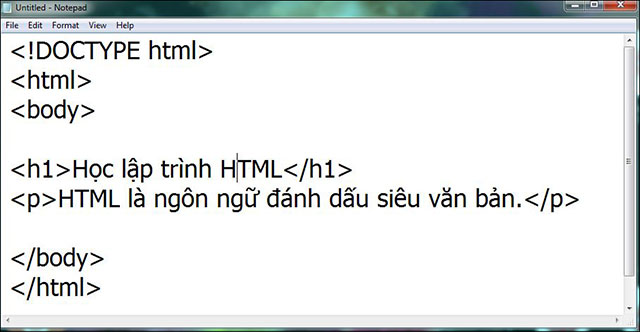
<p>Viết hoặc sao chép đoạn HTML đã viết vào Notepad.</p>

<pre id="pre0">
&lt;!DOCTYPE html&gt;&lt;html&gt;&lt;body&gt;&lt;h1&gt;Học lập trình HTML&lt;/h1&gt;&lt;p&gt;HTML là ngôn ngữ đánh dấu siêu văn bản.&lt;/p&gt;&lt;/body&gt;&lt;/html&gt;</pre>

<p><img alt="Dán đoạn mã HTML vào Notepad" data-i="0" data-src="https://st.quantrimang.com/photos/image/2018/04/28/html-notepad.jpg" data-was-processed="true" height="332" src="https://st.quantrimang.com/photos/image/2018/04/28/html-notepad.jpg" width="640" /><br  />
<em>Dán đoạn mã HTML vào Notepad</em></p>

<p><strong>Bước 3 - Lưu trang HTML</strong></p>

<p>Lưu tập tin lên máy tính, chọn&nbsp;<strong>File</strong>&nbsp;&gt;&nbsp;<strong>Save as</strong>&nbsp;trong trình thả. Đặt tên cho tập tin là&nbsp;<strong>quantrimang.htm</strong>&nbsp;rồi chọn bảng mã UTF-8 (được ưa dùng cho các tập tin HTML).</p>

<p>&nbsp;</p>
​​​​​​<img alt="Hình ảnh hiển thị của tập tin vừa tạo trên trình duyệt Chrome " data-adbro-processed="true" data-i="1" data-src="https://st.quantrimang.com/photos/image/2018/04/28/html-save.jpg" data-was-processed="true" height="114" src="https://st.quantrimang.com/photos/image/2018/04/28/html-save.jpg" width="640" /><br  />
<em>Lưu văn bản vừa tạo dưới dạng text</em>

<p><strong>Lưu ý:</strong>&nbsp;Bạn có thể chọn phần mở rộng cho tập tin này là .htm hoặc .html đều được.</p>

<p><strong>Bước 4 - Xem trang HTML trên trình duyệt</strong></p>

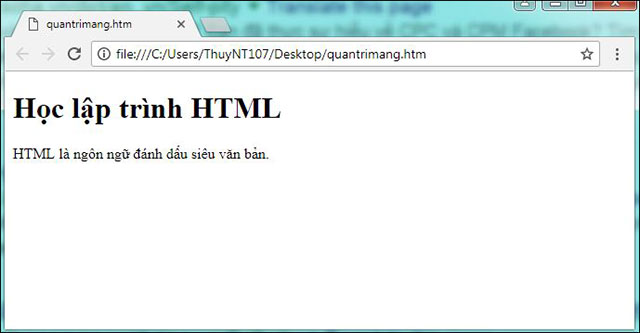
<p>Mở tập tin HTML vừa lưu trên trình duyệt mà bạn muốn (click đúp chuột hoặc click chuột phải và chọn Open With).</p>

<p><img alt="Hình ảnh hiển thị của tập tin vừa tạo trên trình duyệt Chrome " data-i="2" data-src="https://st.quantrimang.com/photos/image/2018/04/28/html-browser.jpg" data-was-processed="true" height="333" src="https://st.quantrimang.com/photos/image/2018/04/28/html-browser.jpg" width="640" /><br  />
<em>Hình ảnh hiển thị của tập tin vừa tạo trên trình duyệt Chrome</em></p>

<p>Bài trước: <a href="http://tinhocdct.xyz/thu-thuat/html-la-gi-cau-truc-html-co-ban-361.html" target="_blank">Bài 1:&nbsp;Giới thiệu về HTML</a></p>

<p>Bài sau: <a href="https://tinhocdct.xyz/tin-cong-nghe/cac-vi-du-co-ban-ve-html-363.html" target="_blank">Bài 3: Các ví dụ cơ bản về HTML</a></p>
		</div>
				<div id="author">
						<p>
				<strong>Tác giả bài viết:</strong>
				Thanh Sơn
			</p>
						<p>
				<strong>Nguồn tin:</strong>
				quantrimang.com
			</p>
		</div>
	</div>
	<div id="footer" class="clearfix">
		<div id="url">
			<strong>URL của bản tin này: </strong><a href="https://tinhocdct.xyz/tin-cong-nghe/cong-cu-soan-thao-html-362.html" title="Bài 2&#x3A; Công cụ soạn thảo HTML">https://tinhocdct.xyz/tin-cong-nghe/cong-cu-soan-thao-html-362.html</a>

		</div>
		<div class="clear"></div>
		<div class="copyright">
			&copy; TỔ TIN HỌC TRƯỜNG THPT ĐỖ CÔNG TƯỜNG
		</div>
		<div id="contact">
			<a href="mailto:webmaster@tinhocdct.xyz">webmaster@tinhocdct.xyz</a>
		</div>
	</div>
</div>
        <div id="timeoutsess" class="chromeframe">
            Bạn đã không sử dụng Site, <a onclick="timeoutsesscancel();" href="https://tinhocdct.xyz/#">Bấm vào đây để duy trì trạng thái đăng nhập</a>. Thời gian chờ: <span id="secField"> 60 </span> giây
        </div>
        <div id="openidResult" class="nv-alert" style="display:none"></div>
        <div id="openidBt" data-result="" data-redirect=""></div>
<script src="https://tinhocdct.xyz/assets/js/jquery/jquery.min.js"></script>
<script>var nv_base_siteurl="/",nv_lang_data="vi",nv_lang_interface="vi",nv_name_variable="nv",nv_fc_variable="op",nv_lang_variable="language",nv_module_name="news",nv_func_name="savefile",nv_is_user=0, nv_my_ofs=-4,nv_my_abbr="EDT",nv_cookie_prefix="nv4",nv_check_pass_mstime=1738000,nv_area_admin=0,nv_safemode=0,theme_responsive=0,nv_is_recaptcha=0;</script>
<script src="https://tinhocdct.xyz/assets/js/language/vi.js"></script>
<script src="https://tinhocdct.xyz/assets/js/global.js"></script>
<script src="https://tinhocdct.xyz/themes/default/js/news.js"></script>
<script src="https://tinhocdct.xyz/themes/default/js/main.js"></script>
<script async src="https://pagead2.googlesyndication.com/pagead/js/adsbygoogle.js?client=ca-pub-1816161148536198"
     crossorigin="anonymous"></script>
<script src="https://tinhocdct.xyz/themes/default/js/bootstrap.min.js"></script>
</body>
</html>