<!DOCTYPE html>
	<html lang="vi" xmlns="http://www.w3.org/1999/xhtml" prefix="og: http://ogp.me/ns#">
	<head>
<title>Cách chuyển Google Chrome sang tiếng Việt</title>
<meta name="description" content="Cách chuyển Google Chrome sang tiếng Việt - Savefile - Tin Tức - https&#x3A;&#x002F;&#x002F;tinhocdct.xyz&#x002F;savefile&#x002F;tin-cong-nghe&#x002F;cach-chuyen-google-chrome-sang-tieng-viet-137.html">
<meta name="author" content="TỔ TIN HỌC TRƯỜNG THPT ĐỖ CÔNG TƯỜNG">
<meta name="copyright" content="TỔ TIN HỌC TRƯỜNG THPT ĐỖ CÔNG TƯỜNG [webmaster@tinhocdct.xyz]">
<meta name="robots" content="index, archive, follow, noodp">
<meta name="googlebot" content="index,archive,follow,noodp">
<meta name="msnbot" content="all,index,follow">
<meta name="generator" content="NukeViet v4.0">
<meta http-equiv="Content-Type" content="text/html; charset=utf-8">
<meta property="og:title" content="Cách chuyển Google Chrome sang tiếng Việt">
<meta property="og:type" content="website">
<meta property="og:description" content="Savefile - Tin Tức - https&#x3A;&#x002F;&#x002F;tinhocdct.xyz&#x002F;savefile&#x002F;tin-cong-nghe&#x002F;cach-chuyen-google-chrome-sang-tieng-viet-137.html">
<meta property="og:site_name" content="TỔ TIN HỌC TRƯỜNG THPT ĐỖ CÔNG TƯỜNG">
<meta property="og:url" content="https://tinhocdct.xyz/tin-cong-nghe/cach-chuyen-google-chrome-sang-tieng-viet-137.html">
<link rel="shortcut icon" href="https://tinhocdct.xyz/favicon.ico">
<link rel="canonical" href="https://tinhocdct.xyz/tin-cong-nghe/cach-chuyen-google-chrome-sang-tieng-viet-137.html">
<link rel="alternate" href="https://tinhocdct.xyz/rss/" title="Tin Tức" type="application/rss+xml">
<link rel="alternate" href="https://tinhocdct.xyz/rss/tin-tuc/" title="Tin Tức - TIN TỨC" type="application/rss+xml">
<link rel="alternate" href="https://tinhocdct.xyz/rss/thong-cao-bao-chi/" title="Tin Tức - THÔNG BÁO" type="application/rss+xml">
<link rel="alternate" href="https://tinhocdct.xyz/rss/ban-tin-noi-bo/" title="Tin Tức - BẢN TIN NỘI BỘ" type="application/rss+xml">
<link rel="alternate" href="https://tinhocdct.xyz/rss/tin-cong-nghe/" title="Tin Tức - CÔNG NGHỆ - KHOA HỌC" type="application/rss+xml">
<link rel="alternate" href="https://tinhocdct.xyz/rss/thu-thuat/" title="Tin Tức - THỦ THUẬT" type="application/rss+xml">
<link rel="alternate" href="https://tinhocdct.xyz/rss/tien-ich/" title="Tin Tức - TIỆN ÍCH" type="application/rss+xml">
<link rel="alternate" href="https://tinhocdct.xyz/rss/ai/" title="Tin Tức - AI" type="application/rss+xml">
<link rel="alternate" href="https://tinhocdct.xyz/rss/khoa-hoc/" title="Tin Tức - KHOA HỌC" type="application/rss+xml">
<link rel="alternate" href="https://tinhocdct.xyz/rss/hoat-dong-chuyen-mon/" title="Tin Tức - HOẠT ĐỘNG CHUYÊN MÔN" type="application/rss+xml">
<link rel="alternate" href="https://tinhocdct.xyz/rss/hoat-dong-cong-doan/" title="Tin Tức - CÔNG ĐOÀN" type="application/rss+xml">
<link rel="alternate" href="https://tinhocdct.xyz/rss/hoat-dong-doan-the/" title="Tin Tức - ĐOÀN THỂ" type="application/rss+xml">
<link rel="alternate" href="https://tinhocdct.xyz/rss/tuyen-sinh-huong-nghiep/" title="Tin Tức - TUYỂN SINH - HƯỚNG NGHIỆP" type="application/rss+xml">
<link rel="alternate" href="https://tinhocdct.xyz/rss/tuyen-sinh-2025/" title="Tin Tức - TUYỂN SINH" type="application/rss+xml">
<link rel="alternate" href="https://tinhocdct.xyz/rss/huong-nghiep/" title="Tin Tức - HƯỚNG NGHIỆP" type="application/rss+xml">
<link rel="alternate" href="https://tinhocdct.xyz/rss/lich-cong-tac-tuan/" title="Tin Tức - Lịch công tác tuần" type="application/rss+xml">
<link rel="preload" as="script" href="https://tinhocdct.xyz/assets/js/jquery/jquery.min.js">
<link rel="preload" as="script" href="https://tinhocdct.xyz/assets/js/language/vi.js">
<link rel="preload" as="script" href="https://tinhocdct.xyz/assets/js/global.js">
<link rel="preload" as="script" href="https://tinhocdct.xyz/themes/default/js/news.js">
<link rel="preload" as="script" href="https://tinhocdct.xyz/themes/default/js/main.js">
<link rel="preload" as="script" href="https://pagead2.googlesyndication.com/pagead/js/adsbygoogle.js?client=ca-pub-1816161148536198">
<link rel="preload" as="script" href="https://tinhocdct.xyz/themes/default/js/bootstrap.min.js">
<link rel="StyleSheet" href="https://tinhocdct.xyz/assets/css/font-awesome.min.css">
<link rel="StyleSheet" href="https://tinhocdct.xyz/themes/default/css/bootstrap.non-responsive.css">
<link rel="StyleSheet" href="https://tinhocdct.xyz/themes/default/css/style.css">
<link rel="StyleSheet" href="https://tinhocdct.xyz/themes/default/css/style.non-responsive.css">
<link rel="StyleSheet" href="https://tinhocdct.xyz/themes/default/css/news.css">
<link rel="StyleSheet" href="https://tinhocdct.xyz/assets/css/default.vi.0.css">
<style>
	body{background: #fff;}
</style>
	</head>
	<body>
<div id="print">
	<div id="hd_print">
		<h2 class="pull-left">TỔ TIN HỌC TRƯỜNG THPT ĐỖ CÔNG TƯỜNG</h2>
		<p class="pull-right"><a title="TỔ TIN HỌC TRƯỜNG THPT ĐỖ CÔNG TƯỜNG" href="https://tinhocdct.xyz/">https://tinhocdct.xyz</a></p>
	</div>
	<div class="clear"></div>
	<hr />
	<div id="content">
		<h1>Cách chuyển Google Chrome sang tiếng Việt</h1>
		<ul class="list-inline">
			<li>Thứ sáu - 24/09/2021 21:39</li>
			<li class="hidden-print txtrequired"><em class="fa fa-print">&nbsp;</em><a title="In ra" href="javascript:;" onclick="window.print()">In ra</a></li>
			<li class="hidden-print txtrequired"><em class="fa fa-power-off">&nbsp;</em><a title="Đóng cửa sổ này" href="javascript:;" onclick="window.close()">Đóng cửa sổ này</a></li>
		</ul>
		<div class="clear"></div>
		<div id="hometext">
			Các trình duyệt web hiện nay đều cũng cấp tùy chọn ngôn ngữ để người dùng có thể đổi sang bất kỳ ngôn ngữ nào để sử dụng, tùy vào nhu cầu mỗi người.
		</div>
				<div class="imghome">
			<img alt="Google Chrome" src="https://tinhocdct.xyz/uploads/news/2021_09/2034057.png" width="460" class="img-thumbnail" />
		</div>
		<div class="clear"></div>
		<div id="bodytext" class="clearfix">
			<p>Việc đổi giao diện trên Chrome sang tiếng Việt sẽ giúp chúng ta dễ dàng hơn trong việc duyệt web, đặc biệt khi thay đổi các thiết lập cài đặt trên trình duyệt. Bài viết dưới đây sẽ hướng dẫn bạn đọc cách đổi ngôn ngữ trên Chrome sang tiếng Việt cho cả bản Chrome trên máy tính và Chrome trên điện thoại.</p>

<h2><strong>1. Chuyển Chrome sang tiếng Việt trên PC</strong></h2>

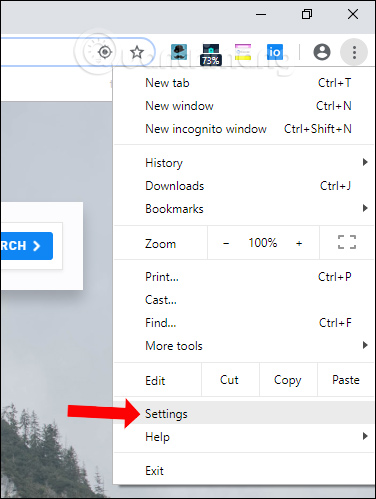
<p><strong>Bước 1:</strong></p>

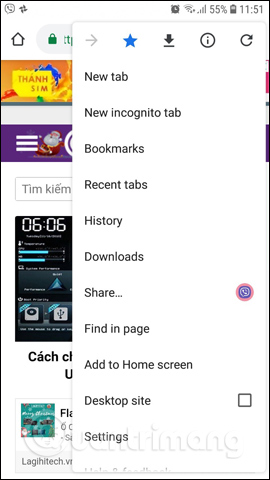
<p>Tại giao diện trình duyệt Chrome bạn nhấn vào&nbsp;<strong>biểu tượng 3 dấu chấm</strong>&nbsp;rồi chọn vào&nbsp;<strong>Settings</strong>.</p>

<p><img alt="Nhấn Cài đặt" data-i="0" data-src="https://st.quantrimang.com/photos/image/2018/12/19/Chrome-doi-sang-tieng-Viet-1.jpg" data-was-processed="true" height="499" src="https://st.quantrimang.com/photos/image/2018/12/19/Chrome-doi-sang-tieng-Viet-1.jpg" width="376" /></p>

<p><strong>Bước 2:</strong></p>

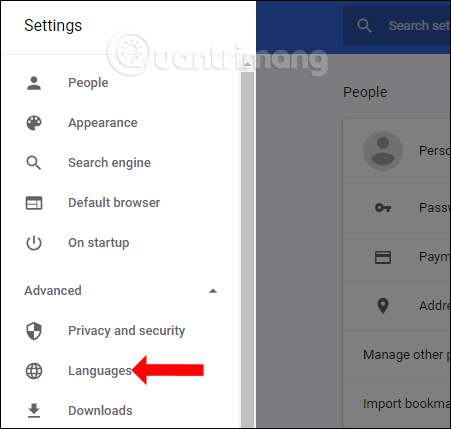
<p>Chuyển sang giao diện cài đặt trên trình duyệt, nhấn chọn vào&nbsp;<strong>biểu tượng 3 dấu gạch ngang</strong>&nbsp;bên trái rồi chọn tiếp vào&nbsp;<strong>Advanced</strong>. Trong danh sách xổ xuống nhấn vào phần&nbsp;<strong>Languages</strong>.</p>
<iframe allowfullscreen="true" allowtransparency="true" data-google-container-id="a!3" data-google-query-id="CM_k0Yf_mPMCFU_ZcwEdMkgK7Q" data-load-complete="true" frameborder="0" height="0" hspace="0" id="aswift_2" marginheight="0" marginwidth="0" name="aswift_2" sandbox="allow-forms allow-popups allow-popups-to-escape-sandbox allow-same-origin allow-scripts allow-top-navigation-by-user-activation" scrolling="no" src="https://googleads.g.doubleclick.net/pagead/ads?client=ca-pub-9275417305531302&amp;output=html&amp;h=174&amp;slotname=4889239415&amp;adk=359473367&amp;adf=3409866189&amp;pi=t.ma~as.4889239415&amp;w=694&amp;fwrn=4&amp;lmt=1632531067&amp;rafmt=11&amp;psa=1&amp;format=694x174&amp;url=https%3A%2F%2Fquantrimang.com%2Flam-the-nao-de-thay-doi-ngon-ngu-cua-google-chrome-117004&amp;flash=0&amp;wgl=1&amp;adsid=ChAI8O61igYQ5bjh3oOK6t4hEj0AiqSB-hy_E566d8IIpdaJJJqw2ONwKSkfT0uH-T_2CRmLQyzgadIVkDUE9byJO0nayB4ODblppmcApVCY&amp;uach=WyJXaW5kb3dzIiwiMTAuMC4wIiwieDg2IiwiIiwiOTQuMC40NjA2LjYxIixbXSxudWxsLG51bGwsIjY0Il0.&amp;tt_state=W3siaXNzdWVyT3JpZ2luIjoiaHR0cHM6Ly9hdHRlc3RhdGlvbi5hbmRyb2lkLmNvbSIsInN0YXRlIjo3fV0.&amp;dt=1632533946886&amp;bpp=2&amp;bdt=358&amp;idt=296&amp;shv=r20210922&amp;mjsv=m202109210101&amp;ptt=9&amp;saldr=aa&amp;abxe=1&amp;cookie=ID%3D90e40a32cba5e6a2-22c1b86cdacb00f1%3AT%3D1632493894%3ART%3D1632493894%3AS%3DALNI_MasrkHKJwr9ZLCEsnIICuItJfF5-g&amp;gpic=00000000-0000-0000-0000-000000000000&amp;prev_fmts=694x174%2C694x174%2C694x174%2C336x672%2C0x0%2C1519x722&amp;nras=2&amp;correlator=2952857530884&amp;frm=20&amp;pv=1&amp;ga_vid=1107040921.1632493894&amp;ga_sid=1632533948&amp;ga_hid=422915901&amp;ga_fc=0&amp;rplot=4&amp;u_tz=420&amp;u_his=1&amp;u_h=864&amp;u_w=1536&amp;u_ah=824&amp;u_aw=1536&amp;u_cd=24&amp;adx=237&amp;ady=1789&amp;biw=1519&amp;bih=722&amp;scr_x=0&amp;scr_y=3954&amp;eid=44747620%2C31062370%2C21067496&amp;oid=3&amp;psts=AGkb-H9UU6x0zCs2brDfA9LRgS1KwWkAQSL6pQZpCaBlAixc_YvSlehLlqanXqtEPkKFw2rD0F56pIoO-Ec&amp;pvsid=2167456708840735&amp;pem=999&amp;ref=https%3A%2F%2Fwww.google.com.vn%2F&amp;eae=0&amp;fc=896&amp;brdim=0%2C0%2C0%2C0%2C1536%2C0%2C1536%2C824%2C1536%2C722&amp;vis=1&amp;rsz=%7C%7CoeE%7C&amp;abl=CS&amp;pfx=0&amp;fu=128&amp;bc=31&amp;jar=2021-09-25-01&amp;ifi=3&amp;uci=a!3&amp;fsb=1&amp;xpc=6JiJBHn5sS&amp;p=https%3A//quantrimang.com&amp;dtd=49420" vspace="0" width="694"></iframe>

<p><img alt="Thay đổi ngôn ngữ" data-i="1" data-src="https://st.quantrimang.com/photos/image/2018/12/19/Chrome-doi-sang-tieng-Viet-2.jpg" data-was-processed="true" height="429" src="https://st.quantrimang.com/photos/image/2018/12/19/Chrome-doi-sang-tieng-Viet-2.jpg" width="451" /></p>

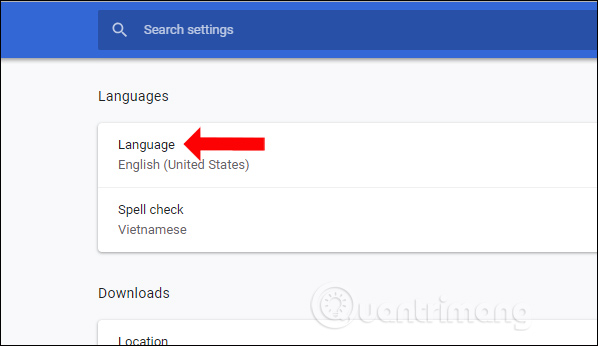
<p><strong>Bước 3:</strong></p>

<p>Khi đó tại phần Language sẽ để ngôn ngữ hiện tại trên trình duyệt, ở đây đang để là tiếng Anh. Bạn click vào phần ngôn ngữ để thay đổi.</p>

<p>&nbsp;</p>
<br  />
<img alt="Chuyển ngôn ngữ" data-i="2" data-inimage-loaded="true" data-src="https://st.quantrimang.com/photos/image/2018/12/19/Chrome-doi-sang-tieng-Viet-3.jpg" data-was-processed="true" height="346" src="https://st.quantrimang.com/photos/image/2018/12/19/Chrome-doi-sang-tieng-Viet-3.jpg" width="598" />
<p><strong>Bước 4:</strong></p>

<p>Để thêm ngôn ngữ tiếng Việt vào danh sách ngôn ngữ cho trình duyệt Chrome, bạn nhấn vào&nbsp;<strong>Add languages</strong>.</p>

<p><img alt="Thêm ngôn ngữ trên Chrome" data-i="3" data-src="https://st.quantrimang.com/photos/image/2018/12/19/Chrome-doi-sang-tieng-Viet-5.jpg" data-was-processed="true" height="459" src="https://st.quantrimang.com/photos/image/2018/12/19/Chrome-doi-sang-tieng-Viet-5.jpg" width="487" /></p>

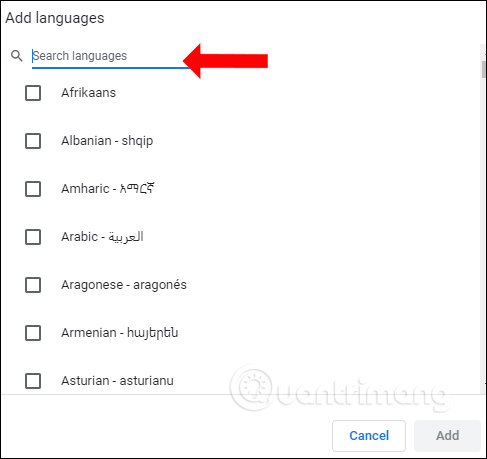
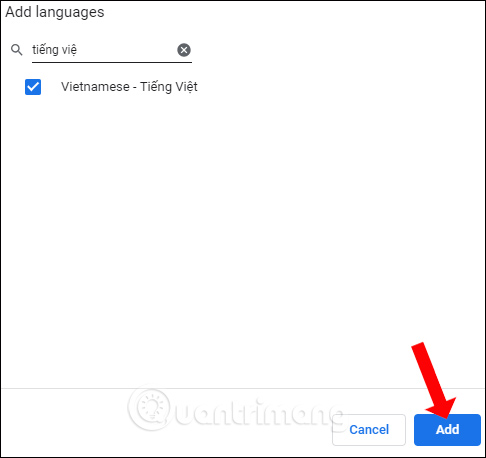
<p>Hiển thị danh sách để tìm kiếm ngôn ngữ muốn thêm vào danh sách ngôn ngữ trên Chrome. Bạn&nbsp;<strong>nhập tiếng Việt</strong>&nbsp;vào thanh tìm kiếm bên trên. Tích chọn vào tiếng Việt và nhấn tiếp vào&nbsp;<strong>nút Add</strong>&nbsp;để thêm tiếng Việt.</p>

<p><img alt="Thêm tiếng Việt" data-i="4" data-src="https://st.quantrimang.com/photos/image/2018/12/19/Chrome-doi-sang-tieng-Viet-6.jpg" data-was-processed="true" height="458" src="https://st.quantrimang.com/photos/image/2018/12/19/Chrome-doi-sang-tieng-Viet-6.jpg" width="486" /></p>
&nbsp;

<p><strong>Bước 5:</strong></p>

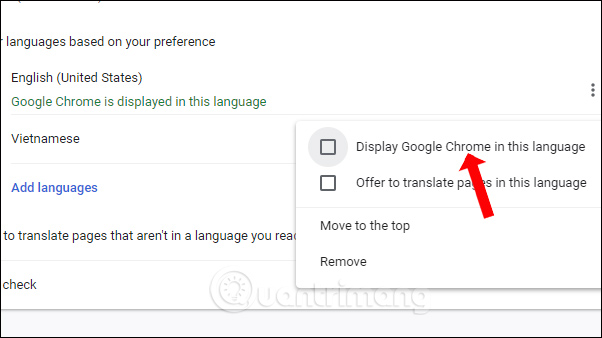
<p>Quay lại giao diện danh sách ngôn ngữ trên Chrome. Tại Vietnamese nhấn vào&nbsp;<strong>biểu tượng 3 dấu chấm</strong>, rồi nhấn vào ô&nbsp;<strong>Display Google Chrome in this language</strong>.</p>

<p><img alt="Đặt tiếng Việt cho Chrome" data-i="5" data-src="https://st.quantrimang.com/photos/image/2018/12/19/Chrome-doi-sang-tieng-Viet-7.jpg" data-was-processed="true" height="338" src="https://st.quantrimang.com/photos/image/2018/12/19/Chrome-doi-sang-tieng-Viet-7.jpg" width="602" /></p>

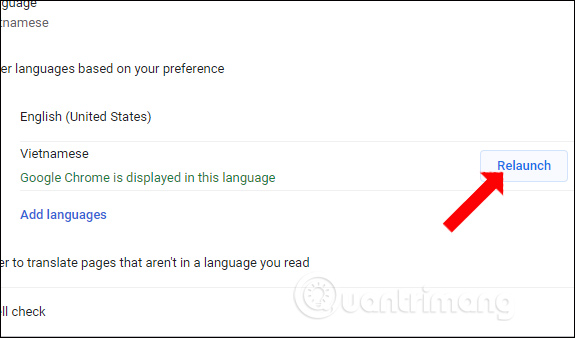
<p>Nhấn vào&nbsp;<strong>nút Relaunch</strong>&nbsp;để khởi động lại trình duyệt Chrome.</p>

<p><img alt="Khởi động lại Chrome" data-i="6" data-src="https://st.quantrimang.com/photos/image/2018/12/19/Chrome-doi-sang-tieng-Viet-8.jpg" data-was-processed="true" height="338" src="https://st.quantrimang.com/photos/image/2018/12/19/Chrome-doi-sang-tieng-Viet-8.jpg" width="575" /></p>

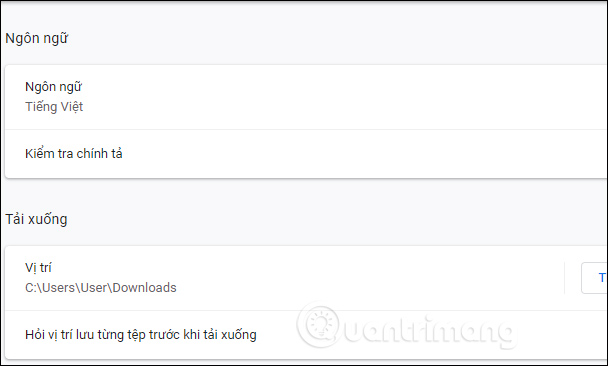
<p>Trình duyệt Chrome sẽ đổi sang ngôn ngữ tiếng Việt như hình dưới đây.</p>

<p><img alt="Giao diện tiếng Việt trên Chrome" data-i="7" data-src="https://st.quantrimang.com/photos/image/2018/12/19/Chrome-doi-sang-tieng-Viet-9.jpg" data-was-processed="true" height="366" src="https://st.quantrimang.com/photos/image/2018/12/19/Chrome-doi-sang-tieng-Viet-9.jpg" width="608" /></p>

<h2>2. Cách đổi Chrome sang tiếng Việt trên mobile</h2>

<h3>1. Đổi ngôn ngữ Chrome trên iPhone</h3>

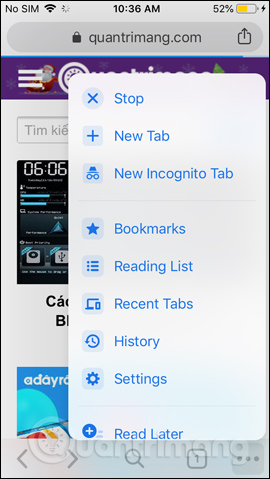
<p>Với bản Chrome iOS chúng ta phải đổi ngôn ngữ của thiết bị thì giao diện của trình duyệt cũng sẽ thay đổi theo. Chẳng hạn chúng ta sẽ đổi giao diện tiếng Anh trên Chrome sang tiếng Việt.</p>
<iframe allowfullscreen="true" allowtransparency="true" data-google-container-id="a!6" data-google-query-id="CNyit_D-mPMCFenEcwEdZu8IIw" data-load-complete="true" frameborder="0" height="0" hspace="0" id="aswift_5" marginheight="0" marginwidth="0" name="aswift_5" sandbox="allow-forms allow-popups allow-popups-to-escape-sandbox allow-same-origin allow-scripts allow-top-navigation-by-user-activation" scrolling="no" src="https://googleads.g.doubleclick.net/pagead/ads?client=ca-pub-9275417305531302&amp;output=html&amp;h=174&amp;slotname=4889239415&amp;adk=359473367&amp;adf=2230724954&amp;pi=t.ma~as.4889239415&amp;w=694&amp;fwrn=4&amp;lmt=1632531067&amp;rafmt=11&amp;psa=1&amp;format=694x174&amp;url=https%3A%2F%2Fquantrimang.com%2Flam-the-nao-de-thay-doi-ngon-ngu-cua-google-chrome-117004&amp;flash=0&amp;wgl=1&amp;uach=WyJXaW5kb3dzIiwiMTAuMC4wIiwieDg2IiwiIiwiOTQuMC40NjA2LjYxIixbXSxudWxsLG51bGwsIjY0Il0.&amp;tt_state=W3siaXNzdWVyT3JpZ2luIjoiaHR0cHM6Ly9hdHRlc3RhdGlvbi5hbmRyb2lkLmNvbSIsInN0YXRlIjo3fV0.&amp;dt=1632533946889&amp;bpp=2&amp;bdt=361&amp;idt=641&amp;shv=r20210922&amp;mjsv=m202109210101&amp;ptt=9&amp;saldr=aa&amp;abxe=1&amp;cookie=ID%3D90e40a32cba5e6a2-22c1b86cdacb00f1%3AT%3D1632493894%3ART%3D1632493894%3AS%3DALNI_MasrkHKJwr9ZLCEsnIICuItJfF5-g&amp;gpic=00000000-0000-0000-0000-000000000000&amp;prev_fmts=694x174%2C694x174&amp;correlator=2952857530884&amp;frm=20&amp;pv=1&amp;ga_vid=1107040921.1632493894&amp;ga_sid=1632533948&amp;ga_hid=422915901&amp;ga_fc=0&amp;rplot=4&amp;u_tz=420&amp;u_his=1&amp;u_h=864&amp;u_w=1536&amp;u_ah=824&amp;u_aw=1536&amp;u_cd=24&amp;adx=237&amp;ady=5914&amp;biw=1519&amp;bih=722&amp;scr_x=0&amp;scr_y=4500&amp;eid=44747620%2C31062370%2C21067496&amp;oid=3&amp;pvsid=2167456708840735&amp;pem=999&amp;ref=https%3A%2F%2Fwww.google.com.vn%2F&amp;eae=0&amp;fc=896&amp;brdim=0%2C0%2C0%2C0%2C1536%2C0%2C1536%2C824%2C1536%2C722&amp;vis=1&amp;rsz=%7C%7CoeEbr%7C&amp;abl=CS&amp;pfx=0&amp;fu=128&amp;bc=31&amp;ifi=6&amp;uci=a!6&amp;btvi=1&amp;fsb=1&amp;xpc=qBbF0tPEjM&amp;p=https%3A//quantrimang.com&amp;dtd=645" vspace="0" width="694"></iframe>

<p><img alt="Đổi ngôn ngữ iPhone" data-i="8" data-src="https://st.quantrimang.com/photos/image/2018/12/19/Chrome-doi-sang-tieng-Viet-10.jpg" data-was-processed="true" height="auto" src="https://st.quantrimang.com/photos/image/2018/12/19/Chrome-doi-sang-tieng-Viet-10.jpg" /></p>

<p><strong>Bước 1:</strong></p>

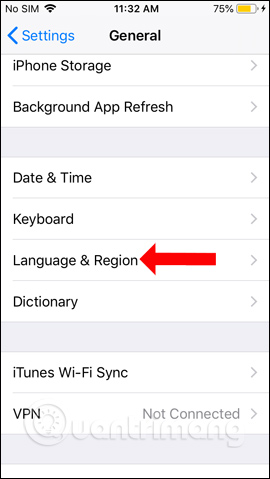
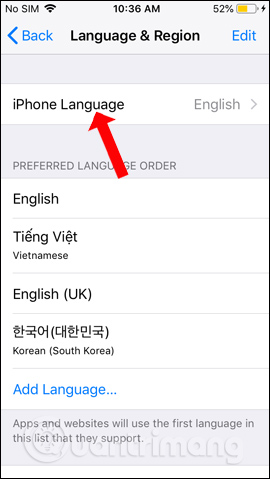
<p>Người dùng truy cập vào&nbsp;<strong>Settings</strong>, chọn&nbsp;<strong>General</strong>&nbsp;rồi tìm tới phần&nbsp;<strong>Language &amp; Region</strong>. Tiếp tục nhấn vào iPhone&nbsp;<strong>Language</strong>&nbsp;để lựa chọn ngôn ngữ mới cho thiết bị.</p>

<p><img alt="Ngôn ngữ trên iPhone" data-i="9" data-src="https://st.quantrimang.com/photos/image/2018/12/19/Chrome-doi-sang-tieng-Viet-11.jpg" data-was-processed="true" height="auto" src="https://st.quantrimang.com/photos/image/2018/12/19/Chrome-doi-sang-tieng-Viet-11.jpg" />&nbsp;<img alt="Đổi ngôn ngữ iPhone" data-i="10" data-src="https://st.quantrimang.com/photos/image/2018/12/19/Chrome-doi-sang-tieng-Viet-12.jpg" data-was-processed="true" height="auto" src="https://st.quantrimang.com/photos/image/2018/12/19/Chrome-doi-sang-tieng-Viet-12.jpg" /></p>

<p><strong>Bước 2:</strong></p>

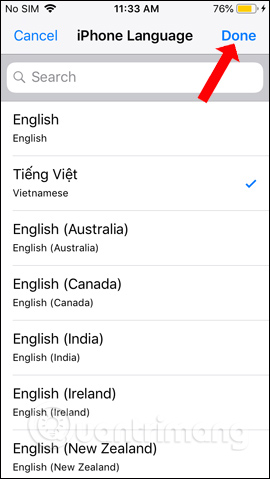
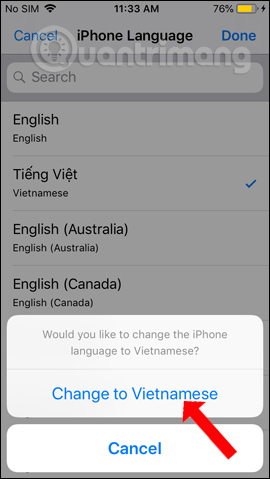
<p>Trong danh sách các ngôn ngữ mà iPhone hỗ trợ, nhấn vào&nbsp;<strong>Vietnames</strong>&nbsp;rồi nhấn&nbsp;<strong>nút Done</strong>&nbsp;bên trên. Người dùng nhấn xác nhận&nbsp;<strong>Change to Vietnames</strong>&nbsp;và chờ iPhone đổi sang ngôn ngữ tiếng Việt.</p>

<p><img alt="Chọn tiếng Việt" data-i="11" data-src="https://st.quantrimang.com/photos/image/2018/12/19/Chrome-doi-sang-tieng-Viet-13.jpg" data-was-processed="true" height="auto" src="https://st.quantrimang.com/photos/image/2018/12/19/Chrome-doi-sang-tieng-Viet-13.jpg" />&nbsp;<img alt="Xác nhận đổi tiếng Việt" data-i="12" data-src="https://st.quantrimang.com/photos/image/2018/12/19/Chrome-doi-sang-tieng-Viet-14.jpg" data-was-processed="true" height="auto" src="https://st.quantrimang.com/photos/image/2018/12/19/Chrome-doi-sang-tieng-Viet-14.jpg" /></p>

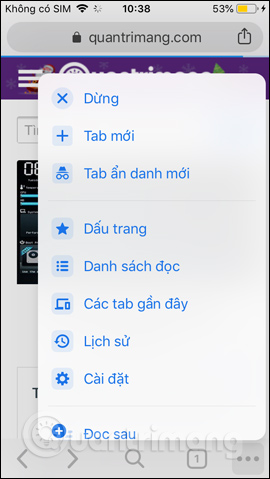
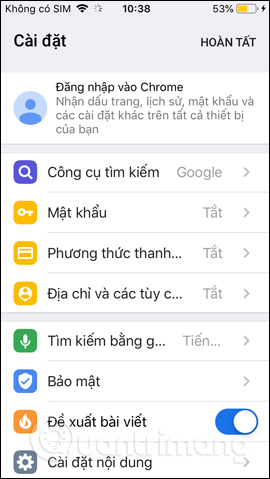
<p>Kết quả khi quay lại Chrome chúng ta sẽ thấy giao diện trình duyệt đang ở tiếng Việt.</p>

<p><img alt="Chrome iPhone tiếng Việt" data-i="13" data-src="https://st.quantrimang.com/photos/image/2018/12/19/Chrome-doi-sang-tieng-Viet-15.jpg" data-was-processed="true" height="auto" src="https://st.quantrimang.com/photos/image/2018/12/19/Chrome-doi-sang-tieng-Viet-15.jpg" />&nbsp;<img alt="Giao diện Chrome iPhone" data-i="14" data-src="https://st.quantrimang.com/photos/image/2018/12/19/Chrome-doi-sang-tieng-Viet-16.jpg" data-was-processed="true" height="auto" src="https://st.quantrimang.com/photos/image/2018/12/19/Chrome-doi-sang-tieng-Viet-16.jpg" /></p>

<h3><strong>2. Đổi Chrome Android sang tiếng Việt</strong></h3>

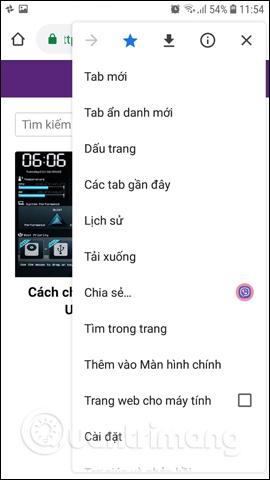
<p>Để đổi ngôn ngữ của Chrome Android từ tiếng Anh sang tiếng Việt hoặc bất kỳ ngôn ngữ nào khác, chúng ta cũng cần đổi ngôn ngữ của thiết bị sang tiếng Việt. Khi đó giao diện trình duyệt Chrome trên Android sẽ được đổi sang tiếng Việt. Với những thiết bị Android không hỗ trợ tiếng Việt thì chúng ta cần phải cài đặt thêm ứng dụng hỗ trợ. Nhưng nhìn chung hiện tại đa phần các thiết bị Android đều có hỗ trợ thêm ngôn ngữ tiếng Việt để sử dụng.</p>

<p>Cách cài tiếng Việt trên điện thoại Android bạn đọc tại bài viết&nbsp;<a href="https://quantrimang.com/huong-dan-cai-tieng-viet-tren-dien-thoai-android-154011" title="Hướng dẫn cài tiếng Việt trên điện thoại Android">Hướng dẫn cài tiếng Việt trên điện thoại Android</a>.</p>

<p><img alt="Giao diện Chrome tiếng Anh" data-i="15" data-src="https://st.quantrimang.com/photos/image/2018/12/19/Chrome-doi-sang-tieng-Viet-17.jpg" data-was-processed="true" height="auto" src="https://st.quantrimang.com/photos/image/2018/12/19/Chrome-doi-sang-tieng-Viet-17.jpg" />&nbsp;<img alt="Giao diện Chrome Android tiếng Việt" data-i="16" data-src="https://st.quantrimang.com/photos/image/2018/12/19/Chrome-doi-sang-tieng-Viet-18.jpg" data-was-processed="true" height="auto" src="https://st.quantrimang.com/photos/image/2018/12/19/Chrome-doi-sang-tieng-Viet-18.jpg" /></p>

<p>Như vậy bạn đã biết cách đổi ngôn ngữ trình duyệt Chrome sang tiếng Việt hoặc bất cứ ngôn ngữ nào khác. Với các thiết bị di động thì ngôn ngữ tình duyệt sẽ tự động được thay đổi theo ngôn ngữ của thiết bị, nên chúng ta chỉ cần đổi ngôn ngữ của điện thoại là được. Với Chrome trên máy tính sẽ có nhiều tùy chọn sử dụng ngôn ngữ hơn cho giao diện.</p>
		</div>
				<div id="author">
						<p>
				<strong>Tác giả bài viết:</strong>
				Thanh Sơn
			</p>
						<p>
				<strong>Nguồn tin:</strong>
				quantrimang.com
			</p>
		</div>
	</div>
	<div id="footer" class="clearfix">
		<div id="url">
			<strong>URL của bản tin này: </strong><a href="https://tinhocdct.xyz/tin-cong-nghe/cach-chuyen-google-chrome-sang-tieng-viet-137.html" title="Cách chuyển Google Chrome sang tiếng Việt">https://tinhocdct.xyz/tin-cong-nghe/cach-chuyen-google-chrome-sang-tieng-viet-137.html</a>

		</div>
		<div class="clear"></div>
		<div class="copyright">
			&copy; TỔ TIN HỌC TRƯỜNG THPT ĐỖ CÔNG TƯỜNG
		</div>
		<div id="contact">
			<a href="mailto:webmaster@tinhocdct.xyz">webmaster@tinhocdct.xyz</a>
		</div>
	</div>
</div>
        <div id="timeoutsess" class="chromeframe">
            Bạn đã không sử dụng Site, <a onclick="timeoutsesscancel();" href="https://tinhocdct.xyz/#">Bấm vào đây để duy trì trạng thái đăng nhập</a>. Thời gian chờ: <span id="secField"> 60 </span> giây
        </div>
        <div id="openidResult" class="nv-alert" style="display:none"></div>
        <div id="openidBt" data-result="" data-redirect=""></div>
<div id="run_cronjobs" style="visibility:hidden;display:none;"><img alt="" src="/index.php?second=cronjobs&amp;p=d40094Zu" width="1" height="1" /></div>
<script src="https://tinhocdct.xyz/assets/js/jquery/jquery.min.js"></script>
<script>var nv_base_siteurl="/",nv_lang_data="vi",nv_lang_interface="vi",nv_name_variable="nv",nv_fc_variable="op",nv_lang_variable="language",nv_module_name="news",nv_func_name="savefile",nv_is_user=0, nv_my_ofs=-4,nv_my_abbr="EDT",nv_cookie_prefix="nv4",nv_check_pass_mstime=1738000,nv_area_admin=0,nv_safemode=0,theme_responsive=0,nv_is_recaptcha=0;</script>
<script src="https://tinhocdct.xyz/assets/js/language/vi.js"></script>
<script src="https://tinhocdct.xyz/assets/js/global.js"></script>
<script src="https://tinhocdct.xyz/themes/default/js/news.js"></script>
<script src="https://tinhocdct.xyz/themes/default/js/main.js"></script>
<script async src="https://pagead2.googlesyndication.com/pagead/js/adsbygoogle.js?client=ca-pub-1816161148536198"
     crossorigin="anonymous"></script>
<script src="https://tinhocdct.xyz/themes/default/js/bootstrap.min.js"></script>
</body>
</html>