<!DOCTYPE html>
	<html lang="vi" xmlns="http://www.w3.org/1999/xhtml" prefix="og: http://ogp.me/ns#">
	<head>
<title>Windows có công cụ đơn giản giúp SSD bền và nhanh hơn</title>
<meta name="description" content="Windows có công cụ đơn giản giúp SSD bền và nhanh hơn - Savefile - Tin Tức -...">
<meta name="author" content="TỔ TIN HỌC TRƯỜNG THPT ĐỖ CÔNG TƯỜNG">
<meta name="copyright" content="TỔ TIN HỌC TRƯỜNG THPT ĐỖ CÔNG TƯỜNG [webmaster@tinhocdct.xyz]">
<meta name="robots" content="index, archive, follow, noodp">
<meta name="googlebot" content="index,archive,follow,noodp">
<meta name="msnbot" content="all,index,follow">
<meta name="generator" content="NukeViet v4.0">
<meta http-equiv="Content-Type" content="text/html; charset=utf-8">
<meta property="og:title" content="Windows có công cụ đơn giản giúp SSD bền và nhanh hơn">
<meta property="og:type" content="website">
<meta property="og:description" content="Savefile - Tin Tức - https&#x3A;&#x002F;&#x002F;tinhocdct.xyz&#x002F;savefile&#x002F;tin-cong-nghe&#x002F;windows-co-cong-cu-don-gian-giup-ssd-ben-va-nhanh-hon-577.html">
<meta property="og:site_name" content="TỔ TIN HỌC TRƯỜNG THPT ĐỖ CÔNG TƯỜNG">
<meta property="og:url" content="https://tinhocdct.xyz/tin-cong-nghe/windows-co-cong-cu-don-gian-giup-ssd-ben-va-nhanh-hon-577.html">
<link rel="shortcut icon" href="https://tinhocdct.xyz/favicon.ico">
<link rel="canonical" href="https://tinhocdct.xyz/tin-cong-nghe/windows-co-cong-cu-don-gian-giup-ssd-ben-va-nhanh-hon-577.html">
<link rel="alternate" href="https://tinhocdct.xyz/rss/" title="Tin Tức" type="application/rss+xml">
<link rel="alternate" href="https://tinhocdct.xyz/rss/tin-tuc/" title="Tin Tức - TIN TỨC" type="application/rss+xml">
<link rel="alternate" href="https://tinhocdct.xyz/rss/thong-cao-bao-chi/" title="Tin Tức - THÔNG BÁO" type="application/rss+xml">
<link rel="alternate" href="https://tinhocdct.xyz/rss/ban-tin-noi-bo/" title="Tin Tức - BẢN TIN NỘI BỘ" type="application/rss+xml">
<link rel="alternate" href="https://tinhocdct.xyz/rss/tin-cong-nghe/" title="Tin Tức - CÔNG NGHỆ - KHOA HỌC" type="application/rss+xml">
<link rel="alternate" href="https://tinhocdct.xyz/rss/thu-thuat/" title="Tin Tức - THỦ THUẬT" type="application/rss+xml">
<link rel="alternate" href="https://tinhocdct.xyz/rss/tien-ich/" title="Tin Tức - TIỆN ÍCH" type="application/rss+xml">
<link rel="alternate" href="https://tinhocdct.xyz/rss/ai/" title="Tin Tức - AI" type="application/rss+xml">
<link rel="alternate" href="https://tinhocdct.xyz/rss/khoa-hoc/" title="Tin Tức - KHOA HỌC" type="application/rss+xml">
<link rel="alternate" href="https://tinhocdct.xyz/rss/hoat-dong-chuyen-mon/" title="Tin Tức - HOẠT ĐỘNG CHUYÊN MÔN" type="application/rss+xml">
<link rel="alternate" href="https://tinhocdct.xyz/rss/hoat-dong-cong-doan/" title="Tin Tức - CÔNG ĐOÀN" type="application/rss+xml">
<link rel="alternate" href="https://tinhocdct.xyz/rss/hoat-dong-doan-the/" title="Tin Tức - ĐOÀN THỂ" type="application/rss+xml">
<link rel="alternate" href="https://tinhocdct.xyz/rss/tuyen-sinh-huong-nghiep/" title="Tin Tức - TUYỂN SINH - HƯỚNG NGHIỆP" type="application/rss+xml">
<link rel="alternate" href="https://tinhocdct.xyz/rss/tuyen-sinh-2025/" title="Tin Tức - TUYỂN SINH 2025" type="application/rss+xml">
<link rel="alternate" href="https://tinhocdct.xyz/rss/lich-cong-tac-tuan/" title="Tin Tức - Lịch công tác tuần" type="application/rss+xml">
<link rel="preload" as="script" href="https://tinhocdct.xyz/assets/js/jquery/jquery.min.js">
<link rel="preload" as="script" href="https://tinhocdct.xyz/assets/js/language/vi.js">
<link rel="preload" as="script" href="https://tinhocdct.xyz/assets/js/global.js">
<link rel="preload" as="script" href="https://tinhocdct.xyz/themes/default/js/news.js">
<link rel="preload" as="script" href="https://tinhocdct.xyz/themes/default/js/main.js">
<link rel="preload" as="script" href="https://pagead2.googlesyndication.com/pagead/js/adsbygoogle.js?client=ca-pub-1816161148536198">
<link rel="preload" as="script" href="https://tinhocdct.xyz/themes/default/js/bootstrap.min.js">
<link rel="StyleSheet" href="https://tinhocdct.xyz/assets/css/font-awesome.min.css">
<link rel="StyleSheet" href="https://tinhocdct.xyz/themes/default/css/bootstrap.non-responsive.css">
<link rel="StyleSheet" href="https://tinhocdct.xyz/themes/default/css/style.css">
<link rel="StyleSheet" href="https://tinhocdct.xyz/themes/default/css/style.non-responsive.css">
<link rel="StyleSheet" href="https://tinhocdct.xyz/themes/default/css/news.css">
<style>
	body{background: #fff;}
</style>
	</head>
	<body>
<div id="print">
	<div id="hd_print">
		<h2 class="pull-left">TỔ TIN HỌC TRƯỜNG THPT ĐỖ CÔNG TƯỜNG</h2>
		<p class="pull-right"><a title="TỔ TIN HỌC TRƯỜNG THPT ĐỖ CÔNG TƯỜNG" href="https://tinhocdct.xyz/">https://tinhocdct.xyz</a></p>
	</div>
	<div class="clear"></div>
	<hr />
	<div id="content">
		<h1>Windows có công cụ đơn giản giúp SSD bền và nhanh hơn</h1>
		<ul class="list-inline">
			<li>Chủ nhật - 05/04/2026 21:54</li>
			<li class="hidden-print txtrequired"><em class="fa fa-print">&nbsp;</em><a title="In ra" href="javascript:;" onclick="window.print()">In ra</a></li>
			<li class="hidden-print txtrequired"><em class="fa fa-power-off">&nbsp;</em><a title="Đóng cửa sổ này" href="javascript:;" onclick="window.close()">Đóng cửa sổ này</a></li>
		</ul>
		<div class="clear"></div>
		<div id="hometext">
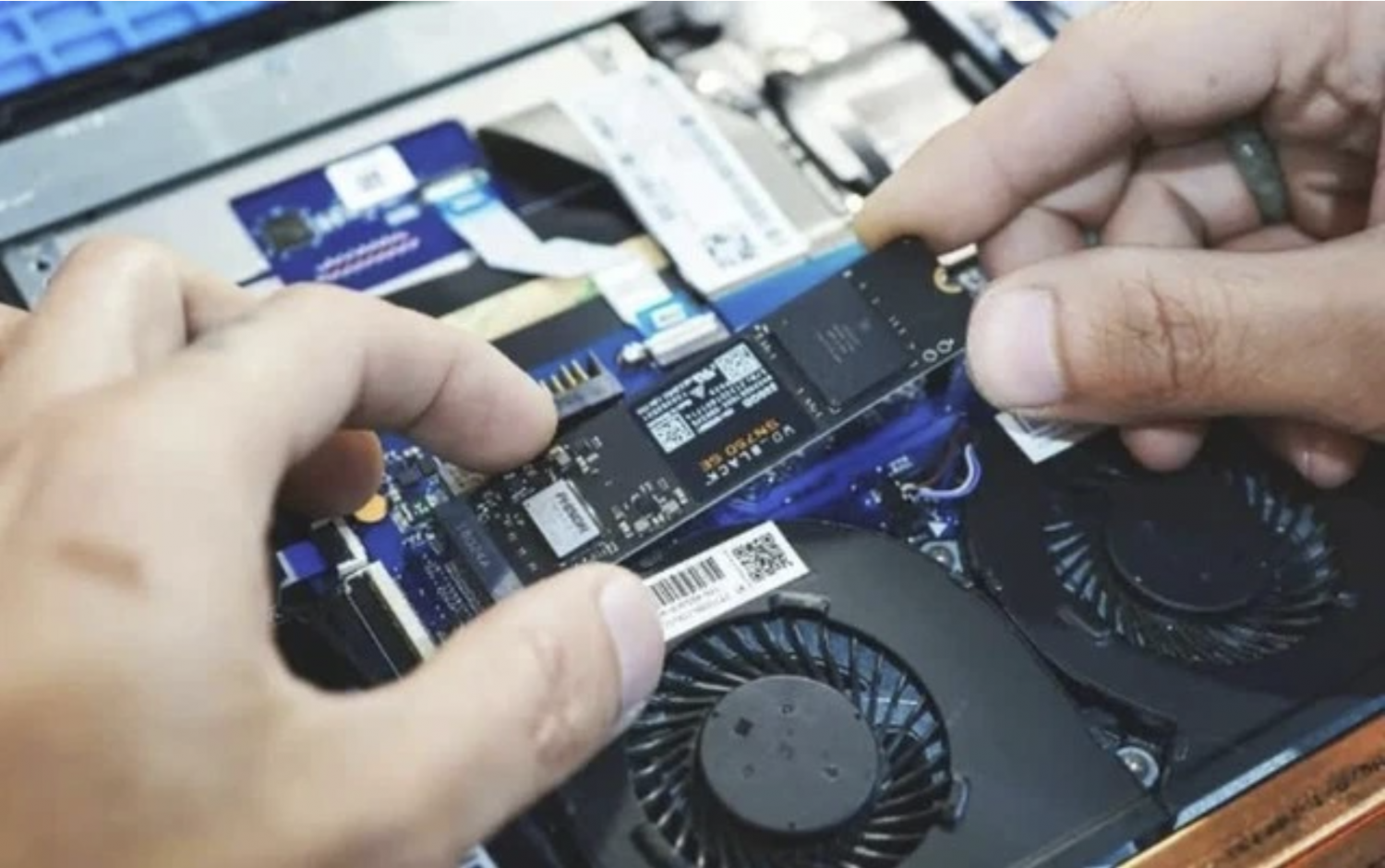
			SSD ngày càng phổ biến nhưng vẫn tồn tại điểm yếu ít người để ý, tuy nhiên Windows đã có sẵn cách giúp ổ đĩa luôn hoạt động mượt mà.
		</div>
				<div class="imghome">
			<img alt="Người dùng đang tìm cách tối ưu hóa SSD để tránh phải mất tiền đầu tư vào ổ đĩa mới  ẢNH&#x3A; REUTERS" src="https://tinhocdct.xyz/uploads/news/2026_04/tn7.png" width="460" class="img-thumbnail" />
		</div>
		<div class="clear"></div>
		<div id="bodytext" class="clearfix">
			<span style="font-size:18px"><span style="-webkit-font-smoothing:antialiased"><span style="text-rendering:geometricprecision"><span style="box-sizing:border-box"><span style="color:rgb(41, 41, 41);"><span style="font-family:Inter"><span style="font-style:normal"><span style="font-variant-ligatures:normal"><span style="font-variant-caps:normal"><span style="font-weight:400"><span style="letter-spacing:normal"><span style="orphans:2"><span style="text-transform:none"><span style="widows:2"><span style="word-spacing:0px"><span style="white-space:normal"><span style="background-color:rgb(255, 255, 255);"><span style="text-decoration-thickness:initial"><span style="text-decoration-style:initial"><span style="text-decoration-color:initial">Với thiết kế không có bộ phận chuyển động,&nbsp;<a class="link-inline-content" data-rel="follow" href="https://thanhnien.vn/hieu-nang-ssd-dang-bi-bop-nghet-boi-anh-chup-man-hinh-18526033113395963.htm" style="-webkit-font-smoothing:antialiased; text-rendering:geometricprecision; box-sizing:border-box; text-decoration:none; color:rgb(0, 129, 177); outline:0px" title="SSD">SSD</a>&nbsp;không gặp phải vấn đề về tốc độ quay như các ổ cứng truyền thống, đồng thời cung cấp tốc độ đọc/ghi cực nhanh. Mặc dù giá thành của SSD hiện nay vẫn còn cao, nhưng chúng đã trở thành lựa chọn phổ biến cho hầu hết máy tính hiện đại nhờ vào nhu cầu ngày càng tăng từ phần mềm, trò chơi điện tử và hệ điều hành.</span></span></span></span></span></span></span></span></span></span></span></span></span></span></span></span></span></span></span></span><br  />
<br  />
<span style="font-size:18px"><span style="-webkit-font-smoothing:antialiased"><span style="text-rendering:geometricprecision"><span style="box-sizing:border-box"><span style="color:rgb(41, 41, 41);"><span style="font-family:Inter"><span style="font-style:normal"><span style="font-variant-ligatures:normal"><span style="font-variant-caps:normal"><span style="font-weight:400"><span style="letter-spacing:normal"><span style="orphans:2"><span style="text-transform:none"><span style="widows:2"><span style="word-spacing:0px"><span style="white-space:normal"><span style="background-color:rgb(255, 255, 255);"><span style="text-decoration-thickness:initial"><span style="text-decoration-style:initial"><span style="text-decoration-color:initial">Tuy nhiên, mặc dù SSD hiện đại có tốc độ nhanh và tuổi thọ cao hơn so với ổ cứng truyền thống (HDD), chúng vẫn có thể bị chậm lại khi dung lượng lưu trữ gần đầy. Đây là điều thường xảy ra với các ổ SSD dung lượng nhỏ khi tốc độ đọc/ghi có thể giảm đáng kể.</span></span></span></span></span></span></span></span></span></span></span></span></span></span></span></span></span></span></span></span><br  />
<span style="font-size:18px"><span style="-webkit-font-smoothing:antialiased"><span style="text-rendering:geometricprecision"><span style="box-sizing:border-box"><span style="color:rgb(41, 41, 41);"><span style="font-family:Inter"><span style="font-style:normal"><span style="font-variant-ligatures:normal"><span style="font-variant-caps:normal"><span style="font-weight:400"><span style="letter-spacing:normal"><span style="orphans:2"><span style="text-transform:none"><span style="widows:2"><span style="word-spacing:0px"><span style="white-space:normal"><span style="background-color:rgb(255, 255, 255);"><span style="text-decoration-thickness:initial"><span style="text-decoration-style:initial"><span style="text-decoration-color:initial">Để khắc phục tình trạng này, các hệ điều hành hiện đại như Windows đã tích hợp một lệnh phần cứng có tên gọi TRIM. Lệnh TRIM giúp dọn dẹp các khối dữ liệu không còn sử dụng, từ đó tối ưu hóa hiệu suất và kéo dài tuổi thọ của SSD. TRIM có thể được coi là phiên bản hiện đại của chức năng&nbsp;<a class="link-inline-content" data-rel="follow" href="https://thanhnien.vn/co-can-chong-phan-manh-dia-cho-o-ssd-de-bao-ve-hieu-suat-185251126164358334.htm" style="-webkit-font-smoothing:antialiased; text-rendering:geometricprecision; box-sizing:border-box; text-decoration:none; color:rgb(0, 129, 177); outline:0px" title="chống phân mảnh">chống phân mảnh</a>&nbsp;ổ đĩa nhằm tổ chức dữ liệu một cách hiệu quả hơn.</span></span></span></span></span></span></span></span></span></span></span></span></span></span></span></span></span></span></span></span>
<h2 style="text-align:start; text-indent:0px; -webkit-text-stroke-width:0px; margin-top:7px; margin-bottom:7px"><span style="font-size:25px"><span style="-webkit-font-smoothing:antialiased"><span style="text-rendering:geometricprecision"><span style="box-sizing:border-box"><span style="font-weight:700"><span style="font-family:Merriweather"><span style="line-height:1.5"><span style="color:rgb(41, 41, 41);"><span style="font-style:normal"><span style="font-variant-ligatures:normal"><span style="font-variant-caps:normal"><span style="letter-spacing:normal"><span style="orphans:2"><span style="text-transform:none"><span style="widows:2"><span style="word-spacing:0px"><span style="white-space:normal"><span style="background-color:rgb(255, 255, 255);"><span style="text-decoration-thickness:initial"><span style="text-decoration-style:initial"><span style="text-decoration-color:initial"><b style="-webkit-font-smoothing:antialiased; text-rendering:geometricprecision; box-sizing:border-box; font-weight:700">Cách kiểm tra TRIM để khắc phục vấn đề SSD</b></span></span></span></span></span></span></span></span></span></span></span></span></span></span></span></span></span></span></span></span></span></h2>
<span style="font-size:18px"><span style="-webkit-font-smoothing:antialiased"><span style="text-rendering:geometricprecision"><span style="box-sizing:border-box"><span style="color:rgb(41, 41, 41);"><span style="font-family:Inter"><span style="font-style:normal"><span style="font-variant-ligatures:normal"><span style="font-variant-caps:normal"><span style="font-weight:400"><span style="letter-spacing:normal"><span style="orphans:2"><span style="text-transform:none"><span style="widows:2"><span style="word-spacing:0px"><span style="white-space:normal"><span style="background-color:rgb(255, 255, 255);"><span style="text-decoration-thickness:initial"><span style="text-decoration-style:initial"><span style="text-decoration-color:initial">Mặc dù TRIM không hoạt động theo nguyên tắc giống như chống phân mảnh, mục tiêu của nó là tương tự: tăng cường hiệu suất và tuổi thọ của SSD bằng cách xóa các khối dữ liệu trống.</span></span></span></span></span></span></span></span></span></span></span></span></span></span></span></span></span></span></span></span><br  />
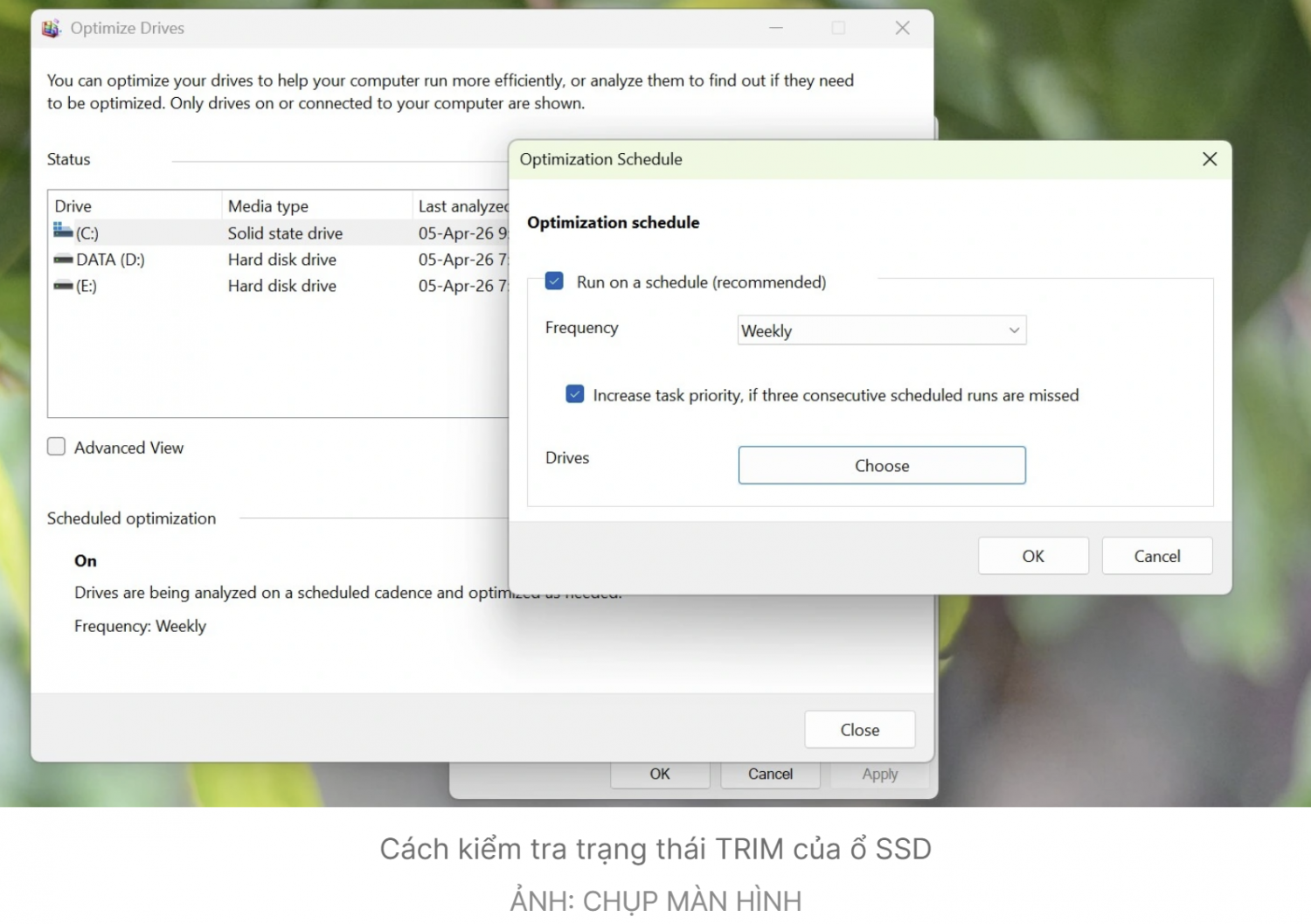
<span style="font-size:18px"><span style="-webkit-font-smoothing:antialiased"><span style="text-rendering:geometricprecision"><span style="box-sizing:border-box"><span style="color:rgb(41, 41, 41);"><span style="font-family:Inter"><span style="font-style:normal"><span style="font-variant-ligatures:normal"><span style="font-variant-caps:normal"><span style="font-weight:400"><span style="letter-spacing:normal"><span style="orphans:2"><span style="text-transform:none"><span style="widows:2"><span style="word-spacing:0px"><span style="white-space:normal"><span style="background-color:rgb(255, 255, 255);"><span style="text-decoration-thickness:initial"><span style="text-decoration-style:initial"><span style="text-decoration-color:initial">Các phiên bản Windows gần đây tự động thực hiện quy trình TRIM trong nền. Người dùng có thể kiểm tra tính năng này thông qua thuộc tính của ổ đĩa trong mục This PC bằng cách vào&nbsp;<i style="-webkit-font-smoothing:antialiased; text-rendering:geometricprecision; box-sizing:border-box; font-style:italic">Properties &gt; Tools &gt; Optimize&nbsp;</i>của ổ SSD tương ứng.<br  />
<img alt="" height="1057" src="https://tinhocdct.xyz/uploads/news/2026_04/tn8.png" width="1500" /></span></span></span></span></span></span></span></span></span></span></span></span></span></span></span></span></span></span></span></span><br  />
<span style="font-size:18px"><span style="-webkit-font-smoothing:antialiased"><span style="text-rendering:geometricprecision"><span style="box-sizing:border-box"><span style="color:rgb(41, 41, 41);"><span style="font-family:Inter"><span style="font-style:normal"><span style="font-variant-ligatures:normal"><span style="font-variant-caps:normal"><span style="font-weight:400"><span style="letter-spacing:normal"><span style="orphans:2"><span style="text-transform:none"><span style="widows:2"><span style="word-spacing:0px"><span style="white-space:normal"><span style="background-color:rgb(255, 255, 255);"><span style="text-decoration-thickness:initial"><span style="text-decoration-style:initial"><span style="text-decoration-color:initial">Nếu tính năng tối ưu hóa theo lịch trình (scheduled optimization) được bật (trạng thái On), Windows sẽ tự động chạy TRIM hằng tuần. Nếu chưa được bật, người dùng có thể nhấn vào&nbsp;<i style="-webkit-font-smoothing:antialiased; text-rendering:geometricprecision; box-sizing:border-box; font-style:italic">Change settings</i>&nbsp;và chọn ổ đĩa tương ứng muốn chạy TRIM.</span></span></span></span></span></span></span></span></span></span></span></span></span></span></span></span></span></span></span></span><br  />
<span style="font-size:18px"><span style="-webkit-font-smoothing:antialiased"><span style="text-rendering:geometricprecision"><span style="box-sizing:border-box"><span style="color:rgb(41, 41, 41);"><span style="font-family:Inter"><span style="font-style:normal"><span style="font-variant-ligatures:normal"><span style="font-variant-caps:normal"><span style="font-weight:400"><span style="letter-spacing:normal"><span style="orphans:2"><span style="text-transform:none"><span style="widows:2"><span style="word-spacing:0px"><span style="white-space:normal"><span style="background-color:rgb(255, 255, 255);"><span style="text-decoration-thickness:initial"><span style="text-decoration-style:initial"><span style="text-decoration-color:initial">Ngoài ra, người dùng cũng có thể kiểm tra trạng thái của TRIM thông qua PowerShell. Chỉ cần mở PowerShell với quyền quản trị viên và gõ lệnh &quot;<i style="-webkit-font-smoothing:antialiased; text-rendering:geometricprecision; box-sizing:border-box; font-style:italic">fsutil behavior query DisableDeleteNotify</i>&quot;. Nếu cả hai giá trị đều bằng 0, điều đó có nghĩa là TRIM đang hoạt động.</span></span></span></span></span></span></span></span></span></span></span></span></span></span></span></span></span></span></span></span><br  />
<span style="font-size:18px"><span style="-webkit-font-smoothing:antialiased"><span style="text-rendering:geometricprecision"><span style="box-sizing:border-box"><span style="color:rgb(41, 41, 41);"><span style="font-family:Inter"><span style="font-style:normal"><span style="font-variant-ligatures:normal"><span style="font-variant-caps:normal"><span style="font-weight:400"><span style="letter-spacing:normal"><span style="orphans:2"><span style="text-transform:none"><span style="widows:2"><span style="word-spacing:0px"><span style="white-space:normal"><span style="background-color:rgb(255, 255, 255);"><span style="text-decoration-thickness:initial"><span style="text-decoration-style:initial"><span style="text-decoration-color:initial">Khi mà giá SSD biến động và tầm quan trọng của việc&nbsp;<a class="link-inline-content" data-rel="follow" href="https://thanhnien.vn/cam-o-cung-roi-lien-tuc-co-khien-du-lieu-boc-hoi-185260326183828817.htm" style="-webkit-font-smoothing:antialiased; text-rendering:geometricprecision; box-sizing:border-box; text-decoration:none; color:rgb(0, 129, 177); outline:0px" title="bảo vệ dữ liệu">bảo vệ dữ liệu</a>, thì duy trì hiệu suất tối ưu cho SSD là cần thiết. TRIM chắc chắn sẽ là một công cụ hữu ích trong việc này.</span></span></span></span></span></span></span></span></span></span></span></span></span></span></span></span></span></span></span></span><br  />
&nbsp;
		</div>
				<div id="author">
						<p>
				<strong>Tác giả bài viết:</strong>
				Thanh Sơn
			</p>
						<p>
				<strong>Nguồn tin:</strong>
				thanhnien.vn
			</p>
		</div>
	</div>
	<div id="footer" class="clearfix">
		<div id="url">
			<strong>URL của bản tin này: </strong><a href="https://tinhocdct.xyz/tin-cong-nghe/windows-co-cong-cu-don-gian-giup-ssd-ben-va-nhanh-hon-577.html" title="Windows có công cụ đơn giản giúp SSD bền và nhanh hơn">https://tinhocdct.xyz/tin-cong-nghe/windows-co-cong-cu-don-gian-giup-ssd-ben-va-nhanh-hon-577.html</a>

		</div>
		<div class="clear"></div>
		<div class="copyright">
			&copy; TỔ TIN HỌC TRƯỜNG THPT ĐỖ CÔNG TƯỜNG
		</div>
		<div id="contact">
			<a href="mailto:webmaster@tinhocdct.xyz">webmaster@tinhocdct.xyz</a>
		</div>
	</div>
</div>
        <div id="timeoutsess" class="chromeframe">
            Bạn đã không sử dụng Site, <a onclick="timeoutsesscancel();" href="https://tinhocdct.xyz/#">Bấm vào đây để duy trì trạng thái đăng nhập</a>. Thời gian chờ: <span id="secField"> 60 </span> giây
        </div>
        <div id="openidResult" class="nv-alert" style="display:none"></div>
        <div id="openidBt" data-result="" data-redirect=""></div>
<script src="https://tinhocdct.xyz/assets/js/jquery/jquery.min.js"></script>
<script>var nv_base_siteurl="/",nv_lang_data="vi",nv_lang_interface="vi",nv_name_variable="nv",nv_fc_variable="op",nv_lang_variable="language",nv_module_name="news",nv_func_name="savefile",nv_is_user=0, nv_my_ofs=-4,nv_my_abbr="EDT",nv_cookie_prefix="nv4",nv_check_pass_mstime=1738000,nv_area_admin=0,nv_safemode=0,theme_responsive=0,nv_is_recaptcha=0;</script>
<script src="https://tinhocdct.xyz/assets/js/language/vi.js"></script>
<script src="https://tinhocdct.xyz/assets/js/global.js"></script>
<script src="https://tinhocdct.xyz/themes/default/js/news.js"></script>
<script src="https://tinhocdct.xyz/themes/default/js/main.js"></script>
<script async src="https://pagead2.googlesyndication.com/pagead/js/adsbygoogle.js?client=ca-pub-1816161148536198"
     crossorigin="anonymous"></script>
<script src="https://tinhocdct.xyz/themes/default/js/bootstrap.min.js"></script>
</body>
</html>