<!DOCTYPE html>
	<html lang="vi" xmlns="http://www.w3.org/1999/xhtml" prefix="og: http://ogp.me/ns#">
	<head>
<title>&quot;Tuyệt chiêu&quot; phục hồi ảnh cũ chuẩn studio chỉ trong vài giây, không cần có Photoshop</title>
<meta name="description" content="&quot;Tuyệt chiêu&quot; phục hồi ảnh cũ chuẩn studio chỉ trong vài giây, không cần có Photoshop - Savefile - Tin Tức -...">
<meta name="author" content="TỔ TIN HỌC TRƯỜNG THPT ĐỖ CÔNG TƯỜNG">
<meta name="copyright" content="TỔ TIN HỌC TRƯỜNG THPT ĐỖ CÔNG TƯỜNG [webmaster@tinhocdct.xyz]">
<meta name="robots" content="index, archive, follow, noodp">
<meta name="googlebot" content="index,archive,follow,noodp">
<meta name="msnbot" content="all,index,follow">
<meta name="generator" content="NukeViet v4.0">
<meta http-equiv="Content-Type" content="text/html; charset=utf-8">
<meta property="og:title" content="&quot;Tuyệt chiêu&quot; phục hồi ảnh cũ chuẩn studio chỉ trong vài giây, không cần có Photoshop">
<meta property="og:type" content="website">
<meta property="og:description" content="Savefile - Tin Tức - https&#x3A;&#x002F;&#x002F;tinhocdct.xyz&#x002F;savefile&#x002F;tin-cong-nghe&#x002F;tuyet-chieu-phuc-hoi-anh-cu-chuan-studio-chi-trong-vai-giay-khong-can-co-photoshop-516.html">
<meta property="og:site_name" content="TỔ TIN HỌC TRƯỜNG THPT ĐỖ CÔNG TƯỜNG">
<meta property="og:url" content="https://tinhocdct.xyz/tin-cong-nghe/tuyet-chieu-phuc-hoi-anh-cu-chuan-studio-chi-trong-vai-giay-khong-can-co-photoshop-516.html">
<link rel="shortcut icon" href="https://tinhocdct.xyz/favicon.ico">
<link rel="canonical" href="https://tinhocdct.xyz/tin-cong-nghe/tuyet-chieu-phuc-hoi-anh-cu-chuan-studio-chi-trong-vai-giay-khong-can-co-photoshop-516.html">
<link rel="alternate" href="https://tinhocdct.xyz/rss/" title="Tin Tức" type="application/rss+xml">
<link rel="alternate" href="https://tinhocdct.xyz/rss/tin-tuc/" title="Tin Tức - TIN TỨC" type="application/rss+xml">
<link rel="alternate" href="https://tinhocdct.xyz/rss/thong-cao-bao-chi/" title="Tin Tức - THÔNG BÁO" type="application/rss+xml">
<link rel="alternate" href="https://tinhocdct.xyz/rss/ban-tin-noi-bo/" title="Tin Tức - BẢN TIN NỘI BỘ" type="application/rss+xml">
<link rel="alternate" href="https://tinhocdct.xyz/rss/tin-cong-nghe/" title="Tin Tức - CÔNG NGHỆ - KHOA HỌC" type="application/rss+xml">
<link rel="alternate" href="https://tinhocdct.xyz/rss/thu-thuat/" title="Tin Tức - THỦ THUẬT" type="application/rss+xml">
<link rel="alternate" href="https://tinhocdct.xyz/rss/tien-ich/" title="Tin Tức - TIỆN ÍCH" type="application/rss+xml">
<link rel="alternate" href="https://tinhocdct.xyz/rss/ai/" title="Tin Tức - AI" type="application/rss+xml">
<link rel="alternate" href="https://tinhocdct.xyz/rss/khoa-hoc/" title="Tin Tức - KHOA HỌC" type="application/rss+xml">
<link rel="alternate" href="https://tinhocdct.xyz/rss/hoat-dong-chuyen-mon/" title="Tin Tức - HOẠT ĐỘNG CHUYÊN MÔN" type="application/rss+xml">
<link rel="alternate" href="https://tinhocdct.xyz/rss/hoat-dong-cong-doan/" title="Tin Tức - CÔNG ĐOÀN" type="application/rss+xml">
<link rel="alternate" href="https://tinhocdct.xyz/rss/hoat-dong-doan-the/" title="Tin Tức - ĐOÀN THỂ" type="application/rss+xml">
<link rel="alternate" href="https://tinhocdct.xyz/rss/tuyen-sinh-huong-nghiep/" title="Tin Tức - TUYỂN SINH - HƯỚNG NGHIỆP" type="application/rss+xml">
<link rel="alternate" href="https://tinhocdct.xyz/rss/tuyen-sinh-2025/" title="Tin Tức - TUYỂN SINH" type="application/rss+xml">
<link rel="alternate" href="https://tinhocdct.xyz/rss/huong-nghiep/" title="Tin Tức - HƯỚNG NGHIỆP" type="application/rss+xml">
<link rel="alternate" href="https://tinhocdct.xyz/rss/lich-cong-tac-tuan/" title="Tin Tức - Lịch công tác tuần" type="application/rss+xml">
<link rel="preload" as="script" href="https://tinhocdct.xyz/assets/js/jquery/jquery.min.js">
<link rel="preload" as="script" href="https://tinhocdct.xyz/assets/js/language/vi.js">
<link rel="preload" as="script" href="https://tinhocdct.xyz/assets/js/global.js">
<link rel="preload" as="script" href="https://tinhocdct.xyz/themes/default/js/news.js">
<link rel="preload" as="script" href="https://tinhocdct.xyz/themes/default/js/main.js">
<link rel="preload" as="script" href="https://pagead2.googlesyndication.com/pagead/js/adsbygoogle.js?client=ca-pub-1816161148536198">
<link rel="preload" as="script" href="https://tinhocdct.xyz/themes/default/js/bootstrap.min.js">
<link rel="StyleSheet" href="https://tinhocdct.xyz/assets/css/font-awesome.min.css">
<link rel="StyleSheet" href="https://tinhocdct.xyz/themes/default/css/bootstrap.non-responsive.css">
<link rel="StyleSheet" href="https://tinhocdct.xyz/themes/default/css/style.css">
<link rel="StyleSheet" href="https://tinhocdct.xyz/themes/default/css/style.non-responsive.css">
<link rel="StyleSheet" href="https://tinhocdct.xyz/themes/default/css/news.css">
<style>
	body{background: #fff;}
</style>
	</head>
	<body>
<div id="print">
	<div id="hd_print">
		<h2 class="pull-left">TỔ TIN HỌC TRƯỜNG THPT ĐỖ CÔNG TƯỜNG</h2>
		<p class="pull-right"><a title="TỔ TIN HỌC TRƯỜNG THPT ĐỖ CÔNG TƯỜNG" href="https://tinhocdct.xyz/">https://tinhocdct.xyz</a></p>
	</div>
	<div class="clear"></div>
	<hr />
	<div id="content">
		<h1>&quot;Tuyệt chiêu&quot; phục hồi ảnh cũ chuẩn studio chỉ trong vài giây, không cần có Photoshop</h1>
		<ul class="list-inline">
			<li>Thứ ba - 16/09/2025 21:09</li>
			<li class="hidden-print txtrequired"><em class="fa fa-print">&nbsp;</em><a title="In ra" href="javascript:;" onclick="window.print()">In ra</a></li>
			<li class="hidden-print txtrequired"><em class="fa fa-power-off">&nbsp;</em><a title="Đóng cửa sổ này" href="javascript:;" onclick="window.close()">Đóng cửa sổ này</a></li>
		</ul>
		<div class="clear"></div>
		<div id="hometext">
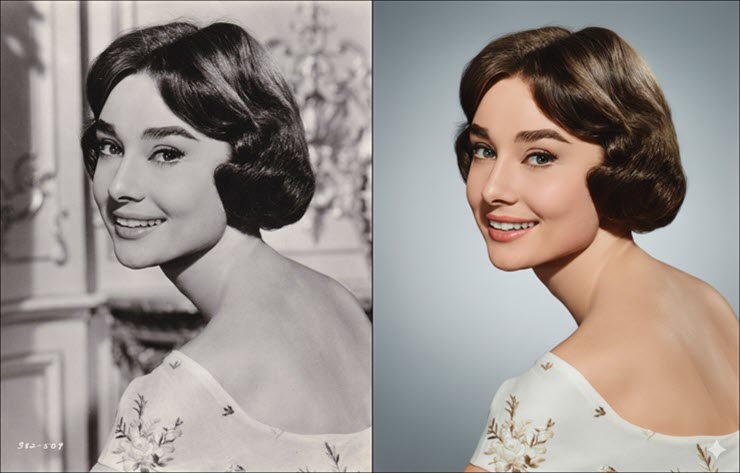
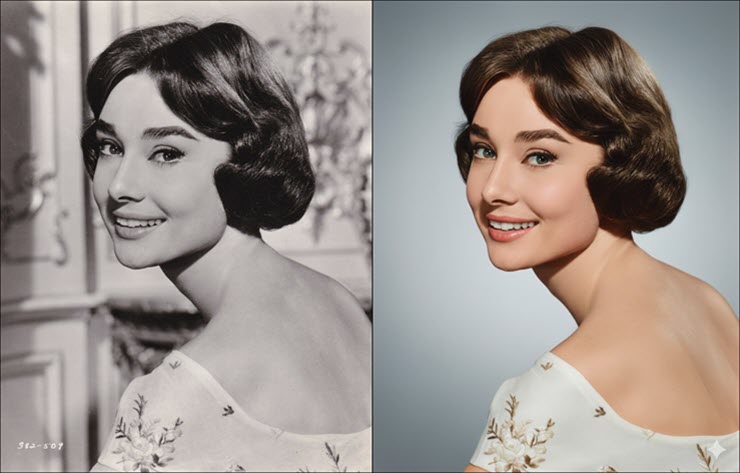
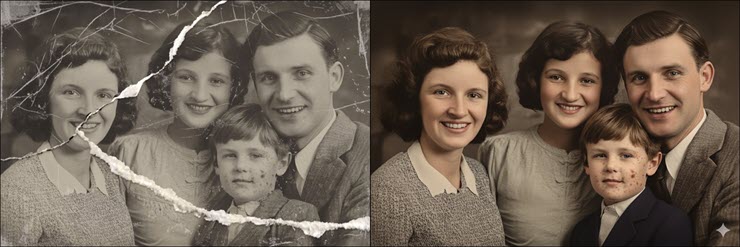
			Sức mạnh chỉnh sửa hình ảnh của Google Gemini ngày càng được khẳng định với &quot;tuyệt chiêu&quot; phục hồi hình ảnh cũ trong vài nốt nhạc.
		</div>
				<div class="imghome">
			<img alt="Hình ảnh cũ được phục dựng vô cùng chân thực bởi Gemini." src="https://tinhocdct.xyz/uploads/news/2025_09/548313729_10234471295857333_1812-horz-1757987942-859-width740height473.jpg" width="460" class="img-thumbnail" />
		</div>
		<div class="clear"></div>
		<div id="bodytext" class="clearfix">
			<p><span style="font-size:14px;">Bạn có những tấm ảnh cũ, ố vàng, đầy vết xước của gia đình và luôn ao ước biến chúng trở nên sống động như mới chụp? Trước đây, công việc này đòi hỏi nhiều giờ làm việc tỉ mỉ trên các phần mềm phức tạp như Photoshop. Giờ đây, với sức mạnh của trí tuệ nhân tạo (AI), bạn có thể &quot;hồi sinh&quot; những kỷ vật vô giá này chỉ bằng một vài dòng lệnh (prompt) với AI Gemini.</span></p>

<h3><span style="font-size:14px;"><strong>Dòng prompt khôi phục hình ảnh cũ đầy &quot;quyền năng&quot;</strong></span></h3>

<p><span style="font-size:14px;">Thay vì kéo thả chuột và loay hoay với hàng trăm công cụ, phương pháp mới này chỉ cần một &quot;công thức&quot; mô tả chi tiết yêu cầu của bạn cho AI. &quot;Công thức&quot; này đang nổi lên như một hiện tượng, được các &quot;phù thủy&quot; chỉnh sửa ảnh chia sẻ trên diễn đàn Reddit, từ đó lan truyền khắp toàn cầu và được tùy biến theo mỗi người dùng. Nội dung của dòng prompt này không đơn thuần là văn bản với những lời yêu cầu,&nbsp;mà là một bản hướng dẫn các thông số cực kỳ chi tiết, yêu cầu AI thực hiện một loạt các tác vụ phức tạp cùng lúc.</span></p>

<p><span style="font-size:14px;">Chỉ trong khoảng chưa đầy&nbsp;1 phút xử lý, AI đã đọc hiểu và thực thi toàn bộ &quot;công thức&quot; trên. Bức ảnh gốc mờ ảo, hư tổn đã được chuyển hóa thành một bức chân dung màu sắc nét, trong trẻo và giàu cảm xúc. Người thầy và các học trò hiện lên sống động với tông da ấm áp, trang phục có chiều sâu và phông nền cây lá được tái tạo đầy nghệ thuật.</span></p>

<p>&nbsp;</p>
<span style="font-size:14px;"><img alt="Hình ảnh cũ được phục dựng vô cùng chân thực bởi Gemini." data-original="https://cdn.24h.com.vn/upload/3-2025/images/2025-09-16/548313729_10234471295857333_1812-horz-1757987942-859-width740height473.jpg" data-was-processed="true" src="https://cdn.24h.com.vn/upload/3-2025/images/2025-09-16/548313729_10234471295857333_1812-horz-1757987942-859-width740height473.jpg" /><br  />
<iframe allow="private-state-token-redemption;attribution-reporting" aria-label="Advertisement" data-google-container-id="2" data-load-complete="true" frameborder="0" height="1" id="google_ads_iframe_/124557882/24h/vn/desktop/technology/in_image_article_0" marginheight="0" marginwidth="0" name="google_ads_iframe_/124557882/24h/vn/desktop/technology/in_image_article_0" scrolling="no" tabindex="0" title="3rd party ad content" width="1"></iframe></span>

<p>&nbsp;</p>

<p><span style="font-size:14px;">Hình ảnh cũ được phục dựng vô cùng chân thực bởi Gemini.</span></p>

<p><span style="font-size:14px;">Điều đáng kinh ngạc là kết quả này không hề có cảm giác &quot;giả&quot; hay &quot;nhựa&quot; như các công cụ tự động thông thường. Nó trông giống như một bức ảnh được chụp mới ngày hôm qua bằng những thiết bị tối tân nhất.</span></p>

<h3><span style="font-size:14px;"><strong>Cách dùng lệnh chuyên dụng trên Gemini để khôi phục hình ảnh cũ, hư hỏng</strong></span></h3>

<p><span style="font-size:14px;">Đầu tiên, bạn truy cập vào trang web của Gemini (gemini.google.com).</span></p>

<p><span style="font-size:14px;">Tại ô nhập lệnh&nbsp;cho chatbot, bấm vào nút Add file (biểu tượng hình dấu +), sau đó chọn hình ảnh cũ cần khôi phục để tải lên khung chat.</span></p>

<p><span style="font-size:14px;">Sau đó, bạn dán (paste) toàn bộ đoạn prompt &quot;quyền năng&quot; dưới đây vào ô nhập lệnh, xong bấm nút Gửi và chờ đợi kết quả.&nbsp;&nbsp;</span></p>

<blockquote>
<p><span style="font-size:14px;">{</span></p>

<p><span style="font-size:14px;">&quot;version&quot;: &quot;1.0&quot;,</span></p>

<p><span style="font-size:14px;">&quot;task&quot;: &quot;image_edit&quot;,</span></p>

<p><span style="font-size:14px;">&quot;caption&quot;: &quot;Phục chế &amp; nâng cấp ảnh cũ – giữ background gốc, màu điện ảnh, chuẩn Phase One XF IQ4 150MP&quot;,</span></p>

<p><span style="font-size:14px;">&quot;notes&quot;: &quot;Biến ảnh cũ (kể cả ảnh chụp lại) thành ảnh màu hiện đại, sạch tuyệt đối, giữ background gốc nhưng nâng cấp đẳng cấp như chụp mới. Ưu tiên bảo toàn danh tính và pose.&quot;,</span></p>

<p><span style="font-size:14px;">&quot;input_image&quot;: &quot;REPLACE_WITH_IMAGE_ID_OR_PATH&quot;,</span></p>

<p><span style="font-size:14px;">&quot;preprocess&quot;: {</span></p>

<p><span style="font-size:14px;">&quot;detect_and_isolate_original_photo&quot;: true,</span></p>

<p><span style="font-size:14px;">&quot;auto_crop_photo_edges&quot;: true,</span></p>

<p><span style="font-size:14px;">&quot;clean_edges&quot;: true,</span></p>

<p><span style="font-size:14px;">&quot;remove_hands_or_objects&quot;: true,</span></p>

<p><span style="font-size:14px;">&quot;perspective_correction&quot;: true,</span></p>

<p><span style="font-size:14px;">&quot;flatten_page_curvature&quot;: true,</span></p>

<p><span style="font-size:14px;">&quot;glare_reduction&quot;: &quot;strict&quot;,</span></p>

<p><span style="font-size:14px;">&quot;reflection_removal&quot;: &quot;strict&quot;,</span></p>

<p><span style="font-size:14px;">&quot;specular_highlight_fix&quot;: true</span></p>

<p><span style="font-size:14px;">},</span></p>

<p><span style="font-size:14px;">&quot;camera_emulation&quot;: {</span></p>

<p><span style="font-size:14px;">&quot;brand_model&quot;: &quot;Phase One XF IQ4 150MP&quot;,</span></p>

<p><span style="font-size:14px;">&quot;lens&quot;: &quot;Schneider Kreuznach 80mm LS f/2.8&quot;,</span></p>

<p><span style="font-size:14px;">&quot;medium_format&quot;: true,</span></p>

<p><span style="font-size:14px;">&quot;look&quot;: &quot;ultimate sharpness, maximum dynamic range, medium format 3D pop, cinematic rendering&quot;</span></p>

<p><span style="font-size:14px;">},</span></p>

<p><span style="font-size:14px;">&quot;composition&quot;: {</span></p>

<p><span style="font-size:14px;">&quot;framing&quot;: &quot;three-quarter body (from mid-thigh up)&quot;,</span></p>

<p><span style="font-size:14px;">&quot;orientation&quot;: &quot;portrait&quot;,</span></p>

<p><span style="font-size:14px;">&quot;crop_policy&quot;: &quot;do_not_crop_face_or_hands&quot;,</span></p>

<p><span style="font-size:14px;">&quot;keep_pose&quot;: true,</span></p>

<p><span style="font-size:14px;">&quot;zoom&quot;: &quot;slight zoom-out for wider context&quot;</span></p>

<p><span style="font-size:14px;">},</span></p>

<p><span style="font-size:14px;">&quot;subject_constraints&quot;: {</span></p>

<p><span style="font-size:14px;">&quot;keep_identity&quot;: true,</span></p>

<p><span style="font-size:14px;">&quot;lock_features&quot;: &#91;&quot;eyes&quot;,&quot;nose&quot;,&quot;lips&quot;,&quot;eyebrows&quot;,&quot;jawline&quot;,&quot;face_shape&quot;,&quot;ears&quot;,&quot;hairline&quot;&#93;,</span></p>

<p><span style="font-size:14px;">&quot;expression_policy&quot;: &quot;preserve_original&quot;</span></p>

<p><span style="font-size:14px;">},</span></p>

<p><span style="font-size:14px;">&quot;retouching&quot;: {</span></p>

<p><span style="font-size:14px;">&quot;skin&quot;: {</span></p>

<p><span style="font-size:14px;">&quot;tone&quot;: &quot;realistic warm neutral&quot;,</span></p>

<p><span style="font-size:14px;">&quot;finish&quot;: &quot;radiant but detailed&quot;,</span></p>

<p><span style="font-size:14px;">&quot;texture&quot;: &quot;retain fine pores; avoid plastic look&quot;,</span></p>

<p><span style="font-size:14px;">&quot;blemishes&quot;: &quot;remove completely&quot;,</span></p>

<p><span style="font-size:14px;">&quot;luminosity_balance&quot;: &quot;uniform subtle glow&quot;,</span></p>

<p><span style="font-size:14px;">&quot;color_uniformity&quot;: &quot;fix uneven tones&quot;</span></p>

<p><span style="font-size:14px;">},</span></p>

<p><span style="font-size:14px;">&quot;hair&quot;: { &quot;finish&quot;: &quot;clean, neat, natural gloss&quot;, &quot;flyaways&quot;: &quot;reduce but keep natural strands&quot; },</span></p>

<p><span style="font-size:14px;">&quot;eyes&quot;: {</span></p>

<p><span style="font-size:14px;">&quot;iris_color&quot;: &quot;natural brown/gray&quot;,</span></p>

<p><span style="font-size:14px;">&quot;whites_desaturation&quot;: 0.1,</span></p>

<p><span style="font-size:14px;">&quot;iris_clarity&quot;: 0.2,</span></p>

<p><span style="font-size:14px;">&quot;avoid_overwhitening&quot;: true,</span></p>

<p><span style="font-size:14px;">&quot;avoid_exaggeration&quot;: true</span></p>

<p><span style="font-size:14px;">},</span></p>

<p><span style="font-size:14px;">&quot;teeth&quot;: { &quot;natural_whiten&quot;: 0.08, &quot;avoid_pure_white&quot;: true },</span></p>

<p><span style="font-size:14px;">&quot;clothing&quot;: {</span></p>

<p><span style="font-size:14px;">&quot;fabric_look&quot;: &quot;premium, fine weave, crisp edges&quot;,</span></p>

<p><span style="font-size:14px;">&quot;wrinkle_reduction&quot;: &quot;moderate&quot;,</span></p>

<p><span style="font-size:14px;">&quot;texture_enhancement&quot;: 0.25</span></p>

<p><span style="font-size:14px;">},</span></p>

<p><span style="font-size:14px;">&quot;repair_cracks&quot;: &quot;strict&quot;,</span></p>

<p><span style="font-size:14px;">&quot;remove_dust_scratches&quot;: &quot;strict&quot;,</span></p>

<p><span style="font-size:14px;">&quot;remove_stains&quot;: &quot;strict&quot;,</span></p>

<p><span style="font-size:14px;">&quot;remove_folds&quot;: true,</span></p>

<p><span style="font-size:14px;">&quot;restore_faded_details&quot;: true</span></p>

<p><span style="font-size:14px;">},</span></p>

<p><span style="font-size:14px;">&quot;colorization&quot;: {</span></p>

<p><span style="font-size:14px;">&quot;apply_to&quot;: &quot;entire_photo&quot;,</span></p>

<p><span style="font-size:14px;">&quot;style&quot;: &quot;cinematic, natural, true-to-life&quot;,</span></p>

<p><span style="font-size:14px;">&quot;skin_tone_accuracy&quot;: &quot;very_high&quot;,</span></p>

<p><span style="font-size:14px;">&quot;background_colorization&quot;: &quot;full, layered, realistic&quot;,</span></p>

<p><span style="font-size:14px;">&quot;clothing_colorization&quot;: &quot;faithful but premium&quot;,</span></p>

<p><span style="font-size:14px;">&quot;avoid_exaggeration&quot;: true</span></p>

<p><span style="font-size:14px;">},</span></p>

<p><span style="font-size:14px;">&quot;background&quot;: {</span></p>

<p><span style="font-size:14px;">&quot;policy&quot;: &quot;preserve_and_enhance&quot;,</span></p>

<p><span style="font-size:14px;">&quot;keep_original&quot;: true,</span></p>

<p><span style="font-size:14px;">&quot;enhancement&quot;: {</span></p>

<p><span style="font-size:14px;">&quot;colorize&quot;: &quot;natural, true-to-life, cinematic color grading&quot;,</span></p>

<p><span style="font-size:14px;">&quot;restore_damage&quot;: true,</span></p>

<p><span style="font-size:14px;">&quot;texture_cleanup&quot;: &quot;remove paper grain and speckles completely&quot;,</span></p>

<p><span style="font-size:14px;">&quot;add_depth&quot;: &quot;studio gradient with layered tones and soft atmospheric haze&quot;,</span></p>

<p><span style="font-size:14px;">&quot;contrast_boost&quot;: &quot;medium-high with soft roll-off&quot;,</span></p>

<p><span style="font-size:14px;">&quot;dynamic_range&quot;: &quot;expanded like medium format&quot;,</span></p>

<p><span style="font-size:14px;">&quot;lighting_match&quot;: true</span></p>

<p><span style="font-size:14px;">},</span></p>

<p><span style="font-size:14px;">&quot;remove_external_objects&quot;: true,</span></p>

<p><span style="font-size:14px;">&quot;banding_fix_on_background&quot;: true</span></p>

<p><span style="font-size:14px;">},</span></p>

<p><span style="font-size:14px;">&quot;color_tone&quot;: {</span></p>

<p><span style="font-size:14px;">&quot;overall&quot;: &quot;natural, true-to-life&quot;,</span></p>

<p><span style="font-size:14px;">&quot;saturation&quot;: &quot;balanced vivid&quot;,</span></p>

<p><span style="font-size:14px;">&quot;contrast&quot;: &quot;medium with cinematic roll-off&quot;,</span></p>

<p><span style="font-size:14px;">&quot;vibrance&quot;: 0.2,</span></p>

<p><span style="font-size:14px;">&quot;color_restoration&quot;: &quot;revive faded colors, unify uneven tones, remove discoloration completely&quot;,</span></p>

<p><span style="font-size:14px;">&quot;auto_tone_balance&quot;: &quot;strict&quot;,</span></p>

<p><span style="font-size:14px;">&quot;auto_contrast_balance&quot;: true,</span></p>

<p><span style="font-size:14px;">&quot;recolorize_consistently&quot;: true</span></p>

<p><span style="font-size:14px;">},</span></p>

<p><span style="font-size:14px;">&quot;detail_sharpness&quot;: {</span></p>

<p><span style="font-size:14px;">&quot;method&quot;: &quot;edge-aware sharpening&quot;,</span></p>

<p><span style="font-size:14px;">&quot;amount&quot;: 0.4,</span></p>

<p><span style="font-size:14px;">&quot;radius&quot;: 0.9,</span></p>

<p><span style="font-size:14px;">&quot;threshold&quot;: 0.02,</span></p>

<p><span style="font-size:14px;">&quot;noise_reduction&quot;: { &quot;luminance&quot;: 0.22, &quot;chroma&quot;: 0.26, &quot;preserve_details&quot;: 0.85 }</span></p>

<p><span style="font-size:14px;">},</span></p>

<p><span style="font-size:14px;">&quot;clean_up&quot;: {</span></p>

<p><span style="font-size:14px;">&quot;remove_noise&quot;: true,</span></p>

<p><span style="font-size:14px;">&quot;remove_artifacts&quot;: true,</span></p>

<p><span style="font-size:14px;">&quot;remove_scratches&quot;: &quot;strict&quot;,</span></p>

<p><span style="font-size:14px;">&quot;remove_dust&quot;: &quot;strict&quot;,</span></p>

<p><span style="font-size:14px;">&quot;remove_stains&quot;: &quot;strict&quot;,</span></p>

<p><span style="font-size:14px;">&quot;remove_folds&quot;: true,</span></p>

<p><span style="font-size:14px;">&quot;deblotching&quot;: true,</span></p>

<p><span style="font-size:14px;">&quot;desilvering_fix&quot;: true,</span></p>

<p><span style="font-size:14px;">&quot;paper_texture_reduction&quot;: &quot;strong&quot;,</span></p>

<p><span style="font-size:14px;">&quot;restore_faded_colors&quot;: true,</span></p>

<p><span style="font-size:14px;">&quot;reconstruct_missing_parts&quot;: &quot;museum-grade&quot;,</span></p>

<p><span style="font-size:14px;">&quot;reconstruct_missing_corners&quot;: true,</span></p>

<p><span style="font-size:14px;">&quot;hallucination_control&quot;: &quot;only realistic restoration, no fantasy&quot;,</span></p>

<p><span style="font-size:14px;">&quot;heritage_preservation_strict&quot;: true,</span></p>

<p><span style="font-size:14px;">&quot;archival_quality&quot;: &quot;museum-grade restoration, pristine finish&quot;,</span></p>

<p><span style="font-size:14px;">&quot;final_finish&quot;: &quot;as new color studio photograph, indistinguishable from modern digital capture&quot;</span></p>

<p><span style="font-size:14px;">},</span></p>

<p><span style="font-size:14px;">&quot;controls&quot;: {</span></p>

<p><span style="font-size:14px;">&quot;face_identity_lock&quot;: 0.96,</span></p>

<p><span style="font-size:14px;">&quot;pose_lock&quot;: 0.95,</span></p>

<p><span style="font-size:14px;">&quot;background_enhancement_strength&quot;: 0.9,</span></p>

<p><span style="font-size:14px;">&quot;colorization_strength&quot;: 0.9,</span></p>

<p><span style="font-size:14px;">&quot;restoration_strength&quot;: 0.95,</span></p>

<p><span style="font-size:14px;">&quot;background_replace_strength&quot;: 0.0</span></p>

<p><span style="font-size:14px;">},</span></p>

<p><span style="font-size:14px;">&quot;output&quot;: {</span></p>

<p><span style="font-size:14px;">&quot;resolution&quot;: &quot;12000x8000&quot;,</span></p>

<p><span style="font-size:14px;">&quot;dpi&quot;: 600,</span></p>

<p><span style="font-size:14px;">&quot;format&quot;: &quot;TIFF&quot;,</span></p>

<p><span style="font-size:14px;">&quot;color_space&quot;: &quot;AdobeRGB 1998&quot;,</span></p>

<p><span style="font-size:14px;">&quot;bit_depth&quot;: &quot;16-bit&quot;,</span></p>

<p><span style="font-size:14px;">&quot;background_alpha&quot;: &quot;opaque&quot;</span></p>

<p><span style="font-size:14px;">},</span></p>

<p><span style="font-size:14px;">&quot;safety_bounds&quot;: {</span></p>

<p><span style="font-size:14px;">&quot;do_not&quot;: &#91;</span></p>

<p><span style="font-size:14px;">&quot;change face geometry or identity&quot;,</span></p>

<p><span style="font-size:14px;">&quot;change pose&quot;,</span></p>

<p><span style="font-size:14px;">&quot;alter clothing style drastically&quot;,</span></p>

<p><span style="font-size:14px;">&quot;add heavy makeup&quot;,</span></p>

<p><span style="font-size:14px;">&quot;over-smooth or plastic skin&quot;,</span></p>

<p><span style="font-size:14px;">&quot;over-sharpen halos&quot;,</span></p>

<p><span style="font-size:14px;">&quot;exaggerated eye colors&quot;</span></p>

<p><span style="font-size:14px;">&#93;,</span></p>

<p><span style="font-size:14px;">&quot;negative_prompt&quot;: &#91;</span></p>

<p><span style="font-size:14px;">&quot;paper grain&quot;,</span></p>

<p><span style="font-size:14px;">&quot;speckles&quot;,</span></p>

<p><span style="font-size:14px;">&quot;flat monochrome background&quot;,</span></p>

<p><span style="font-size:14px;">&quot;hands holding photo&quot;,</span></p>

<p><span style="font-size:14px;">&quot;photo edges visible&quot;,</span></p>

<p><span style="font-size:14px;">&quot;glare spots&quot;,</span></p>

<p><span style="font-size:14px;">&quot;crooked perspective&quot;,</span></p>

<p><span style="font-size:14px;">&quot;color casts&quot;,</span></p>

<p><span style="font-size:14px;">&quot;posterization/banding&quot;,</span></p>

<p><span style="font-size:14px;">&quot;muddy blacks&quot;,</span></p>

<p><span style="font-size:14px;">&quot;oversaturated skin&quot;,</span></p>

<p><span style="font-size:14px;">&quot;cartoonish colors&quot;,</span></p>

<p><span style="font-size:14px;">&quot;loss of fine texture&quot;,</span></p>

<p><span style="font-size:14px;">&quot;visible damage marks&quot;</span></p>

<p><span style="font-size:14px;">&#93;</span></p>

<p><span style="font-size:14px;">},</span></p>

<p><span style="font-size:14px;">&quot;seed&quot;: 142857,</span></p>

<p><span style="font-size:14px;">&quot;metadata&quot;: {</span></p>

<p><span style="font-size:14px;">&quot;locale&quot;: &quot;vi-VN&quot;,</span></p>

<p><span style="font-size:14px;">&quot;creator&quot;: &quot;fine art restoration specialist&quot;,</span></p>

<p><span style="font-size:14px;">&quot;purpose&quot;: &quot;phục chế &amp; nâng cấp toàn ảnh lên chuẩn studio hiện đại, giữ nền gốc nhưng nâng cấp màu/độ sâu/dải sáng&quot;,</span></p>

<p><span style="font-size:14px;">&quot;workflow&quot;: &quot;studio emulation, medium format rendering, heritage restoration, cinematic color grading&quot;</span></p>

<p><span style="font-size:14px;">}</span></p>

<p><span style="font-size:14px;">}</span></p>
</blockquote>

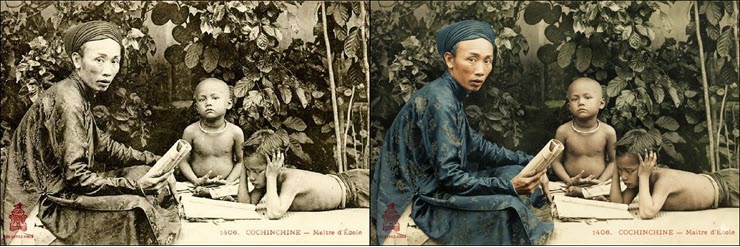
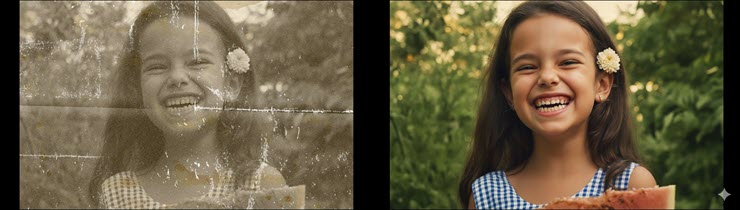
<p><span style="font-size:14px;">Dưới đây là một số mẫu hình ảnh đã được Gemini khôi phục bằng prompt trên:</span></p>

<p><span style="font-size:14px;"><img alt="&#039;Tuyệt chiêu&#039; phục hồi ảnh cũ chuẩn studio chỉ trong vài giây, không cần có Photoshop - 2" data-original="https://cdn.24h.com.vn/upload/3-2025/images/2025-09-16/1-horz-1757988363-16-width740height247.jpg" data-was-processed="true" src="https://cdn.24h.com.vn/upload/3-2025/images/2025-09-16/1-horz-1757988363-16-width740height247.jpg" /><img alt="&#039;Tuyệt chiêu&#039; phục hồi ảnh cũ chuẩn studio chỉ trong vài giây, không cần có Photoshop - 3" data-original="https://cdn.24h.com.vn/upload/3-2025/images/2025-09-16/3-horz-1757988374-590-width740height210.jpg" data-was-processed="true" src="https://cdn.24h.com.vn/upload/3-2025/images/2025-09-16/3-horz-1757988374-590-width740height210.jpg" /><img alt="&#039;Tuyệt chiêu&#039; phục hồi ảnh cũ chuẩn studio chỉ trong vài giây, không cần có Photoshop - 4" data-original="https://cdn.24h.com.vn/upload/3-2025/images/2025-09-16/aahar4etsfc6hsdhwspa0k6wpauq3xvz-horz-1757988398-305-width740height247.jpg" data-was-processed="true" src="https://cdn.24h.com.vn/upload/3-2025/images/2025-09-16/aahar4etsfc6hsdhwspa0k6wpauq3xvz-horz-1757988398-305-width740height247.jpg" /></span></p>

<p><span style="font-size:14px;">Có thể thấy, cuộc cách mạng AI đang mở ra những khả năng phi thường, biến những công việc đòi hỏi kỹ năng chuyên sâu trở nên dễ dàng hơn bao giờ hết. Giờ đây, việc lưu giữ và làm mới những ký ức quý giá của gia đình không còn là một công việc xa vời nữa. Bạn không cần phải là chuyên gia Photoshop, bạn chỉ cần một &quot;công thức&quot; đủ tốt.&nbsp;</span></p>
		</div>
				<div id="author">
						<p>
				<strong>Tác giả bài viết:</strong>
				Thanh Sơn
			</p>
						<p>
				<strong>Nguồn tin:</strong>
				www.24h.com.vn
			</p>
		</div>
	</div>
	<div id="footer" class="clearfix">
		<div id="url">
			<strong>URL của bản tin này: </strong><a href="https://tinhocdct.xyz/tin-cong-nghe/tuyet-chieu-phuc-hoi-anh-cu-chuan-studio-chi-trong-vai-giay-khong-can-co-photoshop-516.html" title="&quot;Tuyệt chiêu&quot; phục hồi ảnh cũ chuẩn studio chỉ trong vài giây, không cần có Photoshop">https://tinhocdct.xyz/tin-cong-nghe/tuyet-chieu-phuc-hoi-anh-cu-chuan-studio-chi-trong-vai-giay-khong-can-co-photoshop-516.html</a>

		</div>
		<div class="clear"></div>
		<div class="copyright">
			&copy; TỔ TIN HỌC TRƯỜNG THPT ĐỖ CÔNG TƯỜNG
		</div>
		<div id="contact">
			<a href="mailto:webmaster@tinhocdct.xyz">webmaster@tinhocdct.xyz</a>
		</div>
	</div>
</div>
        <div id="timeoutsess" class="chromeframe">
            Bạn đã không sử dụng Site, <a onclick="timeoutsesscancel();" href="https://tinhocdct.xyz/#">Bấm vào đây để duy trì trạng thái đăng nhập</a>. Thời gian chờ: <span id="secField"> 60 </span> giây
        </div>
        <div id="openidResult" class="nv-alert" style="display:none"></div>
        <div id="openidBt" data-result="" data-redirect=""></div>
<script src="https://tinhocdct.xyz/assets/js/jquery/jquery.min.js"></script>
<script>var nv_base_siteurl="/",nv_lang_data="vi",nv_lang_interface="vi",nv_name_variable="nv",nv_fc_variable="op",nv_lang_variable="language",nv_module_name="news",nv_func_name="savefile",nv_is_user=0, nv_my_ofs=-4,nv_my_abbr="EDT",nv_cookie_prefix="nv4",nv_check_pass_mstime=1738000,nv_area_admin=0,nv_safemode=0,theme_responsive=0,nv_is_recaptcha=0;</script>
<script src="https://tinhocdct.xyz/assets/js/language/vi.js"></script>
<script src="https://tinhocdct.xyz/assets/js/global.js"></script>
<script src="https://tinhocdct.xyz/themes/default/js/news.js"></script>
<script src="https://tinhocdct.xyz/themes/default/js/main.js"></script>
<script async src="https://pagead2.googlesyndication.com/pagead/js/adsbygoogle.js?client=ca-pub-1816161148536198"
     crossorigin="anonymous"></script>
<script src="https://tinhocdct.xyz/themes/default/js/bootstrap.min.js"></script>
</body>
</html>