<!DOCTYPE html>
	<html lang="vi" xmlns="http://www.w3.org/1999/xhtml" prefix="og: http://ogp.me/ns#">
	<head>
<title>Mẹo hay để không còn bị quảng cáo làm phiền khi xem Youtube</title>
<meta name="description" content="Mẹo hay để không còn bị quảng cáo làm phiền khi xem Youtube - Savefile - Tin Tức -...">
<meta name="author" content="TỔ TIN HỌC TRƯỜNG THPT ĐỖ CÔNG TƯỜNG">
<meta name="copyright" content="TỔ TIN HỌC TRƯỜNG THPT ĐỖ CÔNG TƯỜNG [webmaster@tinhocdct.xyz]">
<meta name="robots" content="index, archive, follow, noodp">
<meta name="googlebot" content="index,archive,follow,noodp">
<meta name="msnbot" content="all,index,follow">
<meta name="generator" content="NukeViet v4.0">
<meta http-equiv="Content-Type" content="text/html; charset=utf-8">
<meta property="og:title" content="Mẹo hay để không còn bị quảng cáo làm phiền khi xem Youtube">
<meta property="og:type" content="website">
<meta property="og:description" content="Savefile - Tin Tức - https&#x3A;&#x002F;&#x002F;tinhocdct.xyz&#x002F;savefile&#x002F;tin-cong-nghe&#x002F;meo-hay-de-khong-con-bi-quang-cao-lam-phien-khi-xem-youtube-242.html">
<meta property="og:site_name" content="TỔ TIN HỌC TRƯỜNG THPT ĐỖ CÔNG TƯỜNG">
<meta property="og:url" content="https://tinhocdct.xyz/tin-cong-nghe/meo-hay-de-khong-con-bi-quang-cao-lam-phien-khi-xem-youtube-242.html">
<link rel="shortcut icon" href="https://tinhocdct.xyz/favicon.ico">
<link rel="canonical" href="https://tinhocdct.xyz/tin-cong-nghe/meo-hay-de-khong-con-bi-quang-cao-lam-phien-khi-xem-youtube-242.html">
<link rel="alternate" href="https://tinhocdct.xyz/rss/" title="Tin Tức" type="application/rss+xml">
<link rel="alternate" href="https://tinhocdct.xyz/rss/tin-tuc/" title="Tin Tức - TIN TỨC" type="application/rss+xml">
<link rel="alternate" href="https://tinhocdct.xyz/rss/thong-cao-bao-chi/" title="Tin Tức - THÔNG BÁO" type="application/rss+xml">
<link rel="alternate" href="https://tinhocdct.xyz/rss/ban-tin-noi-bo/" title="Tin Tức - BẢN TIN NỘI BỘ" type="application/rss+xml">
<link rel="alternate" href="https://tinhocdct.xyz/rss/tin-cong-nghe/" title="Tin Tức - CÔNG NGHỆ - KHOA HỌC" type="application/rss+xml">
<link rel="alternate" href="https://tinhocdct.xyz/rss/thu-thuat/" title="Tin Tức - THỦ THUẬT" type="application/rss+xml">
<link rel="alternate" href="https://tinhocdct.xyz/rss/tien-ich/" title="Tin Tức - TIỆN ÍCH" type="application/rss+xml">
<link rel="alternate" href="https://tinhocdct.xyz/rss/ai/" title="Tin Tức - AI" type="application/rss+xml">
<link rel="alternate" href="https://tinhocdct.xyz/rss/khoa-hoc/" title="Tin Tức - KHOA HỌC" type="application/rss+xml">
<link rel="alternate" href="https://tinhocdct.xyz/rss/hoat-dong-chuyen-mon/" title="Tin Tức - HOẠT ĐỘNG CHUYÊN MÔN" type="application/rss+xml">
<link rel="alternate" href="https://tinhocdct.xyz/rss/hoat-dong-cong-doan/" title="Tin Tức - CÔNG ĐOÀN" type="application/rss+xml">
<link rel="alternate" href="https://tinhocdct.xyz/rss/hoat-dong-doan-the/" title="Tin Tức - ĐOÀN THỂ" type="application/rss+xml">
<link rel="alternate" href="https://tinhocdct.xyz/rss/tuyen-sinh-huong-nghiep/" title="Tin Tức - TUYỂN SINH - HƯỚNG NGHIỆP" type="application/rss+xml">
<link rel="alternate" href="https://tinhocdct.xyz/rss/tuyen-sinh-2025/" title="Tin Tức - TUYỂN SINH" type="application/rss+xml">
<link rel="alternate" href="https://tinhocdct.xyz/rss/huong-nghiep/" title="Tin Tức - HƯỚNG NGHIỆP" type="application/rss+xml">
<link rel="alternate" href="https://tinhocdct.xyz/rss/lich-cong-tac-tuan/" title="Tin Tức - Lịch công tác tuần" type="application/rss+xml">
<link rel="preload" as="script" href="https://tinhocdct.xyz/assets/js/jquery/jquery.min.js">
<link rel="preload" as="script" href="https://tinhocdct.xyz/assets/js/language/vi.js">
<link rel="preload" as="script" href="https://tinhocdct.xyz/assets/js/global.js">
<link rel="preload" as="script" href="https://tinhocdct.xyz/themes/default/js/news.js">
<link rel="preload" as="script" href="https://tinhocdct.xyz/themes/default/js/main.js">
<link rel="preload" as="script" href="https://pagead2.googlesyndication.com/pagead/js/adsbygoogle.js?client=ca-pub-1816161148536198">
<link rel="preload" as="script" href="https://tinhocdct.xyz/themes/default/js/bootstrap.min.js">
<link rel="StyleSheet" href="https://tinhocdct.xyz/assets/css/font-awesome.min.css">
<link rel="StyleSheet" href="https://tinhocdct.xyz/themes/default/css/bootstrap.non-responsive.css">
<link rel="StyleSheet" href="https://tinhocdct.xyz/themes/default/css/style.css">
<link rel="StyleSheet" href="https://tinhocdct.xyz/themes/default/css/style.non-responsive.css">
<link rel="StyleSheet" href="https://tinhocdct.xyz/themes/default/css/news.css">
<style>
	body{background: #fff;}
</style>
	</head>
	<body>
<div id="print">
	<div id="hd_print">
		<h2 class="pull-left">TỔ TIN HỌC TRƯỜNG THPT ĐỖ CÔNG TƯỜNG</h2>
		<p class="pull-right"><a title="TỔ TIN HỌC TRƯỜNG THPT ĐỖ CÔNG TƯỜNG" href="https://tinhocdct.xyz/">https://tinhocdct.xyz</a></p>
	</div>
	<div class="clear"></div>
	<hr />
	<div id="content">
		<h1>Mẹo hay để không còn bị quảng cáo làm phiền khi xem Youtube</h1>
		<ul class="list-inline">
			<li>Thứ ba - 07/03/2023 21:53</li>
			<li class="hidden-print txtrequired"><em class="fa fa-print">&nbsp;</em><a title="In ra" href="javascript:;" onclick="window.print()">In ra</a></li>
			<li class="hidden-print txtrequired"><em class="fa fa-power-off">&nbsp;</em><a title="Đóng cửa sổ này" href="javascript:;" onclick="window.close()">Đóng cửa sổ này</a></li>
		</ul>
		<div class="clear"></div>
		<div id="hometext">
			Bài viết dưới đây sẽ hướng dẫn bạn cách thức đơn giản để không còn bị làm phiền bởi các nội dung quảng cáo khi xem video trên Youtube.
		</div>
				<div class="imghome">
			<img alt="Mẹo hay để không còn bị quảng cáo làm phiền khi xem Youtube" src="https://tinhocdct.xyz/uploads/news/2023_03/youtube.png" width="460" class="img-thumbnail" />
		</div>
		<div class="clear"></div>
		<div id="bodytext" class="clearfix">
			<p>Tần suất của các&nbsp;<a data-auto-link-id="63fdb103d254a68fd076e72a" data-content-name="article-content-autolink" data-content-piece="article-content-autolink_63fdb103d254a68fd076e72a" data-content-target="/suc-manh-so/meo-hay-de-khong-con-bi-quang-cao-lam-phien-khi-xem-youtube-20230207214418771.htm" data-track-content="" href="https://dtadnetwork.com/">quảng cáo</a>&nbsp;xuất hiện trên Youtube ngày càng tăng. Nếu hay xem video hoặc nghe nhạc trên Youtube, bạn sẽ thường xuyên bắt gặp các video quảng cáo bị chèn vào nội dung, điều này sẽ khiến cho đoạn video hoặc bài hát đang phát bị gián đoạn, gây khó chịu cho người xem.</p>

<p>Chẳng hạn bạn đang dùng Youtube trên smartphone để vừa nghe nhạc, nghe đọc truyện hay nghe podcast và vừa làm một công việc khác, thì sau khi một video kết thúc và chuyển sang video mới, quảng cáo sẽ xuất hiện trên Youtube, buộc người dùng phải bỏ dở công việc và nhấn nút tắt quảng cáo, rất phiền toái. Chưa kể âm thanh từ các đoạn quảng cáo giống nhau sẽ lặp đi lặp lại rất khó chịu.</p>

<p>Để không bị làm phiền và cảm thấy &quot;đau đầu&quot; bởi các nội dung quảng cáo trên Youtube, bạn có thể nhờ đến ứng dụng có tên gọi Auto Skip Ads in Youtube (Bỏ qua Quảng cáo).</p>

<p>Về cơ bản, Auto Skip Ads in Youtube sẽ không chặn các video quảng cáo trên Youtube, nhưng sẽ giúp bỏ qua các nội dung quảng cáo một cách tự động mà không cần phải có sự can thiệp của người dùng.</p>

<p>Trong khi dùng ứng dụng Youtube, nếu bắt gặp các video quảng cáo, Auto Skip Ads in Youtube sẽ tự động tắt tiếng video quảng cáo, đồng thời tự động nhấn nút &quot;Bỏ qua quảng cáo&quot; với các video quảng cáo dài.</p>

<p>Auto Skip Ads in Youtube sẽ vận hành một cách tự động mà không cần có sự can thiệp của người dùng.</p>

<figure contenteditable="false"><img alt="Các video quảng cáo dài trên Youtube buộc người dùng bấm nút " data-adbro-processed="true" data-content-name="article-content-image" data-content-piece="article-content-image_2340254" data-content-target="/suc-manh-so/meo-hay-de-khong-con-bi-quang-cao-lam-phien-khi-xem-youtube-20230207214418771.htm" data-custom-alt="true" data-height="329" data-original="https://icdn.dantri.com.vn/2023/02/07/quang-cao-youtube-0-1675780618932.png" data-photo-id="2340254" data-track-content="" data-width="900" src="https://icdn.dantri.com.vn/thumb_w/680/2023/02/07/quang-cao-youtube-0-1675780618932.png" title="Các video quảng cáo dài trên Youtube buộc người dùng bấm nút " />
<figcaption>
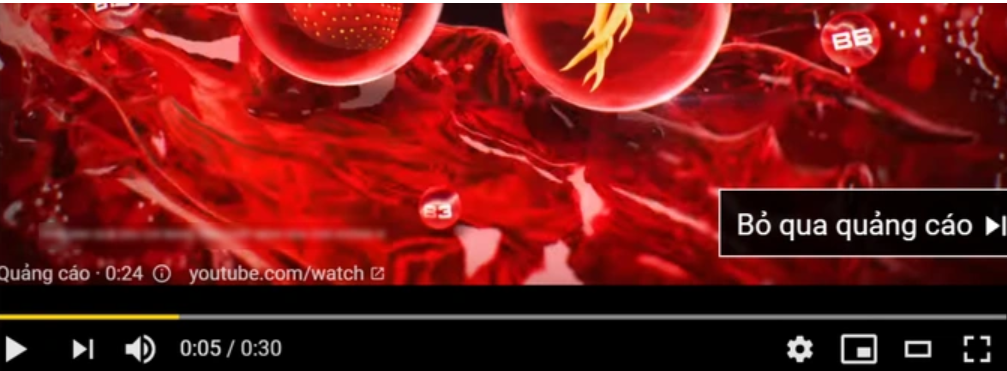
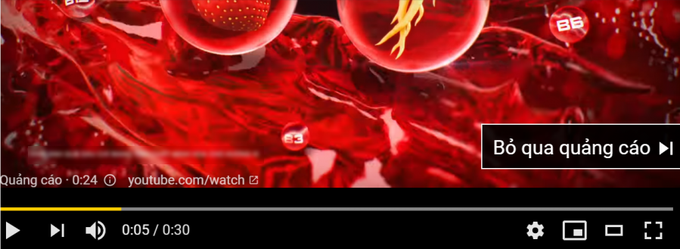
<p>Các video quảng cáo dài trên Youtube buộc người dùng bấm nút &quot;Bỏ qua quảng cáo&quot; nếu không muốn tiếp tục xem, nhưng ứng dụng Auto Skip Ads in Youtube sẽ tự động thực hiện điều này giúp bạn (Ảnh chụp màn hình).</p>
</figcaption>
</figure>

<p>Nhờ vào ứng dụng này, bạn có thể nghe nhạc, nghe đọc truyện hay podcast trên Youtube một cách trơn tru mà không bị các âm thanh quảng cáo chen ngang, đặc biệt không cần phải chạm tay vào smartphone để nhấn nút &quot;Bỏ qua quảng cáo&quot; như trước đây.</p>

<p><strong>Hướng dẫn cài đặt và dùng ứng dụng</strong></p>

<p>Auto Skip Ads in Youtube hiện chỉ có phiên bản dành cho nền tảng Android.</p>

<p>Ứng dụng này đang trong giai đoạn thử nghiệm, chưa được phát hành chính thức trên kho ứng dụng Google Play, do vậy người dùng chỉ có thể download và cài đặt ứng dụng thông qua file .apk (định dạng file cài đặt ứng dụng cho smartphone Android).</p>

<p>Bạn đọc có thể download file cài đặt của ứng dụng Auto Skip Ads in Youtube&nbsp;<a contenteditable="false" href="https://htapp.net/tools/auto-skip-ads-in-tube-movies/" rel="nofollow noopener" target="_blank">miễn phí tại đây</a>&nbsp;(tương thích Android 4.3 trở lên).</p>

<p>Đây là file cài đặt hoàn toàn &quot;sạch&quot; và không có mã độc, đã được chính người viết thử nghiệm và kiểm chứng. Bạn đọc có thể thực hiện theo hướng dẫn của&nbsp;<em>Dân trí</em>&nbsp;<a contenteditable="false" href="https://dantri.com.vn/suc-manh-so/kich-hoat-nhanh-ung-dung-yeu-thich-bang-cach-go-vao-lung-smartphone-20200814213806272.htm">tại đây để biết cách cài đặt file .apk lên smartphone Android.</a></p>

<p>Sau khi cài đặt và kích hoạt Auto Skip Ads in Youtube, bước đầu tiên người dùng cần thực hiện các thiết lập để ứng dụng có thể hoạt động.</p>

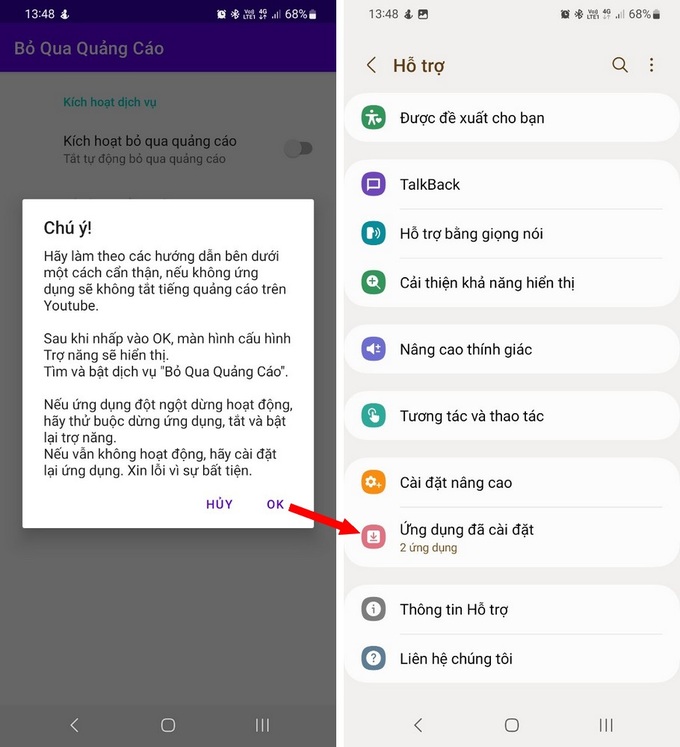
<p>Bạn nhấn vào nút &quot;Ok&quot; ở hộp thoại hiện ra đầu tiên sau khi kích hoạt ứng dụng, sau đó tìm đến mục &quot;Ứng dụng đã cài đặt&quot;.</p>

<figure contenteditable="false"><img alt="Mẹo hay để không còn bị quảng cáo làm phiền khi xem Youtube - 2" data-content-name="article-content-image" data-content-piece="article-content-image_2340258" data-content-target="/suc-manh-so/meo-hay-de-khong-con-bi-quang-cao-lam-phien-khi-xem-youtube-20230207214418771.htm" data-height="1000" data-ll-status="loaded" data-original="https://icdn.dantri.com.vn/2023/02/07/quang-cao-youtube-1-1675780812690.jpg" data-photo-id="2340258" data-src="https://icdn.dantri.com.vn/thumb_w/680/2023/02/07/quang-cao-youtube-1-1675780812690.jpg" data-track-content="" data-width="910" src="https://icdn.dantri.com.vn/thumb_w/680/2023/02/07/quang-cao-youtube-1-1675780812690.jpg" title="Mẹo hay để không còn bị quảng cáo làm phiền khi xem Youtube - 2" /></figure>

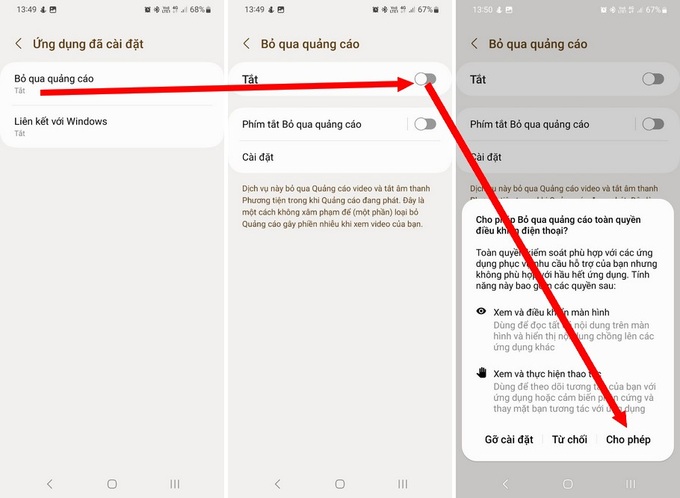
<p>Nhấn chọn &quot;Bỏ qua quảng cáo&quot; tại giao diện tiếp theo, sau đó nhấn vào nút &quot;Tắt&quot; để chuyển sang chế độ &quot;Bật&quot;. Nhấn tiếp nút &quot;Cho phép&quot; tại hộp thoại hiện ra.</p>

<figure contenteditable="false"><img alt="Mẹo hay để không còn bị quảng cáo làm phiền khi xem Youtube - 3" data-content-name="article-content-image" data-content-piece="article-content-image_2340257" data-content-target="/suc-manh-so/meo-hay-de-khong-con-bi-quang-cao-lam-phien-khi-xem-youtube-20230207214418771.htm" data-height="667" data-ll-status="loaded" data-original="https://icdn.dantri.com.vn/2023/02/07/quang-cao-youtube-2-1675780812675.jpg" data-photo-id="2340257" data-src="https://icdn.dantri.com.vn/thumb_w/680/2023/02/07/quang-cao-youtube-2-1675780812675.jpg" data-track-content="" data-width="910" src="https://icdn.dantri.com.vn/thumb_w/680/2023/02/07/quang-cao-youtube-2-1675780812675.jpg" title="Mẹo hay để không còn bị quảng cáo làm phiền khi xem Youtube - 3" /></figure>

<p>Sau khi đã chuyển từ chế độ &quot;Tắt&quot; sang &quot;Bật&quot;, ứng dụng Auto Skip Ads in Youtube sẽ tự động chạy trên smartphone của người dùng mà không cần phải can thiệp hay thiết lập gì thêm.</p>

<p>Bây giờ, mỗi khi bạn xem video trên ứng dụng Youtube và gặp các nội dung quảng cáo, Auto Skip Ads in Youtube sẽ tự động tắt đi âm thanh các đoạn quảng cáo để không làm phiền người dùng.</p>

<p>Đặc biệt, với các quảng cáo dài trên Youtube, ứng dụng sẽ tự động nhấn nút &quot;Bỏ qua quảng cáo&quot; sau 5 giây (khoảng thời gian Youtube cho phép người dùng tắt quảng cáo đối với các nội dung quảng cáo dài) mà người dùng không cần phải can thiệp hay đụng tay vào smartphone.</p>

<p>Nhờ sự giúp đỡ của Auto Skip Ads in Youtube, bạn có thể sử dụng Youtube một cách trơn tru hơn mà không còn bị quảng cáo làm phiền.</p>
		</div>
				<div id="author">
						<p>
				<strong>Tác giả bài viết:</strong>
				Thanh Sơn
			</p>
						<p>
				<strong>Nguồn tin:</strong>
				dantri.com.vn
			</p>
		</div>
	</div>
	<div id="footer" class="clearfix">
		<div id="url">
			<strong>URL của bản tin này: </strong><a href="https://tinhocdct.xyz/tin-cong-nghe/meo-hay-de-khong-con-bi-quang-cao-lam-phien-khi-xem-youtube-242.html" title="Mẹo hay để không còn bị quảng cáo làm phiền khi xem Youtube">https://tinhocdct.xyz/tin-cong-nghe/meo-hay-de-khong-con-bi-quang-cao-lam-phien-khi-xem-youtube-242.html</a>

		</div>
		<div class="clear"></div>
		<div class="copyright">
			&copy; TỔ TIN HỌC TRƯỜNG THPT ĐỖ CÔNG TƯỜNG
		</div>
		<div id="contact">
			<a href="mailto:webmaster@tinhocdct.xyz">webmaster@tinhocdct.xyz</a>
		</div>
	</div>
</div>
        <div id="timeoutsess" class="chromeframe">
            Bạn đã không sử dụng Site, <a onclick="timeoutsesscancel();" href="https://tinhocdct.xyz/#">Bấm vào đây để duy trì trạng thái đăng nhập</a>. Thời gian chờ: <span id="secField"> 60 </span> giây
        </div>
        <div id="openidResult" class="nv-alert" style="display:none"></div>
        <div id="openidBt" data-result="" data-redirect=""></div>
<script src="https://tinhocdct.xyz/assets/js/jquery/jquery.min.js"></script>
<script>var nv_base_siteurl="/",nv_lang_data="vi",nv_lang_interface="vi",nv_name_variable="nv",nv_fc_variable="op",nv_lang_variable="language",nv_module_name="news",nv_func_name="savefile",nv_is_user=0, nv_my_ofs=-4,nv_my_abbr="EDT",nv_cookie_prefix="nv4",nv_check_pass_mstime=1738000,nv_area_admin=0,nv_safemode=0,theme_responsive=0,nv_is_recaptcha=0;</script>
<script src="https://tinhocdct.xyz/assets/js/language/vi.js"></script>
<script src="https://tinhocdct.xyz/assets/js/global.js"></script>
<script src="https://tinhocdct.xyz/themes/default/js/news.js"></script>
<script src="https://tinhocdct.xyz/themes/default/js/main.js"></script>
<script async src="https://pagead2.googlesyndication.com/pagead/js/adsbygoogle.js?client=ca-pub-1816161148536198"
     crossorigin="anonymous"></script>
<script src="https://tinhocdct.xyz/themes/default/js/bootstrap.min.js"></script>
</body>
</html>