<!DOCTYPE html>
	<html lang="vi" xmlns="http://www.w3.org/1999/xhtml" prefix="og: http://ogp.me/ns#">
	<head>
<title>Hướng dẫn tải và cài đặt Free Pascal cho Windows 10</title>
<meta name="description" content="Hướng dẫn tải và cài đặt Free Pascal cho Windows 10 - Savefile - Tin Tức -...">
<meta name="author" content="TỔ TIN HỌC TRƯỜNG THPT ĐỖ CÔNG TƯỜNG">
<meta name="copyright" content="TỔ TIN HỌC TRƯỜNG THPT ĐỖ CÔNG TƯỜNG [webmaster@tinhocdct.xyz]">
<meta name="robots" content="index, archive, follow, noodp">
<meta name="googlebot" content="index,archive,follow,noodp">
<meta name="msnbot" content="all,index,follow">
<meta name="generator" content="NukeViet v4.0">
<meta http-equiv="Content-Type" content="text/html; charset=utf-8">
<meta property="og:title" content="Hướng dẫn tải và cài đặt Free Pascal cho Windows 10">
<meta property="og:type" content="website">
<meta property="og:description" content="Savefile - Tin Tức - https&#x3A;&#x002F;&#x002F;tinhocdct.xyz&#x002F;savefile&#x002F;tin-cong-nghe&#x002F;huong-dan-tai-va-cai-dat-free-pascal-cho-windows-10-209.html">
<meta property="og:site_name" content="TỔ TIN HỌC TRƯỜNG THPT ĐỖ CÔNG TƯỜNG">
<meta property="og:url" content="https://tinhocdct.xyz/tin-cong-nghe/huong-dan-tai-va-cai-dat-free-pascal-cho-windows-10-209.html">
<link rel="shortcut icon" href="https://tinhocdct.xyz/favicon.ico">
<link rel="canonical" href="https://tinhocdct.xyz/tin-cong-nghe/huong-dan-tai-va-cai-dat-free-pascal-cho-windows-10-209.html">
<link rel="alternate" href="https://tinhocdct.xyz/rss/" title="Tin Tức" type="application/rss+xml">
<link rel="alternate" href="https://tinhocdct.xyz/rss/tin-tuc/" title="Tin Tức - TIN TỨC" type="application/rss+xml">
<link rel="alternate" href="https://tinhocdct.xyz/rss/thong-cao-bao-chi/" title="Tin Tức - THÔNG BÁO" type="application/rss+xml">
<link rel="alternate" href="https://tinhocdct.xyz/rss/ban-tin-noi-bo/" title="Tin Tức - BẢN TIN NỘI BỘ" type="application/rss+xml">
<link rel="alternate" href="https://tinhocdct.xyz/rss/tin-cong-nghe/" title="Tin Tức - CÔNG NGHỆ - KHOA HỌC" type="application/rss+xml">
<link rel="alternate" href="https://tinhocdct.xyz/rss/thu-thuat/" title="Tin Tức - THỦ THUẬT" type="application/rss+xml">
<link rel="alternate" href="https://tinhocdct.xyz/rss/tien-ich/" title="Tin Tức - TIỆN ÍCH" type="application/rss+xml">
<link rel="alternate" href="https://tinhocdct.xyz/rss/ai/" title="Tin Tức - AI" type="application/rss+xml">
<link rel="alternate" href="https://tinhocdct.xyz/rss/khoa-hoc/" title="Tin Tức - KHOA HỌC" type="application/rss+xml">
<link rel="alternate" href="https://tinhocdct.xyz/rss/hoat-dong-chuyen-mon/" title="Tin Tức - HOẠT ĐỘNG CHUYÊN MÔN" type="application/rss+xml">
<link rel="alternate" href="https://tinhocdct.xyz/rss/hoat-dong-cong-doan/" title="Tin Tức - CÔNG ĐOÀN" type="application/rss+xml">
<link rel="alternate" href="https://tinhocdct.xyz/rss/hoat-dong-doan-the/" title="Tin Tức - ĐOÀN THỂ" type="application/rss+xml">
<link rel="alternate" href="https://tinhocdct.xyz/rss/tuyen-sinh-huong-nghiep/" title="Tin Tức - TUYỂN SINH - HƯỚNG NGHIỆP" type="application/rss+xml">
<link rel="alternate" href="https://tinhocdct.xyz/rss/tuyen-sinh-2025/" title="Tin Tức - TUYỂN SINH 2025" type="application/rss+xml">
<link rel="alternate" href="https://tinhocdct.xyz/rss/lich-cong-tac-tuan/" title="Tin Tức - Lịch công tác tuần" type="application/rss+xml">
<link rel="preload" as="script" href="https://tinhocdct.xyz/assets/js/jquery/jquery.min.js">
<link rel="preload" as="script" href="https://tinhocdct.xyz/assets/js/language/vi.js">
<link rel="preload" as="script" href="https://tinhocdct.xyz/assets/js/global.js">
<link rel="preload" as="script" href="https://tinhocdct.xyz/themes/default/js/news.js">
<link rel="preload" as="script" href="https://tinhocdct.xyz/themes/default/js/main.js">
<link rel="preload" as="script" href="https://pagead2.googlesyndication.com/pagead/js/adsbygoogle.js?client=ca-pub-1816161148536198">
<link rel="preload" as="script" href="https://tinhocdct.xyz/themes/default/js/bootstrap.min.js">
<link rel="StyleSheet" href="https://tinhocdct.xyz/assets/css/font-awesome.min.css">
<link rel="StyleSheet" href="https://tinhocdct.xyz/themes/default/css/bootstrap.non-responsive.css">
<link rel="StyleSheet" href="https://tinhocdct.xyz/themes/default/css/style.css">
<link rel="StyleSheet" href="https://tinhocdct.xyz/themes/default/css/style.non-responsive.css">
<link rel="StyleSheet" href="https://tinhocdct.xyz/themes/default/css/news.css">
<style>
	body{background: #fff;}
</style>
	</head>
	<body>
<div id="print">
	<div id="hd_print">
		<h2 class="pull-left">TỔ TIN HỌC TRƯỜNG THPT ĐỖ CÔNG TƯỜNG</h2>
		<p class="pull-right"><a title="TỔ TIN HỌC TRƯỜNG THPT ĐỖ CÔNG TƯỜNG" href="https://tinhocdct.xyz/">https://tinhocdct.xyz</a></p>
	</div>
	<div class="clear"></div>
	<hr />
	<div id="content">
		<h1>Hướng dẫn tải và cài đặt Free Pascal cho Windows 10</h1>
		<ul class="list-inline">
			<li>Thứ tư - 26/10/2022 09:07</li>
			<li class="hidden-print txtrequired"><em class="fa fa-print">&nbsp;</em><a title="In ra" href="javascript:;" onclick="window.print()">In ra</a></li>
			<li class="hidden-print txtrequired"><em class="fa fa-power-off">&nbsp;</em><a title="Đóng cửa sổ này" href="javascript:;" onclick="window.close()">Đóng cửa sổ này</a></li>
		</ul>
		<div class="clear"></div>
		<div id="hometext">
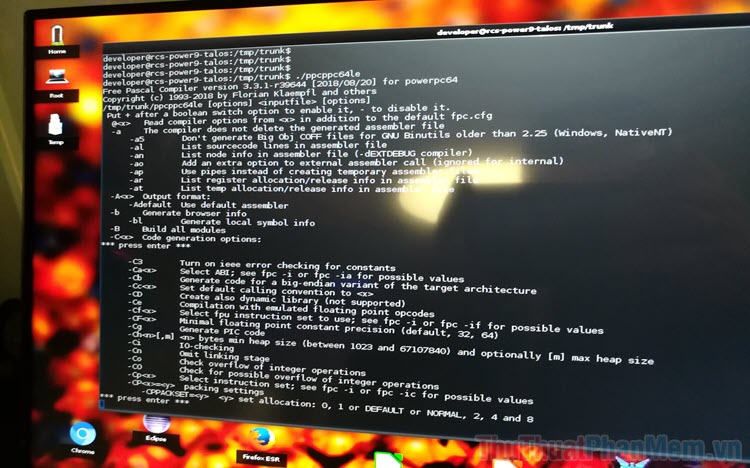
			Free Pascal là phần mềm hỗ trợ lập trình tốt nhất cho ngôn ngữ Pascal, bài viết này, tinhocdct.xyz sẽ hướng dẫn các bạn cách tải và cài đặt Free Pascal cho Windows 10.
		</div>
				<div class="imghome">
			<img alt="Hướng dẫn tải và cài đặt Free Pascal cho Windows 10" src="https://tinhocdct.xyz/uploads/news/2022_10/huong-dan-tai-va-cai-dat-free-pascal-cho-windows-10_052727500.jpg" width="460" class="img-thumbnail" />
		</div>
		<div class="clear"></div>
		<div id="bodytext" class="clearfix">
			<h2 id="1_Cach_tai_Free_Pascal_ve_may_tinh_Windows_10_1">1. Cách tải Free Pascal về máy tính Windows 10</h2>

<p><strong>Bước 1:</strong>&nbsp;Để Free Pascal hoạt động ổn định thì các bạn cần phải tải bản chính thức từ&nbsp;<a href="https://www.freepascal.org/" rel="nofollow" target="_blank"><strong>Trang chủ Free Pascal</strong></a>.</p>

<p align="center"><br  />
<img alt="" height="433" src="https://tinhocdct.xyz/uploads/news/2022_10/hinh-1.jpg" width="550" /></p>

<p><strong>Bước 2:</strong>&nbsp;Tại giao diện chính của trang chủ, các bạn kéo xuống để tìm đến mục&nbsp;<strong>AMD64/ Intel 64/x86_64</strong>&nbsp;và chọn mục&nbsp;<strong>Windows 64-bit</strong>.</p>

<p>Hiện nay đa số các máy tính Windows 10 đều sử dụng nền tảng 64-bit, vậy nên sự lựa chọn này là phù hợp nhất với mọi người. Trong trường hợp Windows 10 của các bạn là nền tảng 32-bit thì hãy tìm Windows 10 32-bit để tải về.</p>

<p align="center"><img alt="" height="329" src="https://tinhocdct.xyz/uploads/news/2022_10/hinh-2.jpg" width="550" /></p>

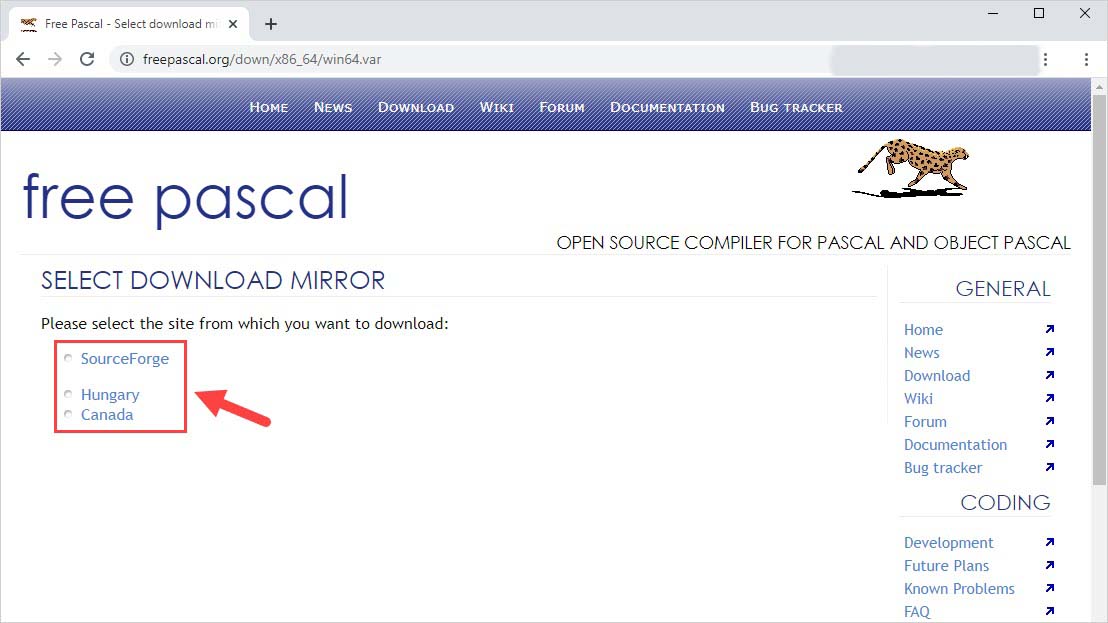
<p><strong>Bước 3:</strong>&nbsp;Sau đó, các bạn cần chọn một nguồn để tải về, cả 03 nguồn đều là chính thức nên các bạn có thể thoải mái chọn. Tuy nhiên tại Việt Nam, server Hungary có tốc độ tải nhanh nhất nên các bạn có thể ưu tiên chúng.</p>

<p align="center"><img alt="" height="309" src="https://tinhocdct.xyz/uploads/news/2022_10/hinh-3.jpg" width="550" /></p>

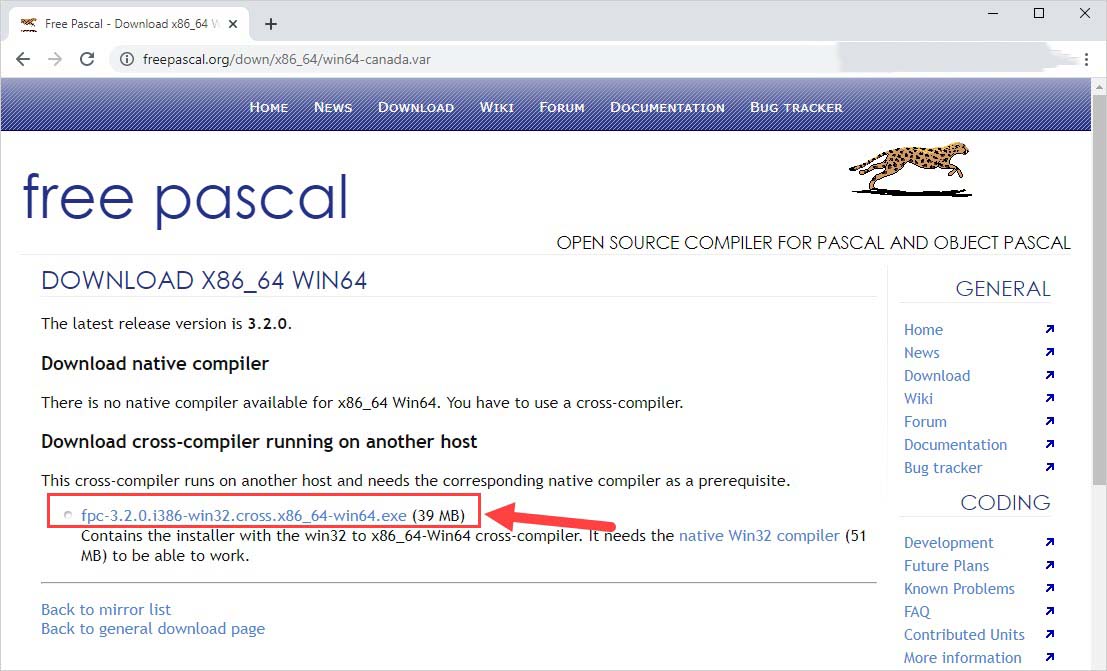
<p><strong>Bước 4:</strong>&nbsp;Cuối cùng, các bạn nhấn vào mục Free Pascal để tải file cài đặt về máy là xong.</p>

<p align="center"><img alt="" height="333" src="https://tinhocdct.xyz/uploads/news/2022_10/hinh-4.jpg" width="550" /></p>

<h2 id="2_Cach_cai_dat_phan_mem_Free_Pascal_tren_Windows_10_2"><strong>2. Cách cài đặt phần mềm Free Pascal trên Windows 10</strong></h2>

<p>Sau khi tải phần mềm về máy tính xong, các bạn có thể cài đặt chúng như những phần mềm khác để sử dụng. Nếu như các bạn chưa biết cách cài đặt thì có thể tham khảo hướng dẫn dưới đây.</p>

<p><strong>Bước 1:</strong>&nbsp;Đầu tiên, các bạn&nbsp;<strong>Click chuột phải vào file</strong>&nbsp;cài đặt và chọn&nbsp;<strong>Open</strong>&nbsp;để mở file.</p>

<p align="center"><img alt="" height="312" src="https://tinhocdct.xyz/uploads/news/2022_10/hinh-5.jpg" width="550" /></p>

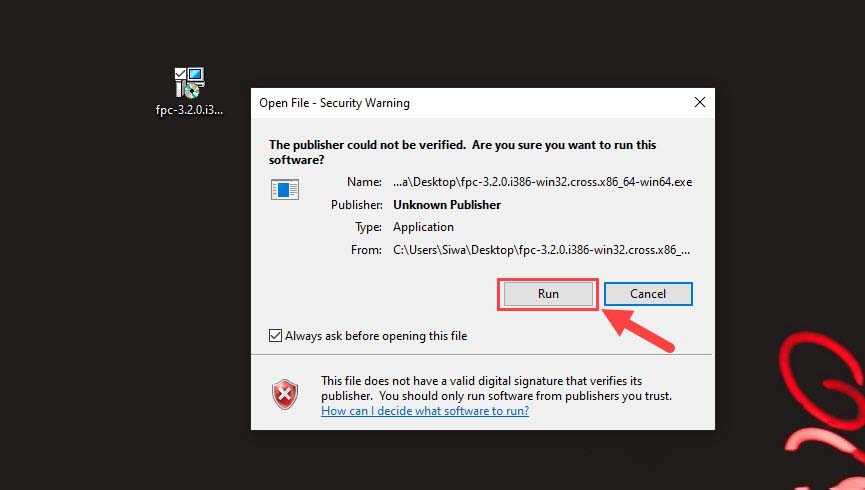
<p><strong>Bước 2:</strong>&nbsp;Khi cửa sổ Open File xuất hiện, các bạn chọn mục&nbsp;<strong>RUN</strong>&nbsp;để bắt đầu cài đặt phần mềm.</p>

<p align="center"><img alt="" height="312" src="https://tinhocdct.xyz/uploads/news/2022_10/hinh-6_1.jpg" width="550" /></p>

<p><strong>Bước 3:</strong>&nbsp;Sau đó, các bạn chọn&nbsp;<strong>Next</strong>&nbsp;để phần mềm tự động cài đặt.</p>

<p align="center"><img alt="" height="343" src="https://tinhocdct.xyz/uploads/news/2022_10/hinh-7.jpg" width="550" /></p>

<p><strong>Bước 4:</strong>&nbsp;Tại cửa sổ thiết lập chế độ cài đặt, các bạn chọn&nbsp;<strong>Full Installation</strong>&nbsp;để cài đặt bản đầy đủ và hoàn chỉnh nhất.</p>

<p align="center"><br  />
<img alt="" height="333" src="https://tinhocdct.xyz/uploads/news/2022_10/hinh-8.jpg" width="550" /></p>

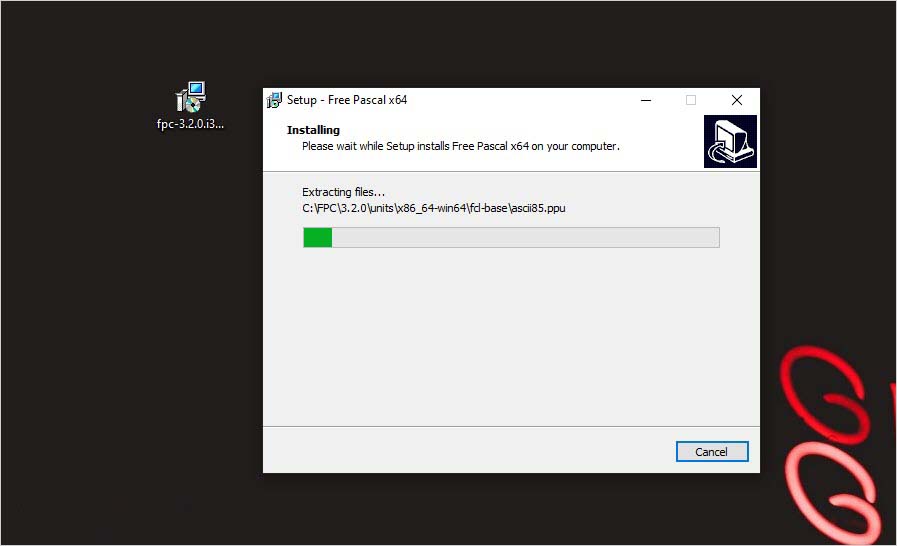
<p><strong>Bước 5:</strong>&nbsp;Bây giờ các bạn chỉ cần đợi phần mềm cài đặt hoàn tất là xong.</p>

<p align="center"><img alt="" height="335" src="https://tinhocdct.xyz/uploads/news/2022_10/hinh-9.jpg" width="550" /></p>

<p><strong>Bước 6:</strong>&nbsp;Để hoàn tất cài đặt, các bạn nhấn&nbsp;<strong>Finish</strong>. Phần mềm sẽ tự động mở lên cho các bạn sử dụng.</p>

<p align="center"><img alt="" height="321" src="https://tinhocdct.xyz/uploads/news/2022_10/hinh-10.jpg" width="550" /></p>

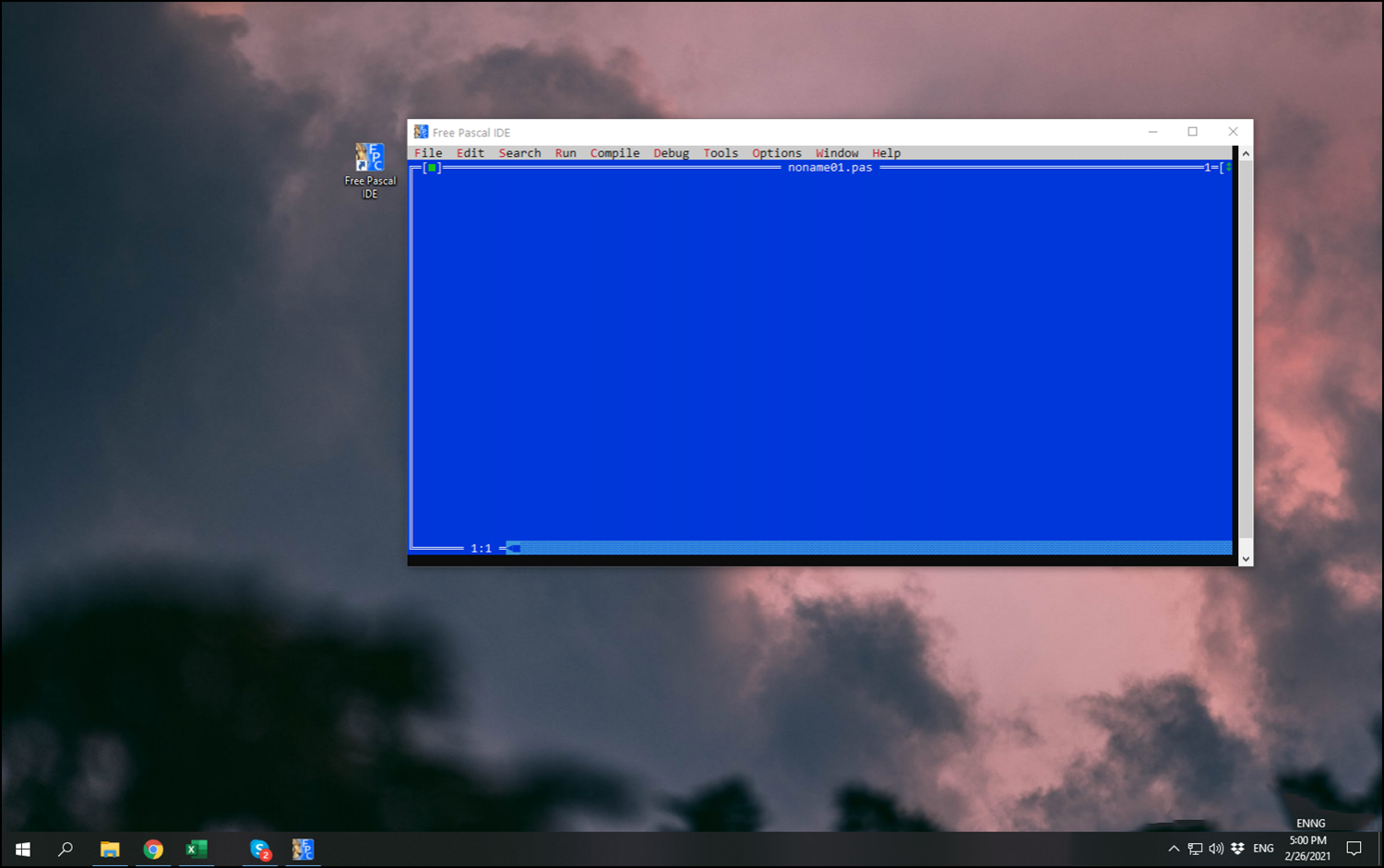
<p><strong>Bước 7:</strong>&nbsp;Cuối cùng, bạn chỉ cần khởi động ứng dụng Free Pascal sau khi cài đặt để sử dụng.</p>

<p align="center"><img alt="" height="345" src="https://tinhocdct.xyz/uploads/news/2022_10/hinh-11.png" width="550" /></p>

<p>Trong bài viết này, tinhocdct.xyz đã hướng dẫn các bạn cách tải và cài đặt phần mềm Free Pascal chuẩn nhất. Chúc các bạn một ngày vui vẻ!</p>
		</div>
				<div id="author">
						<p>
				<strong>Tác giả bài viết:</strong>
				Thanh Sơn
			</p>
		</div>
	</div>
	<div id="footer" class="clearfix">
		<div id="url">
			<strong>URL của bản tin này: </strong><a href="https://tinhocdct.xyz/tin-cong-nghe/huong-dan-tai-va-cai-dat-free-pascal-cho-windows-10-209.html" title="Hướng dẫn tải và cài đặt Free Pascal cho Windows 10">https://tinhocdct.xyz/tin-cong-nghe/huong-dan-tai-va-cai-dat-free-pascal-cho-windows-10-209.html</a>

		</div>
		<div class="clear"></div>
		<div class="copyright">
			&copy; TỔ TIN HỌC TRƯỜNG THPT ĐỖ CÔNG TƯỜNG
		</div>
		<div id="contact">
			<a href="mailto:webmaster@tinhocdct.xyz">webmaster@tinhocdct.xyz</a>
		</div>
	</div>
</div>
        <div id="timeoutsess" class="chromeframe">
            Bạn đã không sử dụng Site, <a onclick="timeoutsesscancel();" href="https://tinhocdct.xyz/#">Bấm vào đây để duy trì trạng thái đăng nhập</a>. Thời gian chờ: <span id="secField"> 60 </span> giây
        </div>
        <div id="openidResult" class="nv-alert" style="display:none"></div>
        <div id="openidBt" data-result="" data-redirect=""></div>
<script src="https://tinhocdct.xyz/assets/js/jquery/jquery.min.js"></script>
<script>var nv_base_siteurl="/",nv_lang_data="vi",nv_lang_interface="vi",nv_name_variable="nv",nv_fc_variable="op",nv_lang_variable="language",nv_module_name="news",nv_func_name="savefile",nv_is_user=0, nv_my_ofs=-4,nv_my_abbr="EDT",nv_cookie_prefix="nv4",nv_check_pass_mstime=1738000,nv_area_admin=0,nv_safemode=0,theme_responsive=0,nv_is_recaptcha=0;</script>
<script src="https://tinhocdct.xyz/assets/js/language/vi.js"></script>
<script src="https://tinhocdct.xyz/assets/js/global.js"></script>
<script src="https://tinhocdct.xyz/themes/default/js/news.js"></script>
<script src="https://tinhocdct.xyz/themes/default/js/main.js"></script>
<script async src="https://pagead2.googlesyndication.com/pagead/js/adsbygoogle.js?client=ca-pub-1816161148536198"
     crossorigin="anonymous"></script>
<script src="https://tinhocdct.xyz/themes/default/js/bootstrap.min.js"></script>
</body>
</html>