<!DOCTYPE html>
	<html lang="vi" xmlns="http://www.w3.org/1999/xhtml" prefix="og: http://ogp.me/ns#">
	<head>
<title>Hướng dẫn chèn ghi chú ở chân trang trong Word</title>
<meta name="description" content="Hướng dẫn chèn ghi chú ở chân trang trong Word - Savefile - Tin Tức - https&#x3A;&#x002F;&#x002F;tinhocdct.xyz&#x002F;savefile&#x002F;tin-cong-nghe&#x002F;huong-dan-chen-ghi-chu-o-chan-trang-trong-word-161.html">
<meta name="author" content="TỔ TIN HỌC TRƯỜNG THPT ĐỖ CÔNG TƯỜNG">
<meta name="copyright" content="TỔ TIN HỌC TRƯỜNG THPT ĐỖ CÔNG TƯỜNG [webmaster@tinhocdct.xyz]">
<meta name="robots" content="index, archive, follow, noodp">
<meta name="googlebot" content="index,archive,follow,noodp">
<meta name="msnbot" content="all,index,follow">
<meta name="generator" content="NukeViet v4.0">
<meta http-equiv="Content-Type" content="text/html; charset=utf-8">
<meta property="og:title" content="Hướng dẫn chèn ghi chú ở chân trang trong Word">
<meta property="og:type" content="website">
<meta property="og:description" content="Savefile - Tin Tức - https&#x3A;&#x002F;&#x002F;tinhocdct.xyz&#x002F;savefile&#x002F;tin-cong-nghe&#x002F;huong-dan-chen-ghi-chu-o-chan-trang-trong-word-161.html">
<meta property="og:site_name" content="TỔ TIN HỌC TRƯỜNG THPT ĐỖ CÔNG TƯỜNG">
<meta property="og:url" content="https://tinhocdct.xyz/tin-cong-nghe/huong-dan-chen-ghi-chu-o-chan-trang-trong-word-161.html">
<link rel="shortcut icon" href="https://tinhocdct.xyz/favicon.ico">
<link rel="canonical" href="https://tinhocdct.xyz/tin-cong-nghe/huong-dan-chen-ghi-chu-o-chan-trang-trong-word-161.html">
<link rel="alternate" href="https://tinhocdct.xyz/rss/" title="Tin Tức" type="application/rss+xml">
<link rel="alternate" href="https://tinhocdct.xyz/rss/tin-tuc/" title="Tin Tức - TIN TỨC" type="application/rss+xml">
<link rel="alternate" href="https://tinhocdct.xyz/rss/thong-cao-bao-chi/" title="Tin Tức - THÔNG BÁO" type="application/rss+xml">
<link rel="alternate" href="https://tinhocdct.xyz/rss/ban-tin-noi-bo/" title="Tin Tức - BẢN TIN NỘI BỘ" type="application/rss+xml">
<link rel="alternate" href="https://tinhocdct.xyz/rss/tin-cong-nghe/" title="Tin Tức - CÔNG NGHỆ - KHOA HỌC" type="application/rss+xml">
<link rel="alternate" href="https://tinhocdct.xyz/rss/thu-thuat/" title="Tin Tức - THỦ THUẬT" type="application/rss+xml">
<link rel="alternate" href="https://tinhocdct.xyz/rss/tien-ich/" title="Tin Tức - TIỆN ÍCH" type="application/rss+xml">
<link rel="alternate" href="https://tinhocdct.xyz/rss/ai/" title="Tin Tức - AI" type="application/rss+xml">
<link rel="alternate" href="https://tinhocdct.xyz/rss/khoa-hoc/" title="Tin Tức - KHOA HỌC" type="application/rss+xml">
<link rel="alternate" href="https://tinhocdct.xyz/rss/hoat-dong-chuyen-mon/" title="Tin Tức - HOẠT ĐỘNG CHUYÊN MÔN" type="application/rss+xml">
<link rel="alternate" href="https://tinhocdct.xyz/rss/hoat-dong-cong-doan/" title="Tin Tức - CÔNG ĐOÀN" type="application/rss+xml">
<link rel="alternate" href="https://tinhocdct.xyz/rss/hoat-dong-doan-the/" title="Tin Tức - ĐOÀN THỂ" type="application/rss+xml">
<link rel="alternate" href="https://tinhocdct.xyz/rss/tuyen-sinh-huong-nghiep/" title="Tin Tức - TUYỂN SINH - HƯỚNG NGHIỆP" type="application/rss+xml">
<link rel="alternate" href="https://tinhocdct.xyz/rss/tuyen-sinh-2025/" title="Tin Tức - TUYỂN SINH 2025" type="application/rss+xml">
<link rel="alternate" href="https://tinhocdct.xyz/rss/lich-cong-tac-tuan/" title="Tin Tức - Lịch công tác tuần" type="application/rss+xml">
<link rel="preload" as="script" href="https://tinhocdct.xyz/assets/js/jquery/jquery.min.js">
<link rel="preload" as="script" href="https://tinhocdct.xyz/assets/js/language/vi.js">
<link rel="preload" as="script" href="https://tinhocdct.xyz/assets/js/global.js">
<link rel="preload" as="script" href="https://tinhocdct.xyz/themes/default/js/news.js">
<link rel="preload" as="script" href="https://tinhocdct.xyz/themes/default/js/main.js">
<link rel="preload" as="script" href="https://pagead2.googlesyndication.com/pagead/js/adsbygoogle.js?client=ca-pub-1816161148536198">
<link rel="preload" as="script" href="https://tinhocdct.xyz/themes/default/js/bootstrap.min.js">
<link rel="StyleSheet" href="https://tinhocdct.xyz/assets/css/font-awesome.min.css">
<link rel="StyleSheet" href="https://tinhocdct.xyz/themes/default/css/bootstrap.non-responsive.css">
<link rel="StyleSheet" href="https://tinhocdct.xyz/themes/default/css/style.css">
<link rel="StyleSheet" href="https://tinhocdct.xyz/themes/default/css/style.non-responsive.css">
<link rel="StyleSheet" href="https://tinhocdct.xyz/themes/default/css/news.css">
<style>
	body{background: #fff;}
</style>
	</head>
	<body>
<div id="print">
	<div id="hd_print">
		<h2 class="pull-left">TỔ TIN HỌC TRƯỜNG THPT ĐỖ CÔNG TƯỜNG</h2>
		<p class="pull-right"><a title="TỔ TIN HỌC TRƯỜNG THPT ĐỖ CÔNG TƯỜNG" href="https://tinhocdct.xyz/">https://tinhocdct.xyz</a></p>
	</div>
	<div class="clear"></div>
	<hr />
	<div id="content">
		<h1>Hướng dẫn chèn ghi chú ở chân trang trong Word</h1>
		<ul class="list-inline">
			<li>Thứ năm - 30/12/2021 09:48</li>
			<li class="hidden-print txtrequired"><em class="fa fa-print">&nbsp;</em><a title="In ra" href="javascript:;" onclick="window.print()">In ra</a></li>
			<li class="hidden-print txtrequired"><em class="fa fa-power-off">&nbsp;</em><a title="Đóng cửa sổ này" href="javascript:;" onclick="window.close()">Đóng cửa sổ này</a></li>
		</ul>
		<div class="clear"></div>
		<div id="hometext">
			Khi tiến hành soản thảo nội dung văn bản Word như luận án, báo cáo, sách,... bạn sẽ gặp những thuật ngữ chuyên ngành, từ viết tắt,.. Và để người đọc có thể hiểu rõ chính xác về nội dung của từ ngữ đó, chúng ta sẽ sử dụng tính năng Footnote chèn chú thích ở chân trang có sẵn ở công cụ soạn thảo Word.
		</div>
				<div class="imghome">
			<img alt="Hướng dẫn chèn ghi chú ở chân trang trong Word" src="https://tinhocdct.xyz/uploads/news/2021_12/word-chen-chu-thich-chan-trang.jpg" width="460" class="img-thumbnail" />
		</div>
		<div class="clear"></div>
		<div id="bodytext" class="clearfix">
			<p>Vậy làm sao để có thể chèn chú thích ở cuối trang trong nội dung văn bản Word? Nếu bạn đọc chưa biết cách tạo ghi chú trong nội dung Word có thể theo dõi bài hướng dẫn dưới đây của Quản trị mạng.</p>

<h2>Cách chèn ghi chú chân trang trên Word</h2>

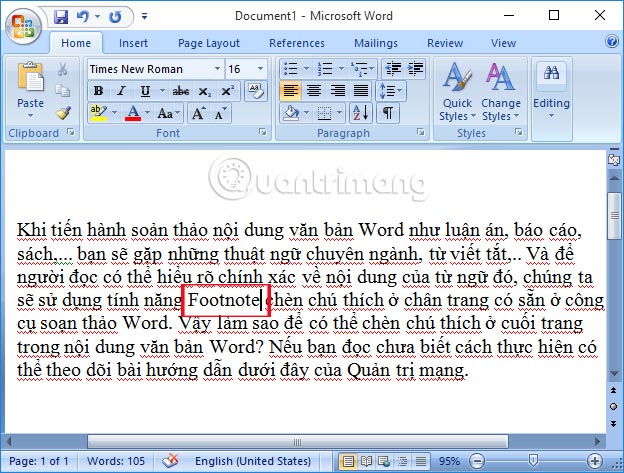
<p><strong>Bước 1:</strong>&nbsp;Tại giao diện nội dung văn bản Word cần chèn chú thích dưới chân trang, bạn&nbsp;<strong>đặt con trỏ chuột ngay sau từ ngữ cần chú thích</strong>. Chẳng hạn ở đây tôi sẽ chú thích từ Footnote.</p>
<img alt="Chèn ghi chú ở chân trang trong Word" data-i="0" data-inimage-loaded="true" data-src="https://st.quantrimang.com/photos/image/2016/12/01/Word-chen-chu-thich-chan-trang.jpg" data-was-processed="true" height="455" src="https://st.quantrimang.com/photos/image/2016/12/01/Word-chen-chu-thich-chan-trang.jpg" title="Từ ngữ cần chú thích " width="600" />
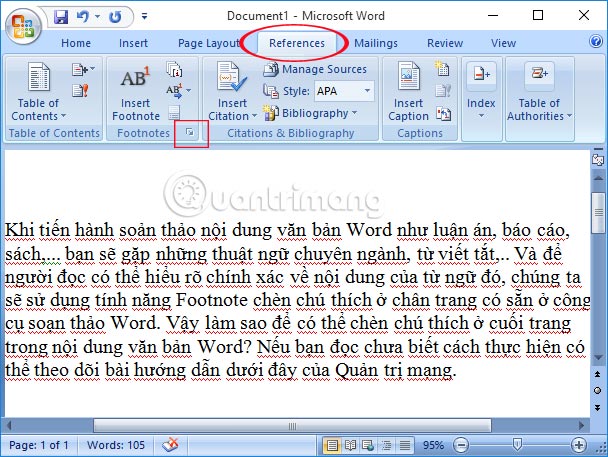
<p><strong>Bước 2:</strong>&nbsp;Tiếp đến, chúng ta sẽ chọn<strong>&nbsp;tab References</strong>&nbsp;trên thanh Ribbon rồi kích vào<strong>&nbsp;mũi tên tại mục Footnotes</strong>&nbsp;như hình dưới. Nếu bạn đang sử dụng&nbsp;<strong>Word 2003</strong>&nbsp;thì chọn&nbsp;<strong>Insert &gt; Reference &gt; Footnote</strong>.</p>
&nbsp;

<p><img alt="Chèn ghi chú ở chân trang trong Word" data-i="1" data-src="https://st.quantrimang.com/photos/image/2016/12/01/Word-chen-chu-thich-References.jpg" data-was-processed="true" height="451" src="https://st.quantrimang.com/photos/image/2016/12/01/Word-chen-chu-thich-References.jpg" title="Chọn tab References " width="600" /></p>

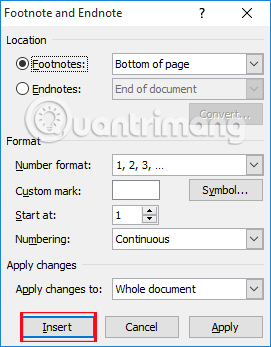
<p><strong>Bước 3:</strong>&nbsp;Sau đó xuất hiện giao diện cửa sổ&nbsp;<strong>Footnote and Endnote</strong>. Trong đó gồm:</p>

<ul>
	<li>Location: Vị trí đặt ghi chú:</li>
</ul>

<ol>
	<li>Footnote: Chân trang (thường để ghi chú ở chân trang).</li>
	<li>Endnotes: Đặt ở vị trí dưới cùng của file văn bản.</li>
</ol>

<ul>
	<li>Format: Định dạng.</li>
</ul>

<ol>
	<li>Number format: Định dạng kiểu đánh số ghi chú (1, 2, 3...; a, b, c...; i, iii, iii,...)</li>
	<li>Custom mark: Tự nhập ký tự làm ký tự ghi chú.</li>
	<li>Start at: Bắt đầu đánh số thứ tự cho chú thích.</li>
	<li>Numbering:</li>
	<li>Continuous: Chú thích từ đầu tới cuối trang</li>
	<li>Restart each section: Chú thích liên tục từ đầu đến cuối phần văn bản chọn và bắt đầu lại từ đầu khi chọn phần văn bản khác.</li>
</ol>
&nbsp;

<ul>
	<li>Nút Symbol...: Chèn ký tự đặc biệt làm ký tự đánh ghi chú.</li>
	<li>Apply changes: Whole document chú thích toàn bộ trong nội dung văn bản.</li>
</ul>

<p>Chúng ta điều chỉnh như hình dưới đây rồi nhấn&nbsp;<strong>Insert</strong>.</p>

<p><img alt="Chèn ghi chú ở chân trang trong Word" data-i="2" data-src="https://st.quantrimang.com/photos/image/2016/12/01/Word-chen-chu-thich-thiet-lap.jpg" data-was-processed="true" height="347" src="https://st.quantrimang.com/photos/image/2016/12/01/Word-chen-chu-thich-thiet-lap.jpg" title="Thiếp lập chú thích chân trang " width="271" /></p>

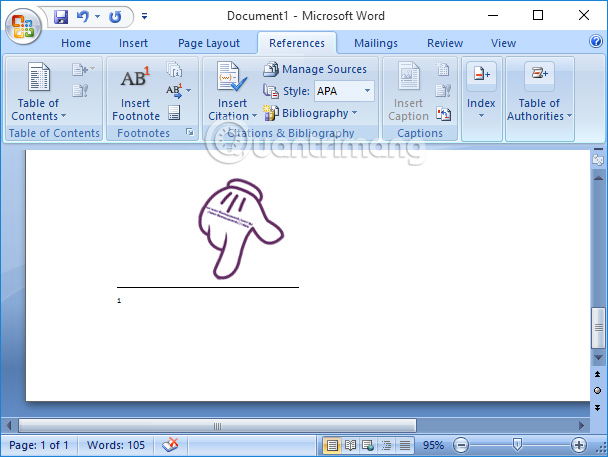
<p>Ngay sau đó, ở cuối chân trang sẽ xuất hiện chú thích như hình dưới đây.</p>

<p><img alt="Chèn ghi chú ở chân trang trong Word" data-i="3" data-src="https://st.quantrimang.com/photos/image/2016/12/01/Word-chen-chu-thich.jpg" data-was-processed="true" height="451" src="https://st.quantrimang.com/photos/image/2016/12/01/Word-chen-chu-thich.jpg" title="Chú thích cuối chân trang " width="600" /></p>

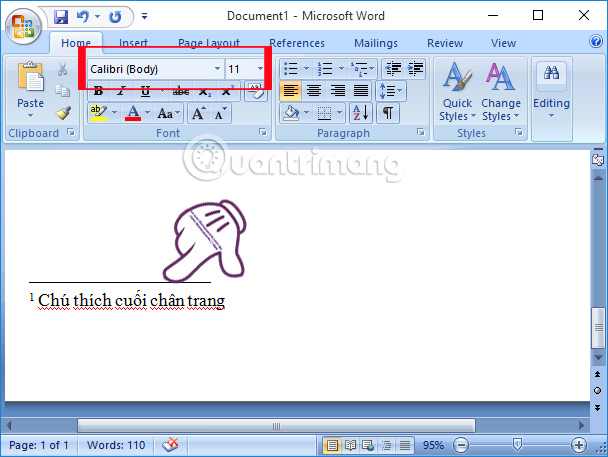
<p><strong>Bước 4:</strong>&nbsp;Cuối cùng bạn chỉ cần&nbsp;<strong>viết nội dung chú thích</strong>&nbsp;vào phía dưới chân trang là được. Chúng ta có thể thay đổi kích cỡ chữ, phông chữ cho chú thích tùy theo từng nhu cầu trình bày của mỗi người.</p>
&nbsp;

<p><img alt="Chèn ghi chú ở chân trang trong Word" data-i="4" data-src="https://st.quantrimang.com/photos/image/2016/12/01/Word-chen-chu-thich-dieu-ching.jpg" data-was-processed="true" height="451" src="https://st.quantrimang.com/photos/image/2016/12/01/Word-chen-chu-thich-dieu-ching.jpg" title="Chỉnh định dạng chú thích " width="600" /></p>

<p>Việc chèn chú thích ở cuối mỗi chân trang sẽ giúp từ ngữ, nội dung trong bài được rõ nghĩa hơn, giúp người đọc có thể dễ dàng hiểu được toàn bộ nội dung của văn bản. Bên cạnh đó, bạn cũng có thể thay đổi định dạng cho chú thích, như sử dụng chữ nghiêng, in đậm, hoặc thêm bất cứ ký tự đặc biệt nào khác.<br  />
&nbsp;</p>

<h2>Video hướng dẫn chèn ghi chú trên Word</h2>
<iframe allowfullscreen="" data-src="https://tinhocdct.xyz//xem.video/embed/22143" data-was-processed="true" frameborder="0" height="360" scrolling="no" src="https://xem.video/embed/22143" width="540"></iframe>

<p>&nbsp;</p>
		</div>
				<div id="author">
						<p>
				<strong>Tác giả bài viết:</strong>
				Thanh Sơn
			</p>
						<p>
				<strong>Nguồn tin:</strong>
				quantrimang.com
			</p>
		</div>
	</div>
	<div id="footer" class="clearfix">
		<div id="url">
			<strong>URL của bản tin này: </strong><a href="https://tinhocdct.xyz/tin-cong-nghe/huong-dan-chen-ghi-chu-o-chan-trang-trong-word-161.html" title="Hướng dẫn chèn ghi chú ở chân trang trong Word">https://tinhocdct.xyz/tin-cong-nghe/huong-dan-chen-ghi-chu-o-chan-trang-trong-word-161.html</a>

		</div>
		<div class="clear"></div>
		<div class="copyright">
			&copy; TỔ TIN HỌC TRƯỜNG THPT ĐỖ CÔNG TƯỜNG
		</div>
		<div id="contact">
			<a href="mailto:webmaster@tinhocdct.xyz">webmaster@tinhocdct.xyz</a>
		</div>
	</div>
</div>
        <div id="timeoutsess" class="chromeframe">
            Bạn đã không sử dụng Site, <a onclick="timeoutsesscancel();" href="https://tinhocdct.xyz/#">Bấm vào đây để duy trì trạng thái đăng nhập</a>. Thời gian chờ: <span id="secField"> 60 </span> giây
        </div>
        <div id="openidResult" class="nv-alert" style="display:none"></div>
        <div id="openidBt" data-result="" data-redirect=""></div>
<div id="run_cronjobs" style="visibility:hidden;display:none;"><img alt="" src="/index.php?second=cronjobs&amp;p=g1jJNirc" width="1" height="1" /></div>
<script src="https://tinhocdct.xyz/assets/js/jquery/jquery.min.js"></script>
<script>var nv_base_siteurl="/",nv_lang_data="vi",nv_lang_interface="vi",nv_name_variable="nv",nv_fc_variable="op",nv_lang_variable="language",nv_module_name="news",nv_func_name="savefile",nv_is_user=0, nv_my_ofs=-4,nv_my_abbr="EDT",nv_cookie_prefix="nv4",nv_check_pass_mstime=1738000,nv_area_admin=0,nv_safemode=0,theme_responsive=0,nv_is_recaptcha=0;</script>
<script src="https://tinhocdct.xyz/assets/js/language/vi.js"></script>
<script src="https://tinhocdct.xyz/assets/js/global.js"></script>
<script src="https://tinhocdct.xyz/themes/default/js/news.js"></script>
<script src="https://tinhocdct.xyz/themes/default/js/main.js"></script>
<script async src="https://pagead2.googlesyndication.com/pagead/js/adsbygoogle.js?client=ca-pub-1816161148536198"
     crossorigin="anonymous"></script>
<script src="https://tinhocdct.xyz/themes/default/js/bootstrap.min.js"></script>
</body>
</html>