<!DOCTYPE html>
	<html lang="vi" xmlns="http://www.w3.org/1999/xhtml" prefix="og: http://ogp.me/ns#">
	<head>
<title>Google tung tính năng &#039;đáng tiền&#039; cho trình duyệt Chrome</title>
<meta name="description" content="Google tung tính năng &#039;đáng tiền&#039; cho trình duyệt Chrome - Savefile - Tin Tức -...">
<meta name="author" content="TỔ TIN HỌC TRƯỜNG THPT ĐỖ CÔNG TƯỜNG">
<meta name="copyright" content="TỔ TIN HỌC TRƯỜNG THPT ĐỖ CÔNG TƯỜNG [webmaster@tinhocdct.xyz]">
<meta name="robots" content="index, archive, follow, noodp">
<meta name="googlebot" content="index,archive,follow,noodp">
<meta name="msnbot" content="all,index,follow">
<meta name="generator" content="NukeViet v4.0">
<meta http-equiv="Content-Type" content="text/html; charset=utf-8">
<meta property="og:title" content="Google tung tính năng &#039;đáng tiền&#039; cho trình duyệt Chrome">
<meta property="og:type" content="website">
<meta property="og:description" content="Savefile - Tin Tức - https&#x3A;&#x002F;&#x002F;tinhocdct.xyz&#x002F;savefile&#x002F;tin-cong-nghe&#x002F;google-tung-tinh-nang-dang-tien-cho-trinh-duyet-chrome-552.html">
<meta property="og:site_name" content="TỔ TIN HỌC TRƯỜNG THPT ĐỖ CÔNG TƯỜNG">
<meta property="og:url" content="https://tinhocdct.xyz/tin-cong-nghe/google-tung-tinh-nang-dang-tien-cho-trinh-duyet-chrome-552.html">
<link rel="shortcut icon" href="https://tinhocdct.xyz/favicon.ico">
<link rel="canonical" href="https://tinhocdct.xyz/tin-cong-nghe/google-tung-tinh-nang-dang-tien-cho-trinh-duyet-chrome-552.html">
<link rel="alternate" href="https://tinhocdct.xyz/rss/" title="Tin Tức" type="application/rss+xml">
<link rel="alternate" href="https://tinhocdct.xyz/rss/tin-tuc/" title="Tin Tức - TIN TỨC" type="application/rss+xml">
<link rel="alternate" href="https://tinhocdct.xyz/rss/thong-cao-bao-chi/" title="Tin Tức - THÔNG BÁO" type="application/rss+xml">
<link rel="alternate" href="https://tinhocdct.xyz/rss/ban-tin-noi-bo/" title="Tin Tức - BẢN TIN NỘI BỘ" type="application/rss+xml">
<link rel="alternate" href="https://tinhocdct.xyz/rss/tin-cong-nghe/" title="Tin Tức - CÔNG NGHỆ - KHOA HỌC" type="application/rss+xml">
<link rel="alternate" href="https://tinhocdct.xyz/rss/thu-thuat/" title="Tin Tức - THỦ THUẬT" type="application/rss+xml">
<link rel="alternate" href="https://tinhocdct.xyz/rss/tien-ich/" title="Tin Tức - TIỆN ÍCH" type="application/rss+xml">
<link rel="alternate" href="https://tinhocdct.xyz/rss/ai/" title="Tin Tức - AI" type="application/rss+xml">
<link rel="alternate" href="https://tinhocdct.xyz/rss/khoa-hoc/" title="Tin Tức - KHOA HỌC" type="application/rss+xml">
<link rel="alternate" href="https://tinhocdct.xyz/rss/hoat-dong-chuyen-mon/" title="Tin Tức - HOẠT ĐỘNG CHUYÊN MÔN" type="application/rss+xml">
<link rel="alternate" href="https://tinhocdct.xyz/rss/hoat-dong-cong-doan/" title="Tin Tức - CÔNG ĐOÀN" type="application/rss+xml">
<link rel="alternate" href="https://tinhocdct.xyz/rss/hoat-dong-doan-the/" title="Tin Tức - ĐOÀN THỂ" type="application/rss+xml">
<link rel="alternate" href="https://tinhocdct.xyz/rss/tuyen-sinh-huong-nghiep/" title="Tin Tức - TUYỂN SINH - HƯỚNG NGHIỆP" type="application/rss+xml">
<link rel="alternate" href="https://tinhocdct.xyz/rss/tuyen-sinh-2025/" title="Tin Tức - TUYỂN SINH" type="application/rss+xml">
<link rel="alternate" href="https://tinhocdct.xyz/rss/huong-nghiep/" title="Tin Tức - HƯỚNG NGHIỆP" type="application/rss+xml">
<link rel="alternate" href="https://tinhocdct.xyz/rss/lich-cong-tac-tuan/" title="Tin Tức - Lịch công tác tuần" type="application/rss+xml">
<link rel="preload" as="script" href="https://tinhocdct.xyz/assets/js/jquery/jquery.min.js">
<link rel="preload" as="script" href="https://tinhocdct.xyz/assets/js/language/vi.js">
<link rel="preload" as="script" href="https://tinhocdct.xyz/assets/js/global.js">
<link rel="preload" as="script" href="https://tinhocdct.xyz/themes/default/js/news.js">
<link rel="preload" as="script" href="https://tinhocdct.xyz/themes/default/js/main.js">
<link rel="preload" as="script" href="https://pagead2.googlesyndication.com/pagead/js/adsbygoogle.js?client=ca-pub-1816161148536198">
<link rel="preload" as="script" href="https://tinhocdct.xyz/themes/default/js/bootstrap.min.js">
<link rel="StyleSheet" href="https://tinhocdct.xyz/assets/css/font-awesome.min.css">
<link rel="StyleSheet" href="https://tinhocdct.xyz/themes/default/css/bootstrap.non-responsive.css">
<link rel="StyleSheet" href="https://tinhocdct.xyz/themes/default/css/style.css">
<link rel="StyleSheet" href="https://tinhocdct.xyz/themes/default/css/style.non-responsive.css">
<link rel="StyleSheet" href="https://tinhocdct.xyz/themes/default/css/news.css">
<style>
	body{background: #fff;}
</style>
	</head>
	<body>
<div id="print">
	<div id="hd_print">
		<h2 class="pull-left">TỔ TIN HỌC TRƯỜNG THPT ĐỖ CÔNG TƯỜNG</h2>
		<p class="pull-right"><a title="TỔ TIN HỌC TRƯỜNG THPT ĐỖ CÔNG TƯỜNG" href="https://tinhocdct.xyz/">https://tinhocdct.xyz</a></p>
	</div>
	<div class="clear"></div>
	<hr />
	<div id="content">
		<h1>Google tung tính năng &#039;đáng tiền&#039; cho trình duyệt Chrome</h1>
		<ul class="list-inline">
			<li>Thứ bảy - 10/01/2026 21:46</li>
			<li class="hidden-print txtrequired"><em class="fa fa-print">&nbsp;</em><a title="In ra" href="javascript:;" onclick="window.print()">In ra</a></li>
			<li class="hidden-print txtrequired"><em class="fa fa-power-off">&nbsp;</em><a title="Đóng cửa sổ này" href="javascript:;" onclick="window.close()">Đóng cửa sổ này</a></li>
		</ul>
		<div class="clear"></div>
		<div id="hometext">
			Tính năng ẩn mới của trình duyệt web Chrome khiến người dùng Mac không muốn quay đầu về Safari.
		</div>
				<div class="imghome">
			<img alt="Google tung tính năng &#039;đáng tiền&#039; cho trình duyệt Chrome" src="https://tinhocdct.xyz/uploads/news/2026_01/tn2.png" width="460" class="img-thumbnail" />
		</div>
		<div class="clear"></div>
		<div id="bodytext" class="clearfix">
			<p>Trình duyệt web ngày nay không chỉ là công cụ lướt mạng mà còn là không gian làm việc chính của dân văn phòng. Việc phải xử lý hàng chục tab, chuyển đổi qua lại giữa các cửa sổ để đối chiếu số liệu hay viết tài liệu luôn là cơn ác mộng về sự tập trung lẫn khả năng quản lý bộ nhớ của thiết bị.</p>

<h2><strong>Trình duyệt Chrome có tính năng Split View mới</strong></h2>

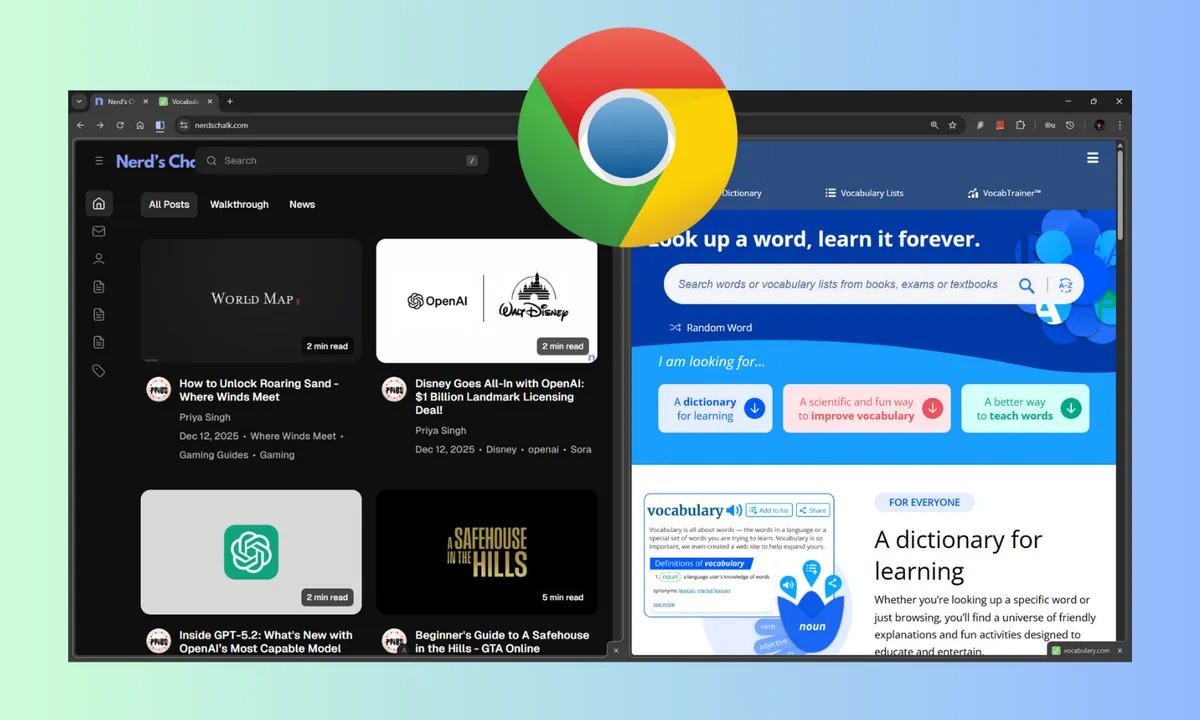
<p>Mới đây,&nbsp;<a href="https://thanhnien.vn/google-tung-loat-tinh-nang-ai-cuc-manh-cho-gmail-185260108213131628.htm" target="_blank" title="Google tung loạt tính năng AI cực mạnh cho Gmail">Google</a>&nbsp;âm thầm tung ra tính năng Split View (chế độ xem chia đôi cửa sổ), cho phép người dùng hiển thị hai trang web song song ngay trong cùng một tab. Đây được xem là &#039;đòn chí mạng&#039; nhắm vào Safari,&nbsp;<a href="https://thanhnien.vn/10-tinh-nang-mac-dinh-tren-chrome-nen-vo-hieu-hoa-ngay-lap-tuc-185251228145636995.htm" target="_blank" title="10 tính năng mặc định trên Chrome nên vô hiệu hóa ngay lập tức">trình duyệt</a>&nbsp;vốn thường bị phàn nàn về khả năng quản lý bộ nhớ kém hiệu quả khi mở nhiều tác vụ nặng.</p>

<p>Khác với việc phải mở hai cửa sổ trình duyệt riêng biệt và loay hoay căn chỉnh kích thước để đặt chúng cạnh nhau, Split View gom gọn mọi thứ vào tab duy nhất.</p>

<figure type="Photo"><a data-fancybox="img-lightbox" href="https://images2.thanhnien.vn/528068263637045248/2026/1/9/chrome-1767943695207513297407.jpg" target="_blank" title="Chrome có tính năng Split View mới tiện lợi"><img alt="Google tung tính năng &#039;đáng tiền&#039; cho trình duyệt Chrome - Ảnh 1." data-adbro-processed="true" data-author="" data-original="https://images2.thanhnien.vn/528068263637045248/2026/1/9/chrome-1767943695207513297407.jpg" h="720" height="720" id="img_200094506468597760" loading="lazy" photoid="200094506468597760" rel="lightbox" src="https://images2.thanhnien.vn/thumb_w/640/528068263637045248/2026/1/9/chrome-1767943695207513297407.jpg" title="" type="photo" w="1200" width="1200" /></a>

<figcaption>
<p data-placeholder="Nhập chú thích ảnh">Chrome có tính năng Split View mới tiện lợi</p>
</figcaption>

<p data-placeholder="Nhập tác giả">ẢNH: CHỤP MÀN HÌNH NERD&#039;S CHALK</p>
</figure>

<p>Một người dùng chia sẻ: &quot;Trước đây, tôi phải mở một tab để viết tài liệu và một tab khác để tra cứu thông tin, liên tục phải bấm chuyển đổi rất mất thời gian. Với Split View, tôi có thể để trang soạn thảo ở bên trái và trang kiểm chứng thông tin ở bên phải. Mọi thứ trực quan và gọn gàng hơn hẳn&quot;.</p>

<p>Điểm cộng lớn nhất của Split View là sự tiện dụng. Khi di chuyển chuột sang nửa màn hình nào, trang web đó sẽ lập tức hoạt động. Nếu người dùng muốn đóng một trang, chỉ cần nhấp vào dấu &#039;x&#039; tương ứng. Thao tác tắt nhanh bằng phím tắt Ctrl + W cũng được xử lý thông minh, đó là chỉ đóng trang web đang thao tác và giữ lại trang còn lại.</p>

<h2><strong>Hướng dẫn kích hoạt và sử dụng Split View trên Chrome</strong></h2>

<p>Để trải nghiệm tính năng này, người dùng cần cập nhật Google Chrome lên phiên bản mới nhất (vào Settings &gt; About Chrome).</p>

<p>Cách sử dụng đơn giản:</p>

<ul>
	<li><strong>Cách 1 (từ một tab có sẵn)</strong>: Nhấn chuột phải (hoặc CMD + Click trên Mac) vào tab hiện tại, chọn &#039;Add tab to new split view&#039;. Cửa sổ sẽ chia đôi để bạn nhập địa chỉ web mới.</li>
	<li><strong>Cách 2 (gộp tab)</strong>: Nếu đang mở nhiều tab, bạn có thể để chuột phải vào tab đang xem và chọn tính năng Split View, Chrome sẽ hiển thị danh sách các tab đang mở khác để bạn chọn ghép đôi ngay lập tức.</li>
</ul>

<p>Với sự bổ sung đáng giá này,&nbsp;<a href="https://thanhnien.vn/microsoft-tung-chieu-ngan-nguoi-dung-windows-chuyen-sang-google-chrome-185251230133628544.htm" target="_blank" title="Microsoft tung &#039;chiêu&#039; ngăn người dùng Windows chuyển sang Google Chrome">Google Chrome</a>&nbsp;đang ngày càng chứng tỏ vị thế &#039;vua trình duyệt&#039;, đặc biệt là với những người dùng đề cao năng suất làm việc và khả năng đa nhiệm.</p>
		</div>
				<div id="author">
						<p>
				<strong>Tác giả bài viết:</strong>
				Thanh Sơn
			</p>
						<p>
				<strong>Nguồn tin:</strong>
				thanhnien.vn
			</p>
		</div>
	</div>
	<div id="footer" class="clearfix">
		<div id="url">
			<strong>URL của bản tin này: </strong><a href="https://tinhocdct.xyz/tin-cong-nghe/google-tung-tinh-nang-dang-tien-cho-trinh-duyet-chrome-552.html" title="Google tung tính năng &#039;đáng tiền&#039; cho trình duyệt Chrome">https://tinhocdct.xyz/tin-cong-nghe/google-tung-tinh-nang-dang-tien-cho-trinh-duyet-chrome-552.html</a>

		</div>
		<div class="clear"></div>
		<div class="copyright">
			&copy; TỔ TIN HỌC TRƯỜNG THPT ĐỖ CÔNG TƯỜNG
		</div>
		<div id="contact">
			<a href="mailto:webmaster@tinhocdct.xyz">webmaster@tinhocdct.xyz</a>
		</div>
	</div>
</div>
        <div id="timeoutsess" class="chromeframe">
            Bạn đã không sử dụng Site, <a onclick="timeoutsesscancel();" href="https://tinhocdct.xyz/#">Bấm vào đây để duy trì trạng thái đăng nhập</a>. Thời gian chờ: <span id="secField"> 60 </span> giây
        </div>
        <div id="openidResult" class="nv-alert" style="display:none"></div>
        <div id="openidBt" data-result="" data-redirect=""></div>
<script src="https://tinhocdct.xyz/assets/js/jquery/jquery.min.js"></script>
<script>var nv_base_siteurl="/",nv_lang_data="vi",nv_lang_interface="vi",nv_name_variable="nv",nv_fc_variable="op",nv_lang_variable="language",nv_module_name="news",nv_func_name="savefile",nv_is_user=0, nv_my_ofs=-4,nv_my_abbr="EDT",nv_cookie_prefix="nv4",nv_check_pass_mstime=1738000,nv_area_admin=0,nv_safemode=0,theme_responsive=0,nv_is_recaptcha=0;</script>
<script src="https://tinhocdct.xyz/assets/js/language/vi.js"></script>
<script src="https://tinhocdct.xyz/assets/js/global.js"></script>
<script src="https://tinhocdct.xyz/themes/default/js/news.js"></script>
<script src="https://tinhocdct.xyz/themes/default/js/main.js"></script>
<script async src="https://pagead2.googlesyndication.com/pagead/js/adsbygoogle.js?client=ca-pub-1816161148536198"
     crossorigin="anonymous"></script>
<script src="https://tinhocdct.xyz/themes/default/js/bootstrap.min.js"></script>
</body>
</html>