<!DOCTYPE html>
	<html lang="vi" xmlns="http://www.w3.org/1999/xhtml" prefix="og: http://ogp.me/ns#">
	<head>
<title>Giúp Windows tìm kiếm cả nội dung bên trong tập tin</title>
<meta name="description" content="Giúp Windows tìm kiếm cả nội dung bên trong tập tin - Savefile - Tin Tức -...">
<meta name="author" content="TỔ TIN HỌC TRƯỜNG THPT ĐỖ CÔNG TƯỜNG">
<meta name="copyright" content="TỔ TIN HỌC TRƯỜNG THPT ĐỖ CÔNG TƯỜNG [webmaster@tinhocdct.xyz]">
<meta name="robots" content="index, archive, follow, noodp">
<meta name="googlebot" content="index,archive,follow,noodp">
<meta name="msnbot" content="all,index,follow">
<meta name="generator" content="NukeViet v4.0">
<meta http-equiv="Content-Type" content="text/html; charset=utf-8">
<meta property="og:title" content="Giúp Windows tìm kiếm cả nội dung bên trong tập tin">
<meta property="og:type" content="website">
<meta property="og:description" content="Savefile - Tin Tức - https&#x3A;&#x002F;&#x002F;tinhocdct.xyz&#x002F;savefile&#x002F;tin-cong-nghe&#x002F;giup-windows-tim-kiem-ca-noi-dung-ben-trong-tap-tin-475.html">
<meta property="og:site_name" content="TỔ TIN HỌC TRƯỜNG THPT ĐỖ CÔNG TƯỜNG">
<meta property="og:url" content="https://tinhocdct.xyz/tin-cong-nghe/giup-windows-tim-kiem-ca-noi-dung-ben-trong-tap-tin-475.html">
<link rel="shortcut icon" href="https://tinhocdct.xyz/favicon.ico">
<link rel="canonical" href="https://tinhocdct.xyz/tin-cong-nghe/giup-windows-tim-kiem-ca-noi-dung-ben-trong-tap-tin-475.html">
<link rel="alternate" href="https://tinhocdct.xyz/rss/" title="Tin Tức" type="application/rss+xml">
<link rel="alternate" href="https://tinhocdct.xyz/rss/tin-tuc/" title="Tin Tức - TIN TỨC" type="application/rss+xml">
<link rel="alternate" href="https://tinhocdct.xyz/rss/thong-cao-bao-chi/" title="Tin Tức - THÔNG BÁO" type="application/rss+xml">
<link rel="alternate" href="https://tinhocdct.xyz/rss/ban-tin-noi-bo/" title="Tin Tức - BẢN TIN NỘI BỘ" type="application/rss+xml">
<link rel="alternate" href="https://tinhocdct.xyz/rss/tin-cong-nghe/" title="Tin Tức - CÔNG NGHỆ - KHOA HỌC" type="application/rss+xml">
<link rel="alternate" href="https://tinhocdct.xyz/rss/thu-thuat/" title="Tin Tức - THỦ THUẬT" type="application/rss+xml">
<link rel="alternate" href="https://tinhocdct.xyz/rss/tien-ich/" title="Tin Tức - TIỆN ÍCH" type="application/rss+xml">
<link rel="alternate" href="https://tinhocdct.xyz/rss/ai/" title="Tin Tức - AI" type="application/rss+xml">
<link rel="alternate" href="https://tinhocdct.xyz/rss/khoa-hoc/" title="Tin Tức - KHOA HỌC" type="application/rss+xml">
<link rel="alternate" href="https://tinhocdct.xyz/rss/hoat-dong-chuyen-mon/" title="Tin Tức - HOẠT ĐỘNG CHUYÊN MÔN" type="application/rss+xml">
<link rel="alternate" href="https://tinhocdct.xyz/rss/hoat-dong-cong-doan/" title="Tin Tức - CÔNG ĐOÀN" type="application/rss+xml">
<link rel="alternate" href="https://tinhocdct.xyz/rss/hoat-dong-doan-the/" title="Tin Tức - ĐOÀN THỂ" type="application/rss+xml">
<link rel="alternate" href="https://tinhocdct.xyz/rss/tuyen-sinh-huong-nghiep/" title="Tin Tức - TUYỂN SINH - HƯỚNG NGHIỆP" type="application/rss+xml">
<link rel="alternate" href="https://tinhocdct.xyz/rss/tuyen-sinh-2025/" title="Tin Tức - TUYỂN SINH 2025" type="application/rss+xml">
<link rel="alternate" href="https://tinhocdct.xyz/rss/lich-cong-tac-tuan/" title="Tin Tức - Lịch công tác tuần" type="application/rss+xml">
<link rel="preload" as="script" href="https://tinhocdct.xyz/assets/js/jquery/jquery.min.js">
<link rel="preload" as="script" href="https://tinhocdct.xyz/assets/js/language/vi.js">
<link rel="preload" as="script" href="https://tinhocdct.xyz/assets/js/global.js">
<link rel="preload" as="script" href="https://tinhocdct.xyz/themes/default/js/news.js">
<link rel="preload" as="script" href="https://tinhocdct.xyz/themes/default/js/main.js">
<link rel="preload" as="script" href="https://pagead2.googlesyndication.com/pagead/js/adsbygoogle.js?client=ca-pub-1816161148536198">
<link rel="preload" as="script" href="https://tinhocdct.xyz/themes/default/js/bootstrap.min.js">
<link rel="StyleSheet" href="https://tinhocdct.xyz/assets/css/font-awesome.min.css">
<link rel="StyleSheet" href="https://tinhocdct.xyz/themes/default/css/bootstrap.non-responsive.css">
<link rel="StyleSheet" href="https://tinhocdct.xyz/themes/default/css/style.css">
<link rel="StyleSheet" href="https://tinhocdct.xyz/themes/default/css/style.non-responsive.css">
<link rel="StyleSheet" href="https://tinhocdct.xyz/themes/default/css/news.css">
<style>
	body{background: #fff;}
</style>
	</head>
	<body>
<div id="print">
	<div id="hd_print">
		<h2 class="pull-left">TỔ TIN HỌC TRƯỜNG THPT ĐỖ CÔNG TƯỜNG</h2>
		<p class="pull-right"><a title="TỔ TIN HỌC TRƯỜNG THPT ĐỖ CÔNG TƯỜNG" href="https://tinhocdct.xyz/">https://tinhocdct.xyz</a></p>
	</div>
	<div class="clear"></div>
	<hr />
	<div id="content">
		<h1>Giúp Windows tìm kiếm cả nội dung bên trong tập tin</h1>
		<ul class="list-inline">
			<li>Thứ bảy - 03/05/2025 22:42</li>
			<li class="hidden-print txtrequired"><em class="fa fa-print">&nbsp;</em><a title="In ra" href="javascript:;" onclick="window.print()">In ra</a></li>
			<li class="hidden-print txtrequired"><em class="fa fa-power-off">&nbsp;</em><a title="Đóng cửa sổ này" href="javascript:;" onclick="window.close()">Đóng cửa sổ này</a></li>
		</ul>
		<div class="clear"></div>
		<div id="hometext">
			Tinhocdct.xyz giới thiệu cho các bạn hai công cụ sau:
		</div>
		<div id="bodytext" class="clearfix">
			<strong>1) Sử dụng công cụ tìm kiếm mặc định của Windows</strong><br  />
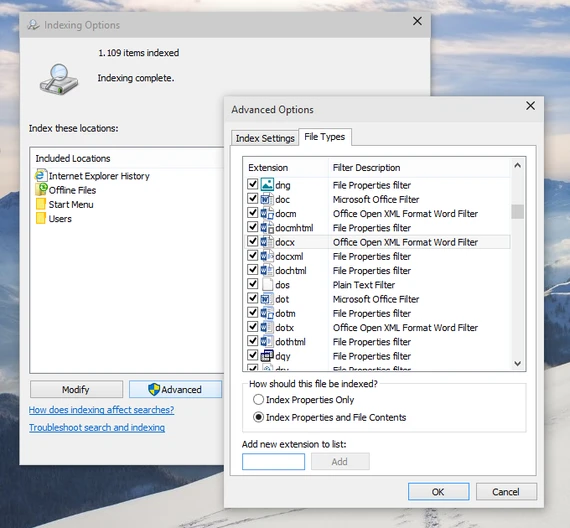
Mặc định, Windows chỉ hỗ trợ người dùng tìm kiếm tên tập tin hoặc định dạng, tuy nhiên, nó còn có chức năng tìm cả nội dung bên trong tập tin mà không phải ai cũng biết cách kích hoạt. Để làm được việc này, đầu tiên bạn nhập vào từ khóa&nbsp;<em>indexing options</em>, kích tiếp vào nút&nbsp;<em>Advanced</em>&nbsp;và chuyển sang thẻ&nbsp;<em>File Types</em>. Nếu định dạng tập tin bạn cần tìm không có trong danh sách này (chẳng hạn .doc&nbsp;<a href="https://plo.vn/hay-dep-la/" title="hay">hay</a>&nbsp;.docx), hãy nhập tên của nó vào khung nhỏ và nhấn Add để thêm vào. Sau đó, đánh dấu chọn vào ô&nbsp;<em>Index Properties and File Contents</em>&nbsp;để Windows tìm kiếm cả các nội dung bên trong tập tin.
<p><img alt="Giúp Windows tìm kiếm cả nội dung bên trong tập tin ảnh 1" data-src="https://image.plo.vn/w570/Uploaded/2025/vrwqqxjwp/2015_05_12/1_SIMN.png.webp" src="https://image.plo.vn/w570/Uploaded/2025/vrwqqxjwp/2015_05_12/1_SIMN.png.webp" title="Giúp Windows tìm kiếm cả nội dung bên trong tập tin ảnh 1" /></p>
<br  />
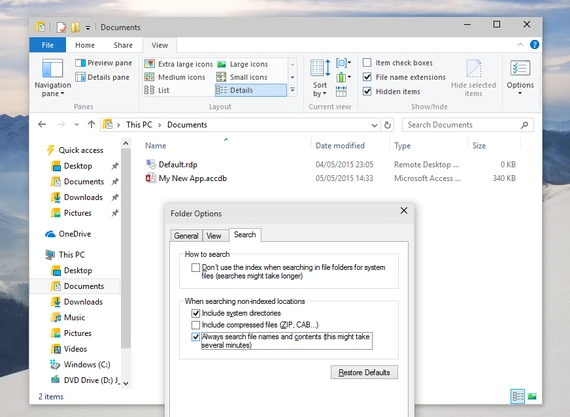
Bên cạnh đó, bạn cũng có thể buộc Windows luôn luôn tìm kiếm các nội dung tập tin đối với từng thư mục cụ thể trên&nbsp;<a href="https://plo.vn/tu-khoa.html?q=m%C3%A1y%20t%C3%ADnh" title="máy tính">máy tính</a>&nbsp;(chẳng hạn như Documents). Đầu tiên, bạn cần truy cập vào thư mục đó, giữ im nút&nbsp;<em>Alt</em>&nbsp;và nhấp vào menu&nbsp;<em>Tools &gt; Folder options</em>&nbsp;(đối với Windows 7 trở xuống), còn Windows 8 trở lên thì nhấn vào menu&nbsp;<em>View &gt; Options</em>, sau đó chuyển sang thẻ&nbsp;<em>Search</em>&nbsp;và đánh dấu chọn vào ô&nbsp;<em>Always search file names and contents</em>.

<p><img alt="Giúp Windows tìm kiếm cả nội dung bên trong tập tin ảnh 2" data-src="https://image.plo.vn/w570/Uploaded/2025/vrwqqxjwp/2015_05_12/2_EDLI.png.webp" src="https://image.plo.vn/w570/Uploaded/2025/vrwqqxjwp/2015_05_12/2_EDLI.png.webp" title="Giúp Windows tìm kiếm cả nội dung bên trong tập tin ảnh 2" /></p>
<br  />
<strong>2) Sử dụng&nbsp;<a href="https://plo.vn/trang-dia-phuong/tien-ich/" title="tiện ích">tiện ích</a>&nbsp;Agent Ransack</strong><br  />
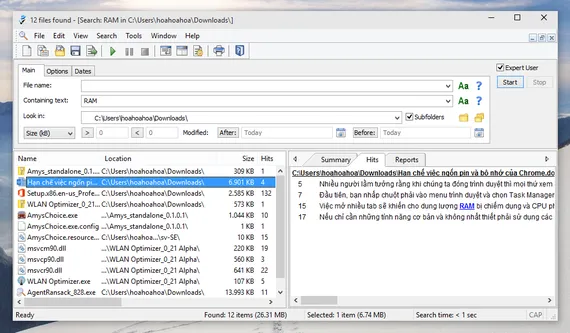
Agent Ransack không phải là chương trình duy nhất hỗ trợ tính năng tìm kiếm nội dung bên trong tập tin, nhưng nó nổi bật hơn cả nhờ khả năng tương thích với nhiều hệ thống và dễ sử dụng.&nbsp;<a href="https://plo.vn/ban-doc/" title="Bạn đọc">Bạn đọc</a>&nbsp;quan tâm có thể tải tại&nbsp;<a href="https://www.mythicsoft.com/agentransack" rel="nofollow" target="_blank">https://www.mythicsoft.com/agentransack</a>&nbsp;(tương thích Windows XP trở lên).

<p><img alt="Giúp Windows tìm kiếm cả nội dung bên trong tập tin ảnh 3" data-src="https://image.plo.vn/w570/Uploaded/2025/vrwqqxjwp/2015_05_12/3_QNOC.png.webp" src="https://image.plo.vn/w570/Uploaded/2025/vrwqqxjwp/2015_05_12/3_QNOC.png.webp" title="Giúp Windows tìm kiếm cả nội dung bên trong tập tin ảnh 3" /></p>
<br  />
Giao diện của chương trình khá đơn giản, để tìm kiếm tên tập tin, bạn chỉ cần nhập từ khóa vào khung&nbsp;<em>File name</em>, ngược lại, mục&nbsp;<em>Containing text</em>&nbsp;sẽ là nơi để bạn tìm các nội dung bên trong tập tin.&nbsp;<strong>Lưu ý</strong>, để tiết kiệm thời gian, bạn nên xác định cụ thể thư mục chứa&nbsp;<a href="https://plo.vn/tu-khoa.html?q=t%E1%BA%ADp%20tin" title="tập tin">tập tin</a>&nbsp;đó tại phần&nbsp;<em>Look in</em>&nbsp;(chẳng hạn như C:\ hay D:\Data\Software…), đồng thời sử dụng thêm các bộ lọc về dung lượng hoặc ngày chỉnh sửa rồi nhấn Start để bắt đầu. Tốc độ thực thi của chương trình khá ấn tượng, khung bên trái sẽ là nơi hiển thị các tập tin tìm được, trong khi khung bên phải sẽ liệt kê số dòng có chứa những từ mà bạn tìm kiếm, quá nhanh và quá đơn giản.
		</div>
				<div id="author">
						<p>
				<strong>Tác giả bài viết:</strong>
				Thanh Sơn
			</p>
						<p>
				<strong>Nguồn tin:</strong>
				plo.vn
			</p>
		</div>
	</div>
	<div id="footer" class="clearfix">
		<div id="url">
			<strong>URL của bản tin này: </strong><a href="https://tinhocdct.xyz/tin-cong-nghe/giup-windows-tim-kiem-ca-noi-dung-ben-trong-tap-tin-475.html" title="Giúp Windows tìm kiếm cả nội dung bên trong tập tin">https://tinhocdct.xyz/tin-cong-nghe/giup-windows-tim-kiem-ca-noi-dung-ben-trong-tap-tin-475.html</a>

		</div>
		<div class="clear"></div>
		<div class="copyright">
			&copy; TỔ TIN HỌC TRƯỜNG THPT ĐỖ CÔNG TƯỜNG
		</div>
		<div id="contact">
			<a href="mailto:webmaster@tinhocdct.xyz">webmaster@tinhocdct.xyz</a>
		</div>
	</div>
</div>
        <div id="timeoutsess" class="chromeframe">
            Bạn đã không sử dụng Site, <a onclick="timeoutsesscancel();" href="https://tinhocdct.xyz/#">Bấm vào đây để duy trì trạng thái đăng nhập</a>. Thời gian chờ: <span id="secField"> 60 </span> giây
        </div>
        <div id="openidResult" class="nv-alert" style="display:none"></div>
        <div id="openidBt" data-result="" data-redirect=""></div>
<script src="https://tinhocdct.xyz/assets/js/jquery/jquery.min.js"></script>
<script>var nv_base_siteurl="/",nv_lang_data="vi",nv_lang_interface="vi",nv_name_variable="nv",nv_fc_variable="op",nv_lang_variable="language",nv_module_name="news",nv_func_name="savefile",nv_is_user=0, nv_my_ofs=-4,nv_my_abbr="EDT",nv_cookie_prefix="nv4",nv_check_pass_mstime=1738000,nv_area_admin=0,nv_safemode=0,theme_responsive=0,nv_is_recaptcha=0;</script>
<script src="https://tinhocdct.xyz/assets/js/language/vi.js"></script>
<script src="https://tinhocdct.xyz/assets/js/global.js"></script>
<script src="https://tinhocdct.xyz/themes/default/js/news.js"></script>
<script src="https://tinhocdct.xyz/themes/default/js/main.js"></script>
<script async src="https://pagead2.googlesyndication.com/pagead/js/adsbygoogle.js?client=ca-pub-1816161148536198"
     crossorigin="anonymous"></script>
<script src="https://tinhocdct.xyz/themes/default/js/bootstrap.min.js"></script>
</body>
</html>