<!DOCTYPE html>
	<html lang="vi" xmlns="http://www.w3.org/1999/xhtml" prefix="og: http://ogp.me/ns#">
	<head>
<title>Cài đặt bí mật giúp điện thoại Samsung tăng tốc truy cập internet</title>
<meta name="description" content="Cài đặt bí mật giúp điện thoại Samsung tăng tốc truy cập internet - Savefile - Tin Tức -...">
<meta name="author" content="TỔ TIN HỌC TRƯỜNG THPT ĐỖ CÔNG TƯỜNG">
<meta name="copyright" content="TỔ TIN HỌC TRƯỜNG THPT ĐỖ CÔNG TƯỜNG [webmaster@tinhocdct.xyz]">
<meta name="robots" content="index, archive, follow, noodp">
<meta name="googlebot" content="index,archive,follow,noodp">
<meta name="msnbot" content="all,index,follow">
<meta name="generator" content="NukeViet v4.0">
<meta http-equiv="Content-Type" content="text/html; charset=utf-8">
<meta property="og:title" content="Cài đặt bí mật giúp điện thoại Samsung tăng tốc truy cập internet">
<meta property="og:type" content="website">
<meta property="og:description" content="Savefile - Tin Tức - https&#x3A;&#x002F;&#x002F;tinhocdct.xyz&#x002F;savefile&#x002F;tin-cong-nghe&#x002F;cai-dat-bi-mat-giup-dien-thoai-samsung-tang-toc-truy-cap-internet-550.html">
<meta property="og:site_name" content="TỔ TIN HỌC TRƯỜNG THPT ĐỖ CÔNG TƯỜNG">
<meta property="og:url" content="https://tinhocdct.xyz/tin-cong-nghe/cai-dat-bi-mat-giup-dien-thoai-samsung-tang-toc-truy-cap-internet-550.html">
<link rel="shortcut icon" href="https://tinhocdct.xyz/favicon.ico">
<link rel="canonical" href="https://tinhocdct.xyz/tin-cong-nghe/cai-dat-bi-mat-giup-dien-thoai-samsung-tang-toc-truy-cap-internet-550.html">
<link rel="alternate" href="https://tinhocdct.xyz/rss/" title="Tin Tức" type="application/rss+xml">
<link rel="alternate" href="https://tinhocdct.xyz/rss/tin-tuc/" title="Tin Tức - TIN TỨC" type="application/rss+xml">
<link rel="alternate" href="https://tinhocdct.xyz/rss/thong-cao-bao-chi/" title="Tin Tức - THÔNG BÁO" type="application/rss+xml">
<link rel="alternate" href="https://tinhocdct.xyz/rss/ban-tin-noi-bo/" title="Tin Tức - BẢN TIN NỘI BỘ" type="application/rss+xml">
<link rel="alternate" href="https://tinhocdct.xyz/rss/tin-cong-nghe/" title="Tin Tức - CÔNG NGHỆ - KHOA HỌC" type="application/rss+xml">
<link rel="alternate" href="https://tinhocdct.xyz/rss/thu-thuat/" title="Tin Tức - THỦ THUẬT" type="application/rss+xml">
<link rel="alternate" href="https://tinhocdct.xyz/rss/tien-ich/" title="Tin Tức - TIỆN ÍCH" type="application/rss+xml">
<link rel="alternate" href="https://tinhocdct.xyz/rss/ai/" title="Tin Tức - AI" type="application/rss+xml">
<link rel="alternate" href="https://tinhocdct.xyz/rss/khoa-hoc/" title="Tin Tức - KHOA HỌC" type="application/rss+xml">
<link rel="alternate" href="https://tinhocdct.xyz/rss/hoat-dong-chuyen-mon/" title="Tin Tức - HOẠT ĐỘNG CHUYÊN MÔN" type="application/rss+xml">
<link rel="alternate" href="https://tinhocdct.xyz/rss/hoat-dong-cong-doan/" title="Tin Tức - CÔNG ĐOÀN" type="application/rss+xml">
<link rel="alternate" href="https://tinhocdct.xyz/rss/hoat-dong-doan-the/" title="Tin Tức - ĐOÀN THỂ" type="application/rss+xml">
<link rel="alternate" href="https://tinhocdct.xyz/rss/tuyen-sinh-huong-nghiep/" title="Tin Tức - TUYỂN SINH - HƯỚNG NGHIỆP" type="application/rss+xml">
<link rel="alternate" href="https://tinhocdct.xyz/rss/tuyen-sinh-2025/" title="Tin Tức - TUYỂN SINH 2025" type="application/rss+xml">
<link rel="alternate" href="https://tinhocdct.xyz/rss/lich-cong-tac-tuan/" title="Tin Tức - Lịch công tác tuần" type="application/rss+xml">
<link rel="preload" as="script" href="https://tinhocdct.xyz/assets/js/jquery/jquery.min.js">
<link rel="preload" as="script" href="https://tinhocdct.xyz/assets/js/language/vi.js">
<link rel="preload" as="script" href="https://tinhocdct.xyz/assets/js/global.js">
<link rel="preload" as="script" href="https://tinhocdct.xyz/themes/default/js/news.js">
<link rel="preload" as="script" href="https://tinhocdct.xyz/themes/default/js/main.js">
<link rel="preload" as="script" href="https://pagead2.googlesyndication.com/pagead/js/adsbygoogle.js?client=ca-pub-1816161148536198">
<link rel="preload" as="script" href="https://tinhocdct.xyz/themes/default/js/bootstrap.min.js">
<link rel="StyleSheet" href="https://tinhocdct.xyz/assets/css/font-awesome.min.css">
<link rel="StyleSheet" href="https://tinhocdct.xyz/themes/default/css/bootstrap.non-responsive.css">
<link rel="StyleSheet" href="https://tinhocdct.xyz/themes/default/css/style.css">
<link rel="StyleSheet" href="https://tinhocdct.xyz/themes/default/css/style.non-responsive.css">
<link rel="StyleSheet" href="https://tinhocdct.xyz/themes/default/css/news.css">
<style>
	body{background: #fff;}
</style>
	</head>
	<body>
<div id="print">
	<div id="hd_print">
		<h2 class="pull-left">TỔ TIN HỌC TRƯỜNG THPT ĐỖ CÔNG TƯỜNG</h2>
		<p class="pull-right"><a title="TỔ TIN HỌC TRƯỜNG THPT ĐỖ CÔNG TƯỜNG" href="https://tinhocdct.xyz/">https://tinhocdct.xyz</a></p>
	</div>
	<div class="clear"></div>
	<hr />
	<div id="content">
		<h1>Cài đặt bí mật giúp điện thoại Samsung tăng tốc truy cập internet</h1>
		<ul class="list-inline">
			<li>Thứ sáu - 02/01/2026 21:44</li>
			<li class="hidden-print txtrequired"><em class="fa fa-print">&nbsp;</em><a title="In ra" href="javascript:;" onclick="window.print()">In ra</a></li>
			<li class="hidden-print txtrequired"><em class="fa fa-power-off">&nbsp;</em><a title="Đóng cửa sổ này" href="javascript:;" onclick="window.close()">Đóng cửa sổ này</a></li>
		</ul>
		<div class="clear"></div>
		<div id="hometext">
			Ít người biết rằng Samsung đã giấu sẵn một cài đặt &#039;thuốc tăng lực&#039; cho Wi-Fi, giúp tăng tốc mạng internet đáng kể.
		</div>
		<div id="bodytext" class="clearfix">
			<p>Theo&nbsp;<em>BGR</em>, không có gì &#039;hủy hoại&#039; tâm trạng làm việc hay giải trí nhanh hơn một kết nối internet &#039;rùa bò&#039;. Nếu như trên máy tính, giải pháp chuyển từ Wi-Fi sang dây mạng (Ethernet) khá đơn giản, thì với người dùng smartphone, điều này đòi hỏi phụ kiện rườm rà. Thông thường, người dùng Android sẽ chọn cách tắt&nbsp;<a href="https://thanhnien.vn/nhieu-nguoi-dang-nham-lan-giua-wi-fi-va-mang-khong-day-185251223111223499.htm" target="_blank" title="Nhiều người đang nhầm lẫn giữa Wi-Fi và mạng không dây">Wi-Fi</a>&nbsp;để chuyển sang 4G, nhưng việc này gây gián đoạn và tốn kém dữ liệu.</p>

<p>Tuy nhiên, ít người biết rằng Samsung đã tích hợp sẵn một &#039;vũ khí bí mật&#039; dựa trên AI để giải quyết triệt để vấn đề này, đó là Intelligent Wi-Fi (Wi-Fi thông minh) và menu ẩn Connectivity Labs.</p>

<h2><strong>Intelligent Wi-Fi: Trợ lý mạng internet thông minh</strong></h2>

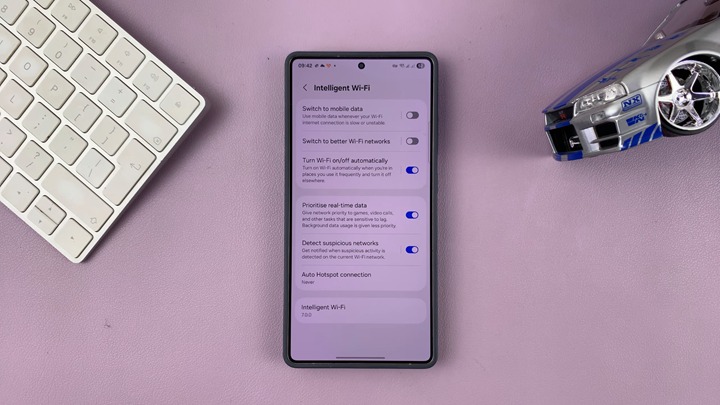
<p>Nằm trong phần cài đặt kết nối, Intelligent Wi-Fi là tập hợp các tùy chọn nâng cao giúp thiết bị tự động tìm kiếm đường truyền tốt nhất. Để mạng luôn nhanh và ổn định, người dùng cần chú ý kích hoạt hai tính năng cốt lõi:</p>

<ul>
	<li><b>Chuyển sang dữ liệu di động (Switch to mobile data):</b>&nbsp;Khi kích hoạt, AI sẽ phát hiện mạng Wi-Fi đang yếu hoặc mất tín hiệu và lập tức chuyển sang 4G/5G mà không làm ngắt quãng trải nghiệm người dùng. Khi Wi-Fi ổn định trở lại, máy sẽ tự động kết nối lại để tiết kiệm dữ liệu.</li>
	<li><b>Chuyển sang mạng Wi-Fi tốt hơn (Switch to better Wi-Fi networks):</b>&nbsp;Nếu bạn đang ở khu vực có nhiều mạng Wi-Fi đã lưu (ví dụ văn phòng hoặc quán cà phê quen thuộc), điện thoại sẽ tự động &#039;nhảy&#039; sang mạng có tốc độ cao hơn khi màn hình tắt.</li>
</ul>

<figure type="Photo"><a data-fancybox="img-lightbox" href="https://images2.thanhnien.vn/528068263637045248/2025/12/30/screenshot-15370-17670704924971543968879.jpg" target="_blank" title="Tính năng Intelligent Wi-Fi trên điện thoại Samsung"><img alt="Cài đặt bí mật giúp điện thoại Samsung truy cập Internet siêu tốc - Ảnh 1." data-author="" data-original="https://images2.thanhnien.vn/528068263637045248/2025/12/30/screenshot-15370-17670704924971543968879.jpg" h="405" height="405" id="img_198263267581919232" loading="lazy" photoid="198263267581919232" rel="lightbox" src="https://images2.thanhnien.vn/thumb_w/640/528068263637045248/2025/12/30/screenshot-15370-17670704924971543968879.jpg" title="" type="photo" w="720" width="720" /></a>

<figcaption>
<p data-placeholder="Nhập chú thích ảnh">Tính năng Intelligent Wi-Fi trên điện thoại Samsung</p>
</figcaption>

<p data-placeholder="Nhập tác giả">ẢNH: CHỤP MÀN HÌNH WEBPRO EDUCATION</p>
</figure>

<h2><strong>Kích hoạt Connectivity Labs</strong></h2>

<p>Đây mới thực sự là tính năng thú vị nhất dành cho những người dùng muốn tối ưu hóa triệt để. Tương tự như chế độ nhà phát triển (Developer Options) của Android,&nbsp;<a href="https://thanhnien.vn/samsung-galaxy-a-se-khong-con-re-du-cau-hinh-it-thay-doi-185251228111911349.htm" target="_blank" title="Samsung Galaxy A sẽ không còn rẻ dù cấu hình ít thay đổi">Samsung</a>&nbsp;giấu một menu chuyên sâu gọi là Connectivity Labs.</p>

<p>Để mở khóa menu này, người dùng cần mở ứng dụng Cài đặt (Settings) &gt; Kết nối (Connections) &gt; Wi-Fi &gt; Chọn dấu ba chấm góc phải &gt; chọn Intelligent Wi-Fi. Tại đây, hãy nhấn liên tiếp 7 lần vào dòng chữ &#039;Intelligent Wi-Fi&#039; (thường hiển thị kèm số phiên bản ở cuối).</p>

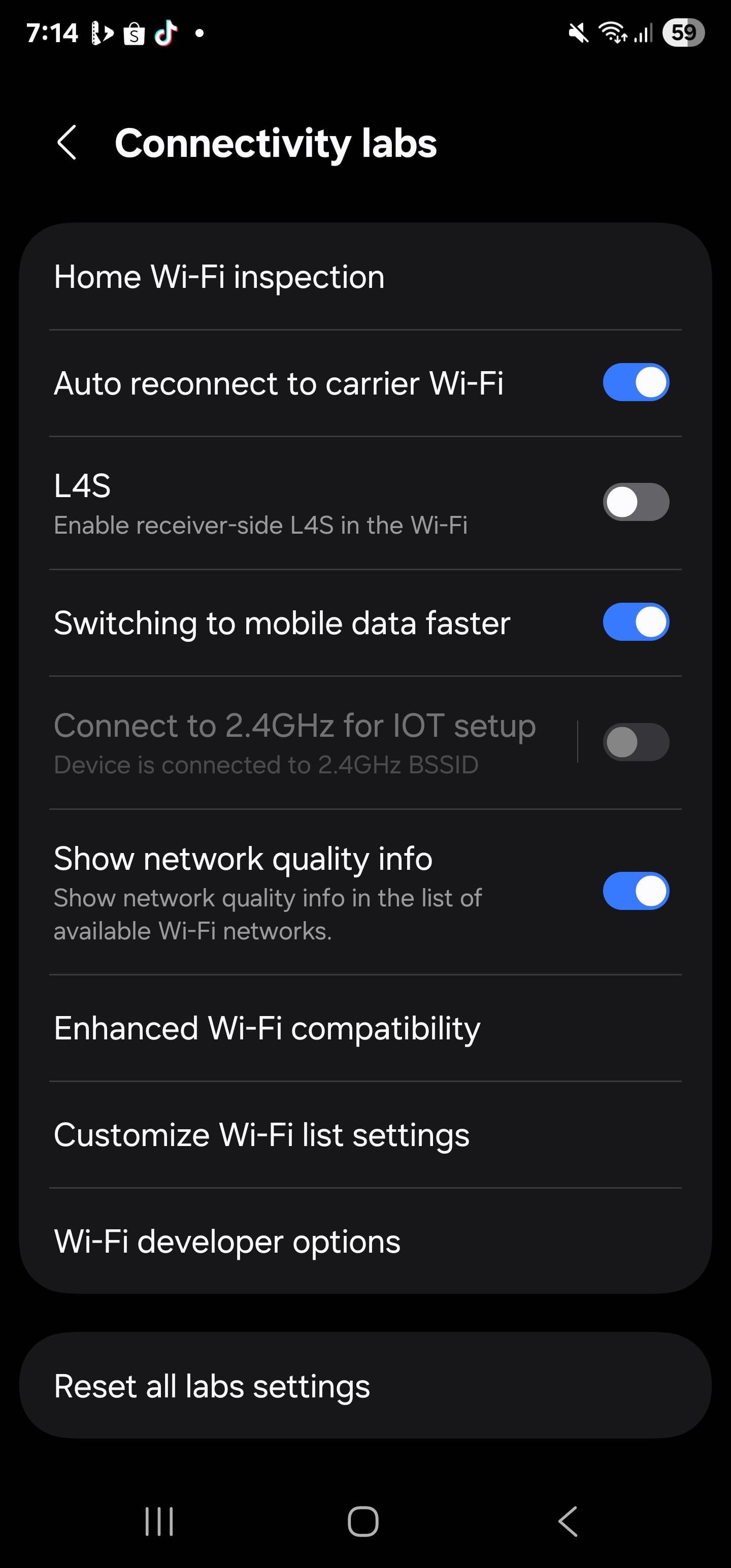
<p>Khi menu Connectivity Labs xuất hiện, người dùng có quyền truy cập vào các công cụ mạnh mẽ gồm:</p>

<ul>
	<li><strong>Home Wi-Fi inspection</strong>: Vẽ biểu đồ sóng Wi-Fi trong nhà để phát hiện &#039;điểm chết&#039; cần lắp thêm bộ kích sóng.</li>
	<li><strong>Switching to mobile data faster</strong>: Tăng tốc độ chuyển đổi giữa Wi-Fi và 4G nhanh hơn mức mặc định.</li>
	<li><strong>Nearby Wi-Fi information</strong>: So sánh và xếp hạng các mạng Wi-Fi xung quanh theo thời gian thực để chọn mạng tốt nhất.</li>
</ul>

<p>Lưu ý: Vì Connectivity Labs chứa các tính năng thử nghiệm, đôi khi chúng có thể hoạt động chưa ổn định. Nếu gặp sự cố, người dùng chỉ cần chọn &#039;Reset all Labs settings&#039; để đưa mọi thứ về mặc định.</p>

<figure type="Photo"><a data-fancybox="img-lightbox" href="https://images2.thanhnien.vn/528068263637045248/2025/12/30/just-unlocked-lots-of-wifi-optio-17670707673394671151.jpg" target="_blank" title="Các tùy chọn của Connectivity Labs"><img alt="Cài đặt bí mật giúp điện thoại Samsung truy cập Internet siêu tốc - Ảnh 2." data-author="" data-original="https://images2.thanhnien.vn/528068263637045248/2025/12/30/just-unlocked-lots-of-wifi-optio-17670707673394671151.jpg" h="3088" height="2144" id="img_198263844130349056" loading="lazy" photoid="198263844130349056" rel="lightbox" src="https://images2.thanhnien.vn/thumb_w/640/528068263637045248/2025/12/30/just-unlocked-lots-of-wifi-optio-17670707673394671151.jpg" srcset="https://images2.thanhnien.vn/thumb_w/640/528068263637045248/2025/12/30/just-unlocked-lots-of-wifi-optio-17670707673394671151.jpg 1x,https://images2.thanhnien.vn/528068263637045248/2025/12/30/just-unlocked-lots-of-wifi-optio-17670707673394671151.jpg 2x" title="" type="photo" w="1440" width="1000" /></a>

<figcaption>
<p data-placeholder="Nhập chú thích ảnh">Các tùy chọn của Connectivity Labs</p>
</figcaption>

<p data-placeholder="Nhập tác giả">ẢNH: CHỤP MÀN HÌNH REDDIT</p>
</figure>

<p>Với những cài đặt ẩn này, chiếc điện thoại Samsung của bạn sẽ trở nên thông minh hơn, đảm bảo&nbsp;<a href="https://thanhnien.vn/microsoft-siet-chat-quy-trinh-cai-dat-windows-11-185251008093757074.htm" target="_blank" title="Microsoft siết chặt quy trình cài đặt Windows 11">kết nối internet</a>&nbsp;luôn trong trạng thái sẵn sàng cho mọi cuộc họp online hay các trận game gay cấn.</p>
		</div>
				<div id="author">
						<p>
				<strong>Tác giả bài viết:</strong>
				Thanh Sơn
			</p>
						<p>
				<strong>Nguồn tin:</strong>
				thanhnien.vn
			</p>
		</div>
	</div>
	<div id="footer" class="clearfix">
		<div id="url">
			<strong>URL của bản tin này: </strong><a href="https://tinhocdct.xyz/tin-cong-nghe/cai-dat-bi-mat-giup-dien-thoai-samsung-tang-toc-truy-cap-internet-550.html" title="Cài đặt bí mật giúp điện thoại Samsung tăng tốc truy cập internet">https://tinhocdct.xyz/tin-cong-nghe/cai-dat-bi-mat-giup-dien-thoai-samsung-tang-toc-truy-cap-internet-550.html</a>

		</div>
		<div class="clear"></div>
		<div class="copyright">
			&copy; TỔ TIN HỌC TRƯỜNG THPT ĐỖ CÔNG TƯỜNG
		</div>
		<div id="contact">
			<a href="mailto:webmaster@tinhocdct.xyz">webmaster@tinhocdct.xyz</a>
		</div>
	</div>
</div>
        <div id="timeoutsess" class="chromeframe">
            Bạn đã không sử dụng Site, <a onclick="timeoutsesscancel();" href="https://tinhocdct.xyz/#">Bấm vào đây để duy trì trạng thái đăng nhập</a>. Thời gian chờ: <span id="secField"> 60 </span> giây
        </div>
        <div id="openidResult" class="nv-alert" style="display:none"></div>
        <div id="openidBt" data-result="" data-redirect=""></div>
<div id="run_cronjobs" style="visibility:hidden;display:none;"><img alt="" src="/index.php?second=cronjobs&amp;p=c0Ca2mnW" width="1" height="1" /></div>
<script src="https://tinhocdct.xyz/assets/js/jquery/jquery.min.js"></script>
<script>var nv_base_siteurl="/",nv_lang_data="vi",nv_lang_interface="vi",nv_name_variable="nv",nv_fc_variable="op",nv_lang_variable="language",nv_module_name="news",nv_func_name="savefile",nv_is_user=0, nv_my_ofs=-4,nv_my_abbr="EDT",nv_cookie_prefix="nv4",nv_check_pass_mstime=1738000,nv_area_admin=0,nv_safemode=0,theme_responsive=0,nv_is_recaptcha=0;</script>
<script src="https://tinhocdct.xyz/assets/js/language/vi.js"></script>
<script src="https://tinhocdct.xyz/assets/js/global.js"></script>
<script src="https://tinhocdct.xyz/themes/default/js/news.js"></script>
<script src="https://tinhocdct.xyz/themes/default/js/main.js"></script>
<script async src="https://pagead2.googlesyndication.com/pagead/js/adsbygoogle.js?client=ca-pub-1816161148536198"
     crossorigin="anonymous"></script>
<script src="https://tinhocdct.xyz/themes/default/js/bootstrap.min.js"></script>
</body>
</html>