<!DOCTYPE html>
	<html lang="vi" xmlns="http://www.w3.org/1999/xhtml" prefix="og: http://ogp.me/ns#">
	<head>
<title>Cách thu hồi email đã gửi qua Gmail trên điện thoại và máy tính dễ dàng</title>
<meta name="description" content="Cách thu hồi email đã gửi qua Gmail trên điện thoại và máy tính dễ dàng - Savefile - Tin Tức -...">
<meta name="author" content="TỔ TIN HỌC TRƯỜNG THPT ĐỖ CÔNG TƯỜNG">
<meta name="copyright" content="TỔ TIN HỌC TRƯỜNG THPT ĐỖ CÔNG TƯỜNG [webmaster@tinhocdct.xyz]">
<meta name="robots" content="index, archive, follow, noodp">
<meta name="googlebot" content="index,archive,follow,noodp">
<meta name="msnbot" content="all,index,follow">
<meta name="generator" content="NukeViet v4.0">
<meta http-equiv="Content-Type" content="text/html; charset=utf-8">
<meta property="og:title" content="Cách thu hồi email đã gửi qua Gmail trên điện thoại và máy tính dễ dàng">
<meta property="og:type" content="website">
<meta property="og:description" content="Savefile - Tin Tức - https&#x3A;&#x002F;&#x002F;tinhocdct.xyz&#x002F;savefile&#x002F;tin-cong-nghe&#x002F;cach-thu-hoi-email-da-gui-qua-gmail-tren-dien-thoai-va-may-tinh-de-dang-537.html">
<meta property="og:site_name" content="TỔ TIN HỌC TRƯỜNG THPT ĐỖ CÔNG TƯỜNG">
<meta property="og:url" content="https://tinhocdct.xyz/tin-cong-nghe/cach-thu-hoi-email-da-gui-qua-gmail-tren-dien-thoai-va-may-tinh-de-dang-537.html">
<link rel="shortcut icon" href="https://tinhocdct.xyz/favicon.ico">
<link rel="canonical" href="https://tinhocdct.xyz/tin-cong-nghe/cach-thu-hoi-email-da-gui-qua-gmail-tren-dien-thoai-va-may-tinh-de-dang-537.html">
<link rel="alternate" href="https://tinhocdct.xyz/rss/" title="Tin Tức" type="application/rss+xml">
<link rel="alternate" href="https://tinhocdct.xyz/rss/tin-tuc/" title="Tin Tức - TIN TỨC" type="application/rss+xml">
<link rel="alternate" href="https://tinhocdct.xyz/rss/thong-cao-bao-chi/" title="Tin Tức - THÔNG BÁO" type="application/rss+xml">
<link rel="alternate" href="https://tinhocdct.xyz/rss/ban-tin-noi-bo/" title="Tin Tức - BẢN TIN NỘI BỘ" type="application/rss+xml">
<link rel="alternate" href="https://tinhocdct.xyz/rss/tin-cong-nghe/" title="Tin Tức - CÔNG NGHỆ - KHOA HỌC" type="application/rss+xml">
<link rel="alternate" href="https://tinhocdct.xyz/rss/thu-thuat/" title="Tin Tức - THỦ THUẬT" type="application/rss+xml">
<link rel="alternate" href="https://tinhocdct.xyz/rss/tien-ich/" title="Tin Tức - TIỆN ÍCH" type="application/rss+xml">
<link rel="alternate" href="https://tinhocdct.xyz/rss/ai/" title="Tin Tức - AI" type="application/rss+xml">
<link rel="alternate" href="https://tinhocdct.xyz/rss/khoa-hoc/" title="Tin Tức - KHOA HỌC" type="application/rss+xml">
<link rel="alternate" href="https://tinhocdct.xyz/rss/hoat-dong-chuyen-mon/" title="Tin Tức - HOẠT ĐỘNG CHUYÊN MÔN" type="application/rss+xml">
<link rel="alternate" href="https://tinhocdct.xyz/rss/hoat-dong-cong-doan/" title="Tin Tức - CÔNG ĐOÀN" type="application/rss+xml">
<link rel="alternate" href="https://tinhocdct.xyz/rss/hoat-dong-doan-the/" title="Tin Tức - ĐOÀN THỂ" type="application/rss+xml">
<link rel="alternate" href="https://tinhocdct.xyz/rss/tuyen-sinh-huong-nghiep/" title="Tin Tức - TUYỂN SINH - HƯỚNG NGHIỆP" type="application/rss+xml">
<link rel="alternate" href="https://tinhocdct.xyz/rss/tuyen-sinh-2025/" title="Tin Tức - TUYỂN SINH 2025" type="application/rss+xml">
<link rel="alternate" href="https://tinhocdct.xyz/rss/lich-cong-tac-tuan/" title="Tin Tức - Lịch công tác tuần" type="application/rss+xml">
<link rel="preload" as="script" href="https://tinhocdct.xyz/assets/js/jquery/jquery.min.js">
<link rel="preload" as="script" href="https://tinhocdct.xyz/assets/js/language/vi.js">
<link rel="preload" as="script" href="https://tinhocdct.xyz/assets/js/global.js">
<link rel="preload" as="script" href="https://tinhocdct.xyz/themes/default/js/news.js">
<link rel="preload" as="script" href="https://tinhocdct.xyz/themes/default/js/main.js">
<link rel="preload" as="script" href="https://pagead2.googlesyndication.com/pagead/js/adsbygoogle.js?client=ca-pub-1816161148536198">
<link rel="preload" as="script" href="https://tinhocdct.xyz/themes/default/js/bootstrap.min.js">
<link rel="StyleSheet" href="https://tinhocdct.xyz/assets/css/font-awesome.min.css">
<link rel="StyleSheet" href="https://tinhocdct.xyz/themes/default/css/bootstrap.non-responsive.css">
<link rel="StyleSheet" href="https://tinhocdct.xyz/themes/default/css/style.css">
<link rel="StyleSheet" href="https://tinhocdct.xyz/themes/default/css/style.non-responsive.css">
<link rel="StyleSheet" href="https://tinhocdct.xyz/themes/default/css/news.css">
<style>
	body{background: #fff;}
</style>
	</head>
	<body>
<div id="print">
	<div id="hd_print">
		<h2 class="pull-left">TỔ TIN HỌC TRƯỜNG THPT ĐỖ CÔNG TƯỜNG</h2>
		<p class="pull-right"><a title="TỔ TIN HỌC TRƯỜNG THPT ĐỖ CÔNG TƯỜNG" href="https://tinhocdct.xyz/">https://tinhocdct.xyz</a></p>
	</div>
	<div class="clear"></div>
	<hr />
	<div id="content">
		<h1>Cách thu hồi email đã gửi qua Gmail trên điện thoại và máy tính dễ dàng</h1>
		<ul class="list-inline">
			<li>Thứ sáu - 21/11/2025 19:09</li>
			<li class="hidden-print txtrequired"><em class="fa fa-print">&nbsp;</em><a title="In ra" href="javascript:;" onclick="window.print()">In ra</a></li>
			<li class="hidden-print txtrequired"><em class="fa fa-power-off">&nbsp;</em><a title="Đóng cửa sổ này" href="javascript:;" onclick="window.close()">Đóng cửa sổ này</a></li>
		</ul>
		<div class="clear"></div>
		<div id="hometext">
			Bạn gửi email nhầm địa chỉ hoặc thiếu nội dung, thông tin sai sót... Bạn đang cần tìm cách để thu hồi thư lại? Bài viết sau đây mình sẽ hướng dẫn cho các bạn cách thu hồi email đã gửi qua Gmail trên điện thoại và máy tính dễ dàng nhất nhé.
		</div>
				<div class="imghome">
			<img alt="Cách thu hồi email đã gửi qua Gmail trên điện thoại và máy tính dễ dàng" src="https://tinhocdct.xyz/uploads/news/2025_11/cach-thu-hoi-email-da-gui-qua-gmail-tren-dien-thoai-va-mayabc-800x450.jpg" width="460" class="img-thumbnail" />
		</div>
		<div class="clear"></div>
		<div id="bodytext" class="clearfix">
			<h3 id="qmenu1"><span style="font-size:14px;"><strong>I. Lợi ích</strong></span></h3>

<ul>
	<li><span style="font-size:14px;">Thu hồi lại email khi lỡ gửi nhầm, email có sai sót...</span></li>
	<li><span style="font-size:14px;">Chỉnh sửa lại email hoàn chỉnh mà không cần soạn lại từ đầu.</span></li>
</ul>
<span style="font-size:14px;"><strong><iframe height="0" id="ads-place-2033553" scrolling="no" width="0"></iframe>III. Cách thu hồi Gmail đã gửi trên máy tính</strong><br  />
<iframe allowfullscreen="" height="449" src="https://www.youtube.com/embed/3FEaRMwVSVI?rel=0&amp;autoplay=1" width="800"></iframe><br  />
<iframe height="0" id="ads-place-2033547" scrolling="no" width="0"></iframe></span>

<h3 id="qmenu3"><span style="font-size:14px;"><strong>III. Cách thu hồi Gmail đã gửi trên máy tính</strong></span></h3>

<p><span style="font-size:14px;"><strong>1. Hướng dẫn nhanh</strong></span></p>

<p><span style="font-size:14px;">Vào trình duyệt bất kỳ trên&nbsp;<a href="https://www.thegioididong.com/laptop" rel="dofollow" target="_blank">máy tính</a>&nbsp;và mở&nbsp;<strong>Gmail</strong>&nbsp;chọn<strong>&nbsp;icon răng cưa</strong>&nbsp;&gt;&nbsp;<strong>Xem tất cả tuỳ chọn cài đặt</strong>&nbsp;&gt; Chọn thời gian&nbsp;<strong>huỷ gửi</strong>&nbsp;&gt;&nbsp;<strong>Lưu thay đổi</strong>&nbsp;&gt;&nbsp;<strong>Soạn thư</strong>&nbsp;&gt;&nbsp;<strong>Gửi</strong>&nbsp;&gt;&nbsp;<strong>Hoàn tác</strong>.</span></p>

<h4 id="subqmenu2"><span style="font-size:14px;"><strong>2. Hướng dẫn chi tiết</strong></span></h4>

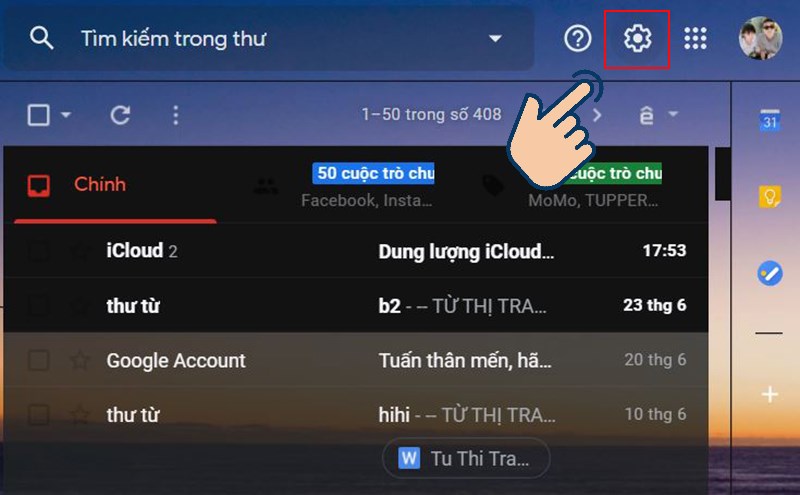
<p><span style="font-size:14px;"><strong>Bước 1:</strong>&nbsp;Đầu tiên bạn hãy vào&nbsp;<strong>Gmail</strong>&nbsp;và chọn vào&nbsp;<strong>icon răng cưa.</strong></span></p>

<p><span style="font-size:14px;"><strong><img alt="vào Gmail và chọn vào icon răng cưa." data-src="https://cdn.tgdd.vn/2020/06/content/cach-thu-hoi-email-da-gui-qua-gmail-tren-dien-thoai-va-may1-800x495.jpg" height="495" src="https://cdn.tgdd.vn/2020/06/content/cach-thu-hoi-email-da-gui-qua-gmail-tren-dien-thoai-va-may1-800x495.jpg" width="800" /></strong></span></p>

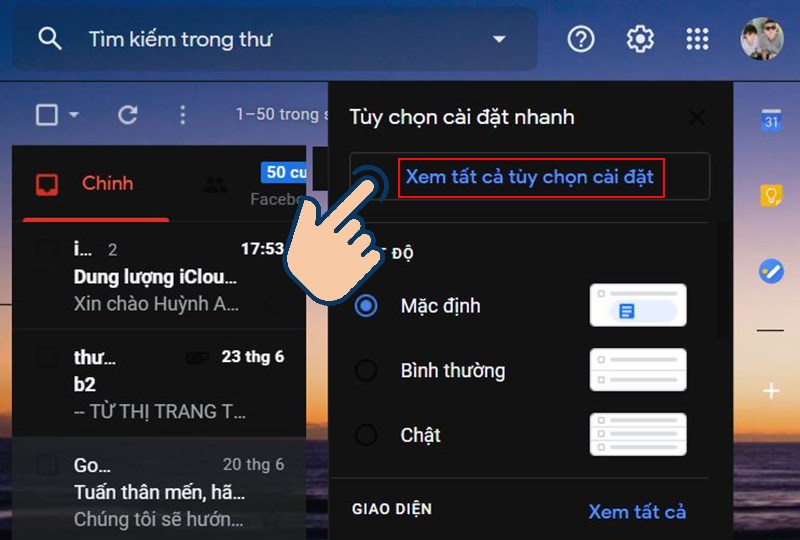
<p><span style="font-size:14px;"><strong>Bước 2:</strong>&nbsp;Tiếp theo bạn hãy chọn vào&nbsp;<strong>Xem tất cả tuỳ chọn cài đặt.</strong></span></p>

<p><span style="font-size:14px;"><strong><img alt="họn vào Xem tất cả tuỳ chọn cài đặt." data-src="https://cdn.tgdd.vn/2020/06/content/cach-thu-hoi-email-da-gui-qua-gmail-tren-dien-thoai-va-may2-800x540.jpg" height="540" src="https://cdn.tgdd.vn/2020/06/content/cach-thu-hoi-email-da-gui-qua-gmail-tren-dien-thoai-va-may2-800x540.jpg" width="800" /></strong></span></p>

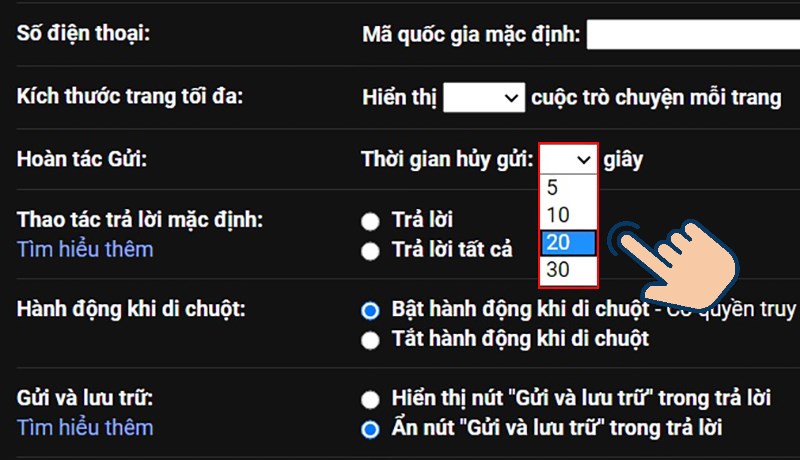
<p><span style="font-size:14px;"><strong>Bước 3:</strong>&nbsp;Kéo tìm mục&nbsp;<strong>Hoàn tác gửi</strong>&nbsp;và chọn&nbsp;<strong>thời gian</strong>&nbsp;có thể huỷ gửi.</span></p>

<p><span style="font-size:14px;"><img alt="Kéo tìm mục Hoàn tác gửi và chọn thời gian có thể huỷ gửi." data-src="https://cdn.tgdd.vn/2020/06/content/cach-thu-hoi-email-da-gui-qua-gmail-tren-dien-thoai-va-may3-800x460.jpg" height="460" src="https://cdn.tgdd.vn/2020/06/content/cach-thu-hoi-email-da-gui-qua-gmail-tren-dien-thoai-va-may3-800x460.jpg" width="800" /></span></p>

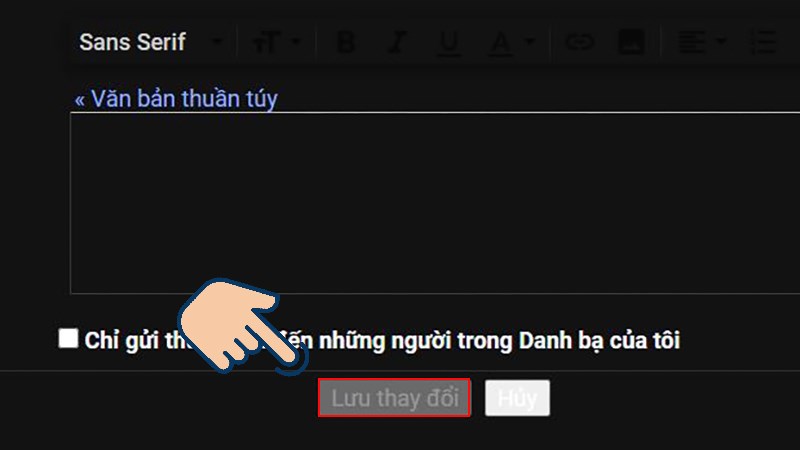
<p><span style="font-size:14px;"><strong>Bước 4:</strong>&nbsp;Kéo xuống cuối trang chọn vào&nbsp;<strong>Lưu thay đổi</strong>.</span></p>

<p><span style="font-size:14px;"><img alt="Kéo xuống cuối trang chọn vào Lưu thay đổi." data-src="https://cdn.tgdd.vn/2020/06/content/cach-thu-hoi-email-da-gui-qua-gmail-tren-dien-thoai-va-may4-800x450.jpg" height="450" src="https://cdn.tgdd.vn/2020/06/content/cach-thu-hoi-email-da-gui-qua-gmail-tren-dien-thoai-va-may4-800x450.jpg" width="800" /></span></p>

<p><span style="font-size:14px;"><strong>Bước 5:</strong>&nbsp;Bây giờ bạn có thể kiểm tra bằng cách&nbsp;<strong>soạn thư</strong>&nbsp;và&nbsp;<strong>gửi</strong>.</span></p>

<p><span style="font-size:14px;"><img alt="soạn thư và gửi." data-src="https://cdn.tgdd.vn/2020/06/content/cach-thu-hoi-email-da-gui-qua-gmail-tren-dien-thoai-va-may5-800x690-1.jpg" height="690" src="https://cdn.tgdd.vn/2020/06/content/cach-thu-hoi-email-da-gui-qua-gmail-tren-dien-thoai-va-may5-800x690-1.jpg" width="800" /></span></p>

<p><span style="font-size:14px;"><strong>Bước 6:</strong>&nbsp;Sau đó chọn&nbsp;<strong>Hoàn tác</strong>&nbsp;thử xem nhé.</span></p>

<p><span style="font-size:14px;"><img alt="chọn Hoàn tác thử xem nhé." data-src="https://cdn.tgdd.vn/2020/06/content/cach-thu-hoi-email-da-gui-qua-gmail-tren-dien-thoai-va-may6-800x595.jpg" height="595" src="https://cdn.tgdd.vn/2020/06/content/cach-thu-hoi-email-da-gui-qua-gmail-tren-dien-thoai-va-may6-800x595.jpg" width="800" /></span></p>

<p><span style="font-size:14px;"><strong>Lưu ý người dùng:</strong></span></p>

<ul>
	<li><span style="font-size:14px;">Tính năng hoàn tác này chỉ hiển thị trong khoảng thời gian mà bạn cài đặt.</span></li>
	<li><span style="font-size:14px;">Sau thời gian hoàn tác, email của bạn sẽ được gửi đi và không có cách nào thu hồi lại thư đã gửi.</span></li>
</ul>

<p><br  />
<span style="font-size:14px;"><strong>IV. Cách thu hồi Gmail đã gửi trên điện thoại</strong></span></p>

<p><span style="font-size:14px;"><strong>1. Hướng dẫn nhanh</strong></span></p>

<p><span style="font-size:14px;">Vào ứng dụng&nbsp;<strong>Gmail</strong>&nbsp;&gt;&nbsp;<strong>Soạn tin nhắn</strong>&nbsp;&gt;&nbsp;<strong>Gửi</strong>&nbsp;&gt;&nbsp;<strong>Hoàn tác</strong>.</span></p>

<h4 id="subqmenu4"><span style="font-size:14px;"><strong>2. Hướng dẫn chi tiết</strong></span></h4>

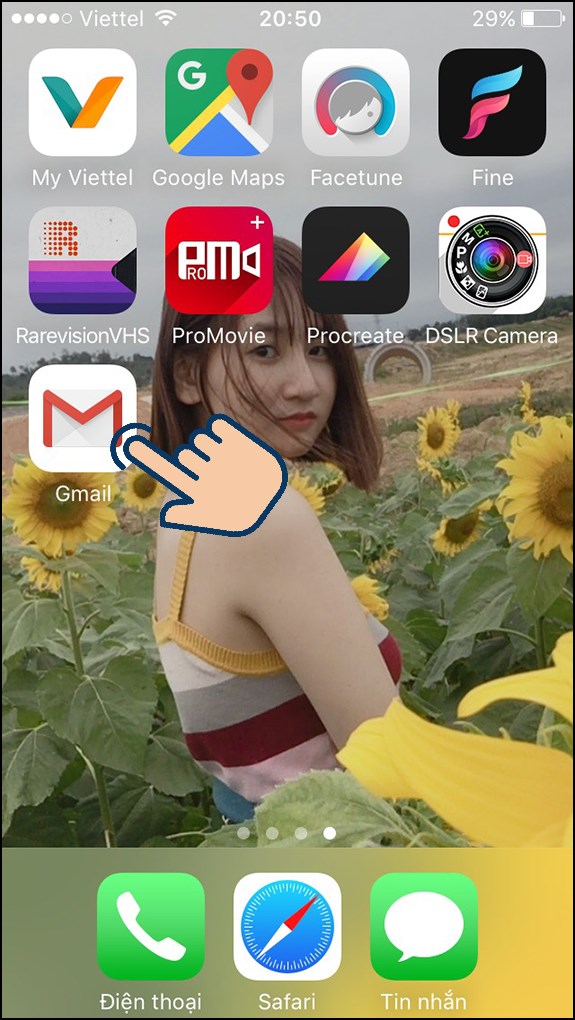
<p><span style="font-size:14px;"><strong>Bước 1:</strong>&nbsp;Bạn hãy đăng nhập và mở&nbsp;<strong>ứng dụng Gmail&nbsp;</strong>trên&nbsp;<a href="https://www.thegioididong.com/dtdd" rel="dofollow" target="_blank">điện thoại</a>.</span></p>

<p><span style="font-size:14px;"><img alt="đăng nhập vào ứng dụng Gmail." data-src="https://cdn.tgdd.vn/2020/06/content/cach-thu-hoi-email-da-gui-qua-gmail-tren-dien-thoai-va-may7.1-575x1020.jpg" height="1020" src="https://cdn.tgdd.vn/2020/06/content/cach-thu-hoi-email-da-gui-qua-gmail-tren-dien-thoai-va-may7.1-575x1020.jpg" width="575" /></span></p>

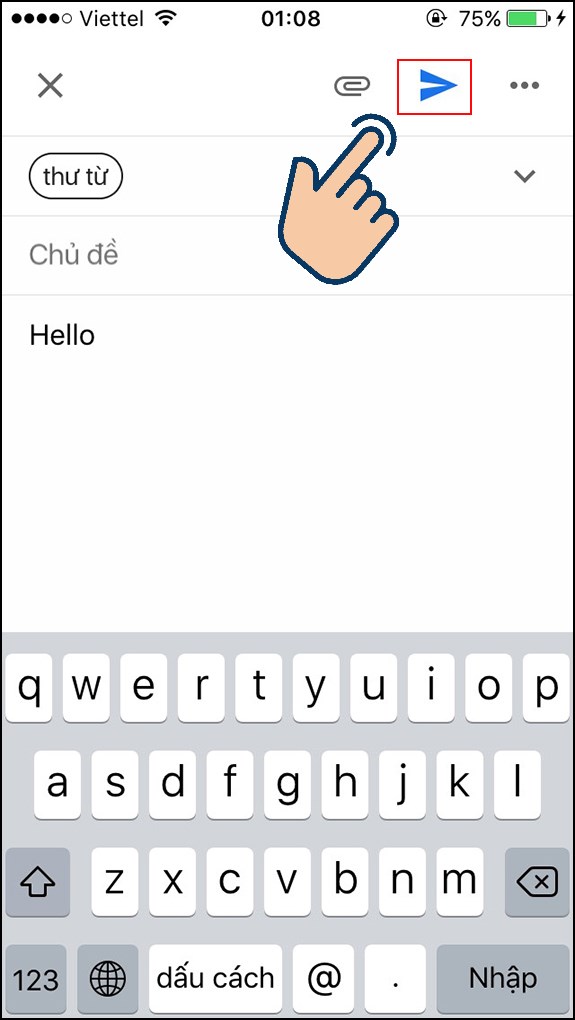
<p><span style="font-size:14px;"><strong>Bước 2:</strong>&nbsp;Tiếp theo bạn hãy vào&nbsp;<strong>soạn</strong>&nbsp;và&nbsp;<strong>gửi</strong>&nbsp;tin nhắn&nbsp;<strong>Gmail</strong>.</span></p>

<p><span style="font-size:14px;"><img alt="hãy soạn và gửi tin nhắn Gmail." data-src="https://cdn.tgdd.vn/2020/06/content/cach-thu-hoi-email-da-gui-qua-gmail-tren-dien-thoai-va-may7-575x1020.jpg" height="1020" src="https://cdn.tgdd.vn/2020/06/content/cach-thu-hoi-email-da-gui-qua-gmail-tren-dien-thoai-va-may7-575x1020.jpg" width="575" /></span></p>

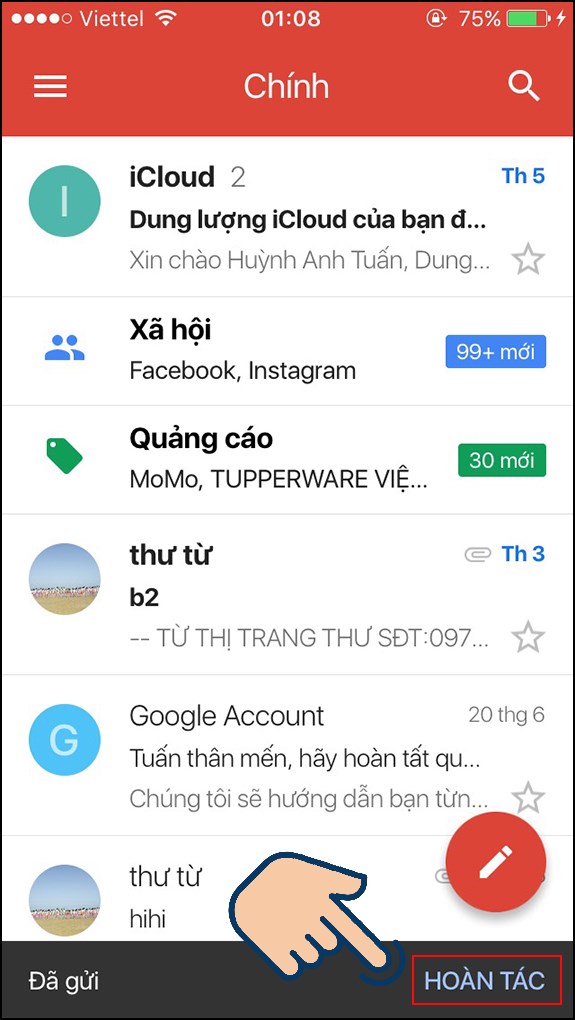
<p><span style="font-size:14px;"><strong>Bước 3:</strong>&nbsp;sau khi gửi sẽ có thông báo&nbsp;<strong>đã gửi và hoàn tác,&nbsp;</strong>bạn chọn<strong>&nbsp;hoàn toác&nbsp;</strong>để dừng gửi thư. Sau khi chọn hoàn tác ứng dụng sẽ trở về giao diện soạn thư. Bạn có thể chỉnh sửa lại hoặc xoá bỏ thư.</span></p>

<p><span style="font-size:14px;"><img alt="Chọn hoàn tác để dừng gửi" data-src="https://cdn.tgdd.vn/2020/06/content/cach-thu-hoi-email-da-gui-qua-gmail-tren-dien-thoai-va-may8-575x1020.jpg" height="1020" src="https://cdn.tgdd.vn/2020/06/content/cach-thu-hoi-email-da-gui-qua-gmail-tren-dien-thoai-va-may8-575x1020.jpg" width="575" /></span></p>

<p>&nbsp;</p>

<p><span style="font-size:14px;">Với cách thu hồi email đã gửi qua Gmail đơn giản ở trên, mong sẽ giúp bạn thu hồi được những mail bị lỗi và khắc phục những nội dung bị mắc phải trong quá trình soạn thư. Nếu có thắc mắc thêm bạn để lại bình luận phía dưới nhé! Chúc các bạn thành công.</span></p>
		</div>
				<div id="author">
						<p>
				<strong>Tác giả bài viết:</strong>
				Thanh Sơn
			</p>
						<p>
				<strong>Nguồn tin:</strong>
				www.thegioididong.com
			</p>
		</div>
	</div>
	<div id="footer" class="clearfix">
		<div id="url">
			<strong>URL của bản tin này: </strong><a href="https://tinhocdct.xyz/tin-cong-nghe/cach-thu-hoi-email-da-gui-qua-gmail-tren-dien-thoai-va-may-tinh-de-dang-537.html" title="Cách thu hồi email đã gửi qua Gmail trên điện thoại và máy tính dễ dàng">https://tinhocdct.xyz/tin-cong-nghe/cach-thu-hoi-email-da-gui-qua-gmail-tren-dien-thoai-va-may-tinh-de-dang-537.html</a>

		</div>
		<div class="clear"></div>
		<div class="copyright">
			&copy; TỔ TIN HỌC TRƯỜNG THPT ĐỖ CÔNG TƯỜNG
		</div>
		<div id="contact">
			<a href="mailto:webmaster@tinhocdct.xyz">webmaster@tinhocdct.xyz</a>
		</div>
	</div>
</div>
        <div id="timeoutsess" class="chromeframe">
            Bạn đã không sử dụng Site, <a onclick="timeoutsesscancel();" href="https://tinhocdct.xyz/#">Bấm vào đây để duy trì trạng thái đăng nhập</a>. Thời gian chờ: <span id="secField"> 60 </span> giây
        </div>
        <div id="openidResult" class="nv-alert" style="display:none"></div>
        <div id="openidBt" data-result="" data-redirect=""></div>
<script src="https://tinhocdct.xyz/assets/js/jquery/jquery.min.js"></script>
<script>var nv_base_siteurl="/",nv_lang_data="vi",nv_lang_interface="vi",nv_name_variable="nv",nv_fc_variable="op",nv_lang_variable="language",nv_module_name="news",nv_func_name="savefile",nv_is_user=0, nv_my_ofs=-4,nv_my_abbr="EDT",nv_cookie_prefix="nv4",nv_check_pass_mstime=1738000,nv_area_admin=0,nv_safemode=0,theme_responsive=0,nv_is_recaptcha=0;</script>
<script src="https://tinhocdct.xyz/assets/js/language/vi.js"></script>
<script src="https://tinhocdct.xyz/assets/js/global.js"></script>
<script src="https://tinhocdct.xyz/themes/default/js/news.js"></script>
<script src="https://tinhocdct.xyz/themes/default/js/main.js"></script>
<script async src="https://pagead2.googlesyndication.com/pagead/js/adsbygoogle.js?client=ca-pub-1816161148536198"
     crossorigin="anonymous"></script>
<script src="https://tinhocdct.xyz/themes/default/js/bootstrap.min.js"></script>
</body>
</html>