<!DOCTYPE html>
	<html lang="vi" xmlns="http://www.w3.org/1999/xhtml" prefix="og: http://ogp.me/ns#">
	<head>
<title>Cách tắt thông báo trên Windows khi kết nối máy chiếu để tránh sự cố tế nhị</title>
<meta name="description" content="Cách tắt thông báo trên Windows khi kết nối máy chiếu để tránh sự cố tế nhị - Savefile - Tin Tức -...">
<meta name="author" content="TỔ TIN HỌC TRƯỜNG THPT ĐỖ CÔNG TƯỜNG">
<meta name="copyright" content="TỔ TIN HỌC TRƯỜNG THPT ĐỖ CÔNG TƯỜNG [webmaster@tinhocdct.xyz]">
<meta name="robots" content="index, archive, follow, noodp">
<meta name="googlebot" content="index,archive,follow,noodp">
<meta name="msnbot" content="all,index,follow">
<meta name="generator" content="NukeViet v4.0">
<meta http-equiv="Content-Type" content="text/html; charset=utf-8">
<meta property="og:title" content="Cách tắt thông báo trên Windows khi kết nối máy chiếu để tránh sự cố tế nhị">
<meta property="og:type" content="website">
<meta property="og:description" content="Savefile - Tin Tức - https&#x3A;&#x002F;&#x002F;tinhocdct.xyz&#x002F;savefile&#x002F;tin-cong-nghe&#x002F;cach-tat-thong-bao-tren-windows-khi-ket-noi-may-chieu-de-tranh-su-co-te-nhi-339.html">
<meta property="og:site_name" content="TỔ TIN HỌC TRƯỜNG THPT ĐỖ CÔNG TƯỜNG">
<meta property="og:url" content="https://tinhocdct.xyz/tin-cong-nghe/cach-tat-thong-bao-tren-windows-khi-ket-noi-may-chieu-de-tranh-su-co-te-nhi-339.html">
<link rel="shortcut icon" href="https://tinhocdct.xyz/favicon.ico">
<link rel="canonical" href="https://tinhocdct.xyz/tin-cong-nghe/cach-tat-thong-bao-tren-windows-khi-ket-noi-may-chieu-de-tranh-su-co-te-nhi-339.html">
<link rel="alternate" href="https://tinhocdct.xyz/rss/" title="Tin Tức" type="application/rss+xml">
<link rel="alternate" href="https://tinhocdct.xyz/rss/tin-tuc/" title="Tin Tức - TIN TỨC" type="application/rss+xml">
<link rel="alternate" href="https://tinhocdct.xyz/rss/thong-cao-bao-chi/" title="Tin Tức - THÔNG BÁO" type="application/rss+xml">
<link rel="alternate" href="https://tinhocdct.xyz/rss/ban-tin-noi-bo/" title="Tin Tức - BẢN TIN NỘI BỘ" type="application/rss+xml">
<link rel="alternate" href="https://tinhocdct.xyz/rss/tin-cong-nghe/" title="Tin Tức - CÔNG NGHỆ - KHOA HỌC" type="application/rss+xml">
<link rel="alternate" href="https://tinhocdct.xyz/rss/thu-thuat/" title="Tin Tức - THỦ THUẬT" type="application/rss+xml">
<link rel="alternate" href="https://tinhocdct.xyz/rss/tien-ich/" title="Tin Tức - TIỆN ÍCH" type="application/rss+xml">
<link rel="alternate" href="https://tinhocdct.xyz/rss/ai/" title="Tin Tức - AI" type="application/rss+xml">
<link rel="alternate" href="https://tinhocdct.xyz/rss/khoa-hoc/" title="Tin Tức - KHOA HỌC" type="application/rss+xml">
<link rel="alternate" href="https://tinhocdct.xyz/rss/hoat-dong-chuyen-mon/" title="Tin Tức - HOẠT ĐỘNG CHUYÊN MÔN" type="application/rss+xml">
<link rel="alternate" href="https://tinhocdct.xyz/rss/hoat-dong-cong-doan/" title="Tin Tức - CÔNG ĐOÀN" type="application/rss+xml">
<link rel="alternate" href="https://tinhocdct.xyz/rss/hoat-dong-doan-the/" title="Tin Tức - ĐOÀN THỂ" type="application/rss+xml">
<link rel="alternate" href="https://tinhocdct.xyz/rss/tuyen-sinh-huong-nghiep/" title="Tin Tức - TUYỂN SINH - HƯỚNG NGHIỆP" type="application/rss+xml">
<link rel="alternate" href="https://tinhocdct.xyz/rss/tuyen-sinh-2025/" title="Tin Tức - TUYỂN SINH" type="application/rss+xml">
<link rel="alternate" href="https://tinhocdct.xyz/rss/huong-nghiep/" title="Tin Tức - HƯỚNG NGHIỆP" type="application/rss+xml">
<link rel="alternate" href="https://tinhocdct.xyz/rss/lich-cong-tac-tuan/" title="Tin Tức - Lịch công tác tuần" type="application/rss+xml">
<link rel="preload" as="script" href="https://tinhocdct.xyz/assets/js/jquery/jquery.min.js">
<link rel="preload" as="script" href="https://tinhocdct.xyz/assets/js/language/vi.js">
<link rel="preload" as="script" href="https://tinhocdct.xyz/assets/js/global.js">
<link rel="preload" as="script" href="https://tinhocdct.xyz/themes/default/js/news.js">
<link rel="preload" as="script" href="https://tinhocdct.xyz/themes/default/js/main.js">
<link rel="preload" as="script" href="https://pagead2.googlesyndication.com/pagead/js/adsbygoogle.js?client=ca-pub-1816161148536198">
<link rel="preload" as="script" href="https://tinhocdct.xyz/themes/default/js/bootstrap.min.js">
<link rel="StyleSheet" href="https://tinhocdct.xyz/assets/css/font-awesome.min.css">
<link rel="StyleSheet" href="https://tinhocdct.xyz/themes/default/css/bootstrap.non-responsive.css">
<link rel="StyleSheet" href="https://tinhocdct.xyz/themes/default/css/style.css">
<link rel="StyleSheet" href="https://tinhocdct.xyz/themes/default/css/style.non-responsive.css">
<link rel="StyleSheet" href="https://tinhocdct.xyz/themes/default/css/news.css">
<style>
	body{background: #fff;}
</style>
	</head>
	<body>
<div id="print">
	<div id="hd_print">
		<h2 class="pull-left">TỔ TIN HỌC TRƯỜNG THPT ĐỖ CÔNG TƯỜNG</h2>
		<p class="pull-right"><a title="TỔ TIN HỌC TRƯỜNG THPT ĐỖ CÔNG TƯỜNG" href="https://tinhocdct.xyz/">https://tinhocdct.xyz</a></p>
	</div>
	<div class="clear"></div>
	<hr />
	<div id="content">
		<h1>Cách tắt thông báo trên Windows khi kết nối máy chiếu để tránh sự cố tế nhị</h1>
		<ul class="list-inline">
			<li>Thứ tư - 29/05/2024 22:43</li>
			<li class="hidden-print txtrequired"><em class="fa fa-print">&nbsp;</em><a title="In ra" href="javascript:;" onclick="window.print()">In ra</a></li>
			<li class="hidden-print txtrequired"><em class="fa fa-power-off">&nbsp;</em><a title="Đóng cửa sổ này" href="javascript:;" onclick="window.close()">Đóng cửa sổ này</a></li>
		</ul>
		<div class="clear"></div>
		<div id="hometext">
			Bài viết dưới đây sẽ hướng dẫn bạn cách thức tắt các thông báo trên máy tính chạy Windows 10 và 11 khi kết nối với màn hình chiếu bên ngoài, nhằm tránh những tình huống nhạy cảm có thể xảy ra.
		</div>
		<div id="bodytext" class="clearfix">
			<div>Nếu sử dụng các phần mềm nhắn tin trên Windows, chẳng hạn như Zalo, mỗi khi có tin nhắn mới được gửi đến, một hộp thoại sẽ xuất hiện ở góc màn hình kèm theo nội dung của tin nhắn để thông báo cho người dùng được biết.</div>

<div>&nbsp;</div>

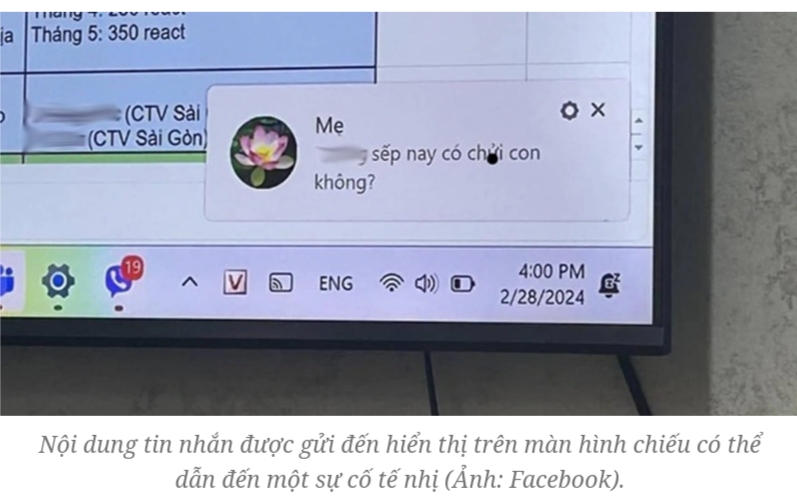
<div>Điều này sẽ giúp người dùng biết được có tin nhắn được gửi đến và sớm phản hồi cho người gửi. Tuy nhiên, tính năng này cũng có thể dẫn đến những tình huống nhạy cảm và sự cố hy hữu trong trường hợp máy tính chạy Windows kết nối với máy chiếu hoặc màn hình ngoài để trình chiếu nội dung cho nhiều người cùng xem.<br  />
<br  />
<img alt="Screenshot 2024 05 30 09 47 02 205" height="496" src="https://tinhocdct.xyz/uploads/news/2024_05/screenshot_2024-05-30-09-47-02-205.png" width="797" /></div>

<div>Chẳng hạn, bạn đang sử dụng máy tính chạy Windows kết nối với máy chiếu để thực hiện một bài diễn thuyết nào đó cho mọi người cùng theo dõi, thì bất ngờ một tin nhắn được gửi đến phần mềm Zalo trên máy tính và toàn bộ nội dung của tin nhắn đó sẽ hiển thị ngay trên màn chiếu, trước sự chứng kiến của mọi người.</div>

<div>&nbsp;</div>

<div>Nếu đó là một tin nhắn với nội dung thông thường thì không có gì đáng nói, nhưng nếu đó là một tin nhắn với nội dung riêng tư, nhạy cảm hoặc thậm chí nói xấu một người nào đó đang có mặt ở phía dưới… thì đây chắc chắn là một tình huống tế nhị và rất đáng xấu hổ.</div>

<div>&nbsp;</div>

<div>Vậy làm thế nào để tình huống tế nhị và nhạy cảm này không xảy ra? Cách đơn giản nhất đó là tắt đi chức năng thông báo trên Windows trong trường hợp máy tính được kết nối với máy chiếu hoặc màn hình bên ngoài.</div>

<div>&nbsp;</div>

<div>Để thực hiện điều này, bạn tiến hành theo các bước sau:</div>

<div>&nbsp;</div>

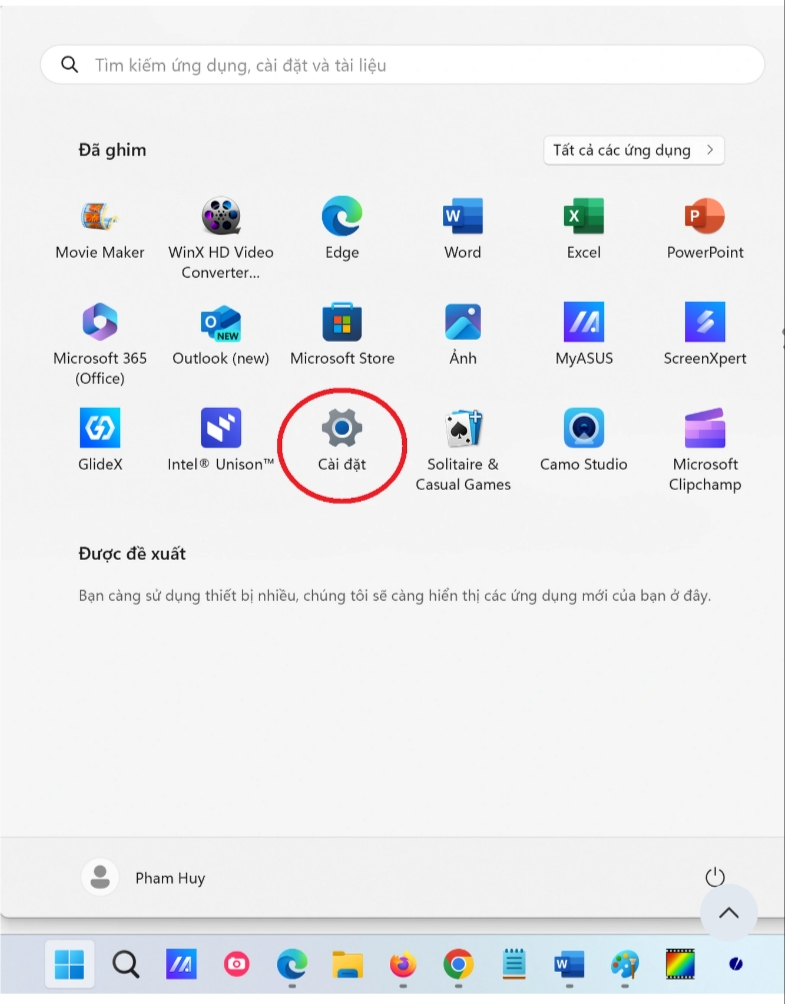
<div>- Đầu tiên, nhấn vào nút Start trên Windows, chọn &quot;Cài đặt&quot; từ menu hiện ra.<br  />
<br  />
<img alt="" height="1004" src="https://tinhocdct.xyz/uploads/news/2024_05/screenshot_2024-05-30-09-47-33-256.png" width="785" /></div>

<div>&nbsp;</div>

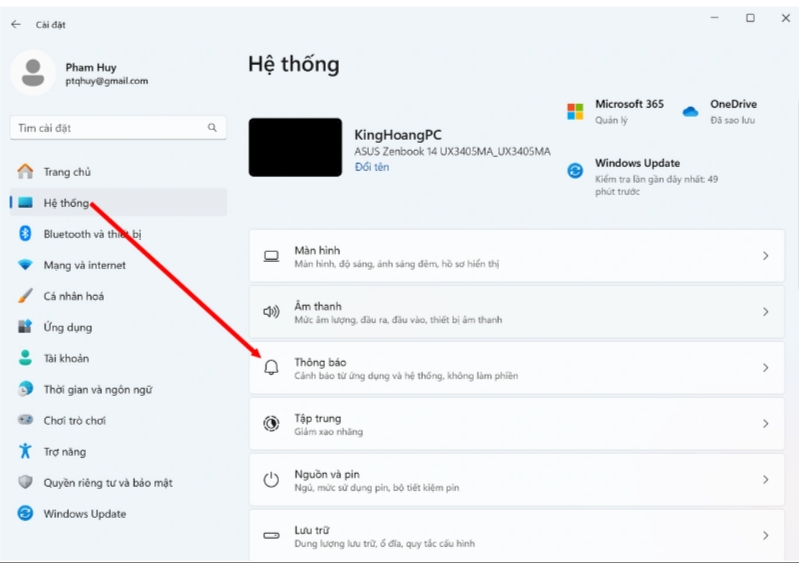
<div>- Tại cửa sổ &quot;Cài đặt&quot; hiện ra, bạn chọn &quot;Hệ thống&quot; từ menu bên trái, sau đó chọn &quot;Thông báo&quot; từ danh sách bên phải.</div>

<div><br  />
<img alt="" height="563" src="https://tinhocdct.xyz/uploads/news/2024_05/screenshot_2024-05-30-09-47-52-339.png" width="799" /></div>

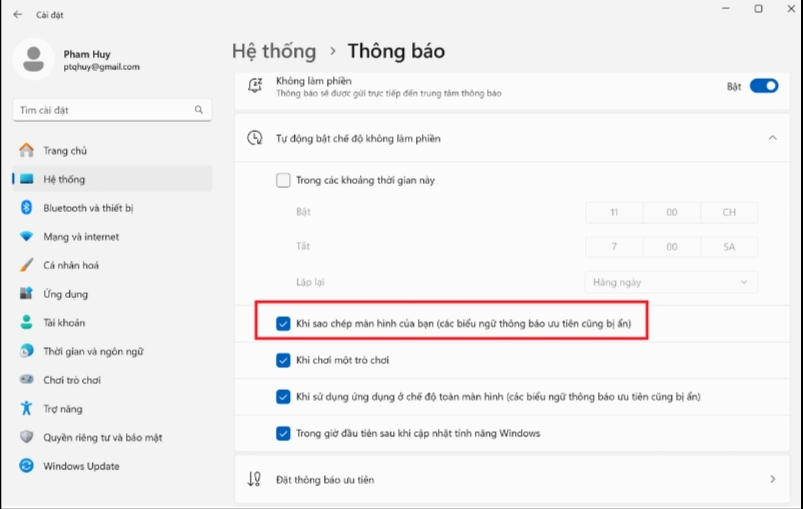
<div>- Tại giao diện hiện ra tiếp theo, bạn nhấn vào mục &quot;Tự động bật chế độ không làm phiền&quot;, sau đó đánh dấu vào tùy chọn &quot;Khi sao chép màn hình của bạn (các biểu ngữ thông báo ưu tiên cũng bị ẩn)&quot;.<br  />
<br  />
<img alt="" height="509" src="https://tinhocdct.xyz/uploads/news/2024_05/screenshot_2024-05-30-09-48-08-684.png" width="803" /></div>

<div>&nbsp;</div>

<div>Giờ đây, mỗi khi máy tính của bạn được kết nối với máy chiếu hoặc màn hình bên ngoài để trình chiếu nội dung cho nhiều người cùng xem, những hộp thoại thông báo được gửi đến các phần mềm trên Windows sẽ tự động được ẩn đi, điều này không chỉ giúp bạn có thể tránh được những tình huống khó xử, mà sẽ bảo vệ được sự riêng tư của bạn khi đang chia sẻ màn hình máy tính của mình cho đông người.</div>

<div>&nbsp;</div>

<div><strong>Lưu ý</strong>:&nbsp;<br  />
Ở win10 hơi khác 1 xíu. Truy cập vào <strong>setting &gt; system &gt; focus assist &gt; kích hoạt tùy chọn &quot;when i&#039;m duplicating my display&quot;.</strong></div>
		</div>
				<div id="author">
						<p>
				<strong>Tác giả bài viết:</strong>
				Thanh Sơn
			</p>
						<p>
				<strong>Nguồn tin:</strong>
				Báo điện tử Dân Trí
			</p>
		</div>
	</div>
	<div id="footer" class="clearfix">
		<div id="url">
			<strong>URL của bản tin này: </strong><a href="https://tinhocdct.xyz/tin-cong-nghe/cach-tat-thong-bao-tren-windows-khi-ket-noi-may-chieu-de-tranh-su-co-te-nhi-339.html" title="Cách tắt thông báo trên Windows khi kết nối máy chiếu để tránh sự cố tế nhị">https://tinhocdct.xyz/tin-cong-nghe/cach-tat-thong-bao-tren-windows-khi-ket-noi-may-chieu-de-tranh-su-co-te-nhi-339.html</a>

		</div>
		<div class="clear"></div>
		<div class="copyright">
			&copy; TỔ TIN HỌC TRƯỜNG THPT ĐỖ CÔNG TƯỜNG
		</div>
		<div id="contact">
			<a href="mailto:webmaster@tinhocdct.xyz">webmaster@tinhocdct.xyz</a>
		</div>
	</div>
</div>
        <div id="timeoutsess" class="chromeframe">
            Bạn đã không sử dụng Site, <a onclick="timeoutsesscancel();" href="https://tinhocdct.xyz/#">Bấm vào đây để duy trì trạng thái đăng nhập</a>. Thời gian chờ: <span id="secField"> 60 </span> giây
        </div>
        <div id="openidResult" class="nv-alert" style="display:none"></div>
        <div id="openidBt" data-result="" data-redirect=""></div>
<script src="https://tinhocdct.xyz/assets/js/jquery/jquery.min.js"></script>
<script>var nv_base_siteurl="/",nv_lang_data="vi",nv_lang_interface="vi",nv_name_variable="nv",nv_fc_variable="op",nv_lang_variable="language",nv_module_name="news",nv_func_name="savefile",nv_is_user=0, nv_my_ofs=-4,nv_my_abbr="EDT",nv_cookie_prefix="nv4",nv_check_pass_mstime=1738000,nv_area_admin=0,nv_safemode=0,theme_responsive=0,nv_is_recaptcha=0;</script>
<script src="https://tinhocdct.xyz/assets/js/language/vi.js"></script>
<script src="https://tinhocdct.xyz/assets/js/global.js"></script>
<script src="https://tinhocdct.xyz/themes/default/js/news.js"></script>
<script src="https://tinhocdct.xyz/themes/default/js/main.js"></script>
<script async src="https://pagead2.googlesyndication.com/pagead/js/adsbygoogle.js?client=ca-pub-1816161148536198"
     crossorigin="anonymous"></script>
<script src="https://tinhocdct.xyz/themes/default/js/bootstrap.min.js"></script>
</body>
</html>