<!DOCTYPE html>
	<html lang="vi" xmlns="http://www.w3.org/1999/xhtml" prefix="og: http://ogp.me/ns#">
	<head>
<title>Cách gửi file từ Google Drive trên Zalo điện thoại, máy tính</title>
<meta name="description" content="Cách gửi file từ Google Drive trên Zalo điện thoại, máy tính - Savefile - Tin Tức -...">
<meta name="author" content="TỔ TIN HỌC TRƯỜNG THPT ĐỖ CÔNG TƯỜNG">
<meta name="copyright" content="TỔ TIN HỌC TRƯỜNG THPT ĐỖ CÔNG TƯỜNG [webmaster@tinhocdct.xyz]">
<meta name="robots" content="index, archive, follow, noodp">
<meta name="googlebot" content="index,archive,follow,noodp">
<meta name="msnbot" content="all,index,follow">
<meta name="generator" content="NukeViet v4.0">
<meta http-equiv="Content-Type" content="text/html; charset=utf-8">
<meta property="og:title" content="Cách gửi file từ Google Drive trên Zalo điện thoại, máy tính">
<meta property="og:type" content="website">
<meta property="og:description" content="Savefile - Tin Tức - https&#x3A;&#x002F;&#x002F;tinhocdct.xyz&#x002F;savefile&#x002F;tin-cong-nghe&#x002F;cach-gui-file-tu-google-drive-tren-zalo-dien-thoai-may-tinh-384.html">
<meta property="og:site_name" content="TỔ TIN HỌC TRƯỜNG THPT ĐỖ CÔNG TƯỜNG">
<meta property="og:url" content="https://tinhocdct.xyz/tin-cong-nghe/cach-gui-file-tu-google-drive-tren-zalo-dien-thoai-may-tinh-384.html">
<link rel="shortcut icon" href="https://tinhocdct.xyz/favicon.ico">
<link rel="canonical" href="https://tinhocdct.xyz/tin-cong-nghe/cach-gui-file-tu-google-drive-tren-zalo-dien-thoai-may-tinh-384.html">
<link rel="alternate" href="https://tinhocdct.xyz/rss/" title="Tin Tức" type="application/rss+xml">
<link rel="alternate" href="https://tinhocdct.xyz/rss/tin-tuc/" title="Tin Tức - TIN TỨC" type="application/rss+xml">
<link rel="alternate" href="https://tinhocdct.xyz/rss/thong-cao-bao-chi/" title="Tin Tức - THÔNG BÁO" type="application/rss+xml">
<link rel="alternate" href="https://tinhocdct.xyz/rss/ban-tin-noi-bo/" title="Tin Tức - BẢN TIN NỘI BỘ" type="application/rss+xml">
<link rel="alternate" href="https://tinhocdct.xyz/rss/tin-cong-nghe/" title="Tin Tức - CÔNG NGHỆ - KHOA HỌC" type="application/rss+xml">
<link rel="alternate" href="https://tinhocdct.xyz/rss/thu-thuat/" title="Tin Tức - THỦ THUẬT" type="application/rss+xml">
<link rel="alternate" href="https://tinhocdct.xyz/rss/tien-ich/" title="Tin Tức - TIỆN ÍCH" type="application/rss+xml">
<link rel="alternate" href="https://tinhocdct.xyz/rss/ai/" title="Tin Tức - AI" type="application/rss+xml">
<link rel="alternate" href="https://tinhocdct.xyz/rss/khoa-hoc/" title="Tin Tức - KHOA HỌC" type="application/rss+xml">
<link rel="alternate" href="https://tinhocdct.xyz/rss/hoat-dong-chuyen-mon/" title="Tin Tức - HOẠT ĐỘNG CHUYÊN MÔN" type="application/rss+xml">
<link rel="alternate" href="https://tinhocdct.xyz/rss/hoat-dong-cong-doan/" title="Tin Tức - CÔNG ĐOÀN" type="application/rss+xml">
<link rel="alternate" href="https://tinhocdct.xyz/rss/hoat-dong-doan-the/" title="Tin Tức - ĐOÀN THỂ" type="application/rss+xml">
<link rel="alternate" href="https://tinhocdct.xyz/rss/tuyen-sinh-huong-nghiep/" title="Tin Tức - TUYỂN SINH - HƯỚNG NGHIỆP" type="application/rss+xml">
<link rel="alternate" href="https://tinhocdct.xyz/rss/tuyen-sinh-2025/" title="Tin Tức - TUYỂN SINH 2025" type="application/rss+xml">
<link rel="alternate" href="https://tinhocdct.xyz/rss/lich-cong-tac-tuan/" title="Tin Tức - Lịch công tác tuần" type="application/rss+xml">
<link rel="preload" as="script" href="https://tinhocdct.xyz/assets/js/jquery/jquery.min.js">
<link rel="preload" as="script" href="https://tinhocdct.xyz/assets/js/language/vi.js">
<link rel="preload" as="script" href="https://tinhocdct.xyz/assets/js/global.js">
<link rel="preload" as="script" href="https://tinhocdct.xyz/themes/default/js/news.js">
<link rel="preload" as="script" href="https://tinhocdct.xyz/themes/default/js/main.js">
<link rel="preload" as="script" href="https://pagead2.googlesyndication.com/pagead/js/adsbygoogle.js?client=ca-pub-1816161148536198">
<link rel="preload" as="script" href="https://tinhocdct.xyz/themes/default/js/bootstrap.min.js">
<link rel="StyleSheet" href="https://tinhocdct.xyz/assets/css/font-awesome.min.css">
<link rel="StyleSheet" href="https://tinhocdct.xyz/themes/default/css/bootstrap.non-responsive.css">
<link rel="StyleSheet" href="https://tinhocdct.xyz/themes/default/css/style.css">
<link rel="StyleSheet" href="https://tinhocdct.xyz/themes/default/css/style.non-responsive.css">
<link rel="StyleSheet" href="https://tinhocdct.xyz/themes/default/css/news.css">
<style>
	body{background: #fff;}
</style>
	</head>
	<body>
<div id="print">
	<div id="hd_print">
		<h2 class="pull-left">TỔ TIN HỌC TRƯỜNG THPT ĐỖ CÔNG TƯỜNG</h2>
		<p class="pull-right"><a title="TỔ TIN HỌC TRƯỜNG THPT ĐỖ CÔNG TƯỜNG" href="https://tinhocdct.xyz/">https://tinhocdct.xyz</a></p>
	</div>
	<div class="clear"></div>
	<hr />
	<div id="content">
		<h1>Cách gửi file từ Google Drive trên Zalo điện thoại, máy tính</h1>
		<ul class="list-inline">
			<li>Thứ ba - 30/07/2024 10:13</li>
			<li class="hidden-print txtrequired"><em class="fa fa-print">&nbsp;</em><a title="In ra" href="javascript:;" onclick="window.print()">In ra</a></li>
			<li class="hidden-print txtrequired"><em class="fa fa-power-off">&nbsp;</em><a title="Đóng cửa sổ này" href="javascript:;" onclick="window.close()">Đóng cửa sổ này</a></li>
		</ul>
		<div class="clear"></div>
		<div id="hometext">
			Hiện tại Zalo đã hỗ trợ bạn gửi file từ Google Drive trên máy tính lẫn điện thoại, giúp người dùng dễ dàng hơn trong việc chuyển tập tin, thay vì phải tải file xuống thiết bị rồi mới gửi trên Zalo. Zalo hỗ trợ người dùng có thể gửi bất kỳ loại tập tin nào từ Google Drive, với dung lượng lên tới 1GB.
		</div>
				<div class="imghome">
			<img alt="Cách gửi file từ Google Drive trên Zalo điện thoại, máy tính" src="https://tinhocdct.xyz/uploads/news/2024_07/qt2.jpg" width="460" class="img-thumbnail" />
		</div>
		<div class="clear"></div>
		<div id="bodytext" class="clearfix">
			<p>Như vậy người dùng sẽ dễ dàng trong việc chuyển file khi có thể gửi nhiều file trên Zalo có dung lượng lớn. Bài viết dưới đây sẽ hướng dẫn bạn gửi file từ Google Drive trên Zalo.</p>

<h2>Hướng dẫn gửi file từ Google Drive trên Zalo điện thoại</h2>

<h3><strong>Hướng dẫn nhanh</strong></h3>

<p>Mở cuộc trò chuyện trên Zalo &gt; Nhấn vào biểu tượng dấu ba chấm &gt; Ấn vào mục Tài liệu &gt; Nhấn vào biểu tượng Google Drive &gt; Chạm vào mục Drive của tôi &gt; Chọn file dữ liệu bất kỳ và gửi đi.</p>

<h3><strong>Hướng dẫn chi tiết</strong></h3>

<p><strong>Bước 1:</strong></p>

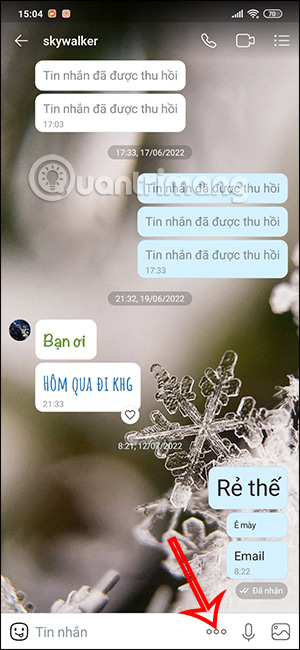
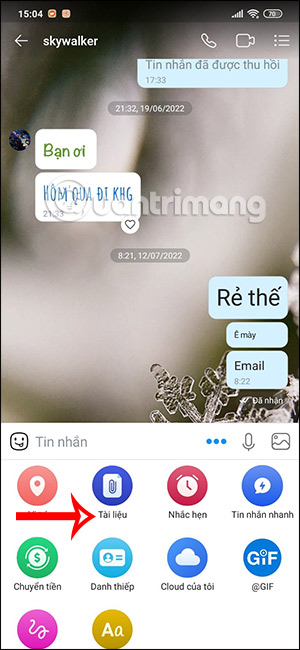
<p>Trước hết bạn mở đoạn chat muốn gửi file lên, sau đó nhấn vào<strong>&nbsp;biểu tượng 3 dấu chấm&nbsp;</strong>trong khung gửi tin nhắn. Tiếp đến người dùng nhấn vào&nbsp;<strong>mục Tài liệu</strong>&nbsp;trong khung tùy chọn bên dưới.</p>

<figure><img alt="Tùy chọn tin nhắn Zalo" data-i="0" data-src="https://st.quantrimang.com/photos/image/2022/07/26/Zalo-gui-file-Google-Drive-1.jpg" data-was-processed="true" height="650" src="https://st.quantrimang.com/photos/image/2022/07/26/Zalo-gui-file-Google-Drive-1.jpg" width="300" /></figure>

<figure><img alt="Tài liệu trên Zalo" data-i="1" data-src="https://st.quantrimang.com/photos/image/2022/07/26/Zalo-gui-file-Google-Drive-2.jpg" data-was-processed="true" height="650" src="https://st.quantrimang.com/photos/image/2022/07/26/Zalo-gui-file-Google-Drive-2.jpg" width="300" /></figure>
<br  />
<iframe allow="attribution-reporting; run-ad-auction" allowtransparency="true" aria-label="Advertisement" browsingtopics="true" data-google-container-id="a!2" data-google-query-id="CNX465_4zocDFYSI6QUdT5UWfw" data-load-complete="true" frameborder="0" height="0" hspace="0" id="aswift_1" marginheight="0" marginwidth="0" name="aswift_1" sandbox="allow-forms allow-popups allow-popups-to-escape-sandbox allow-same-origin allow-scripts allow-top-navigation-by-user-activation" scrolling="no" src="https://googleads.g.doubleclick.net/pagead/ads?client=ca-pub-9275417305531302&amp;output=html&amp;h=174&amp;slotname=2079243249&amp;adk=1150885378&amp;adf=1465845563&amp;pi=t.ma~as.2079243249&amp;w=694&amp;abgtt=5&amp;fwrn=4&amp;lmt=1722348549&amp;rafmt=11&amp;format=694x174&amp;url=https%3A%2F%2Fquantrimang.com%2Fcong-nghe%2Fcach-gui-file-tu-google-drive-dropbox-tren-zalo-pc-142462&amp;wgl=1&amp;uach=WyJXaW5kb3dzIiwiMTUuMC4wIiwieDg2IiwiIiwiMTI3LjAuNjUzMy43MyIsbnVsbCwwLG51bGwsIjY0IixbWyJOb3QpQTtCcmFuZCIsIjk5LjAuMC4wIl0sWyJHb29nbGUgQ2hyb21lIiwiMTI3LjAuNjUzMy43MyJdLFsiQ2hyb21pdW0iLCIxMjcuMC42NTMzLjczIl1dLDBd&amp;dt=1722348524356&amp;bpp=1&amp;bdt=71&amp;idt=74&amp;shv=r20240725&amp;mjsv=m202407250101&amp;ptt=9&amp;saldr=aa&amp;abxe=1&amp;cookie=ID%3D9355174c58565e6d%3AT%3D1717298287%3ART%3D1722348485%3AS%3DALNI_MbdSnjK_kj9JvFXz95oJ80qIGB_1Q&amp;gpic=UID%3D00000e3f28fe26e7%3AT%3D1717298287%3ART%3D1722348485%3AS%3DALNI_MYSvfa-VuTUKxFCE-_AZzT_hPJiIA&amp;eo_id_str=ID%3D5da9184bb49a16b0%3AT%3D1717298287%3ART%3D1722348485%3AS%3DAA-AfjYtx9418Nf_lEAoYiHDE8KW&amp;prev_fmts=1048x280&amp;correlator=4023379739473&amp;frm=20&amp;pv=1&amp;rplot=4&amp;u_tz=420&amp;u_his=4&amp;u_h=900&amp;u_w=1440&amp;u_ah=852&amp;u_aw=1440&amp;u_cd=24&amp;u_sd=2.5&amp;dmc=8&amp;adx=46&amp;ady=1349&amp;biw=1138&amp;bih=612&amp;scr_x=0&amp;scr_y=0&amp;eid=44759876%2C44759927%2C44759842%2C44795922%2C95331689%2C95334524%2C95334829%2C95337869%2C95338228%2C95338247%2C95336266%2C31078663%2C31078665%2C31078668%2C31078670&amp;oid=2&amp;pvsid=3570193146383420&amp;tmod=2105044387&amp;uas=0&amp;nvt=1&amp;ref=https%3A%2F%2Fquantrimang.com%2F&amp;fc=896&amp;brdim=0%2C0%2C0%2C0%2C1440%2C0%2C1440%2C852%2C1152%2C612&amp;vis=1&amp;rsz=%7C%7CoEebr%7C&amp;abl=CS&amp;pfx=0&amp;fu=128&amp;bc=31&amp;bz=1.25&amp;td=1&amp;tdf=2&amp;psd=W251bGwsbnVsbCxudWxsLDNd&amp;nt=1&amp;ifi=2&amp;uci=a!2&amp;btvi=1&amp;fsb=1&amp;dtd=83" tabindex="0" title="Advertisement" vspace="0" width="694"></iframe>

<p><strong>Bước 2:</strong></p>

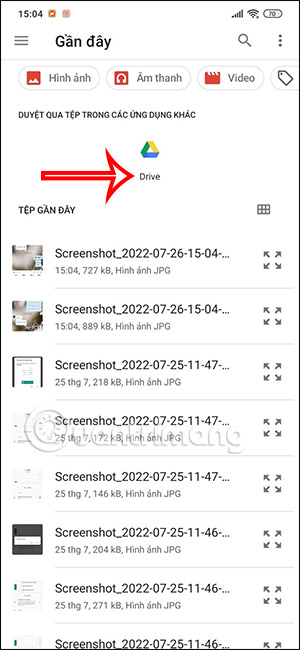
<p>Lúc này hiển thị giao diện quản lý các tập tin trên thiết bị, bạn nhấn vào<strong>&nbsp;biểu tượng Google Drive</strong>&nbsp;để lựa chọn tập tin lưu trữ trong tài khoản này.</p>

<p><img alt="Truy cập Google Drive" data-i="2" data-src="https://st.quantrimang.com/photos/image/2022/07/26/Zalo-gui-file-Google-Drive-3.jpg" data-was-processed="true" height="650" src="https://st.quantrimang.com/photos/image/2022/07/26/Zalo-gui-file-Google-Drive-3.jpg" width="300" /></p>

<p><strong>Bước 3:</strong></p>

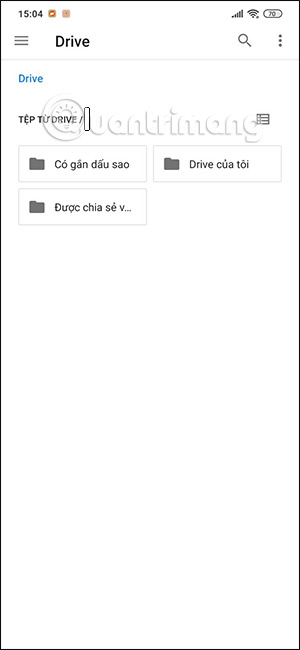
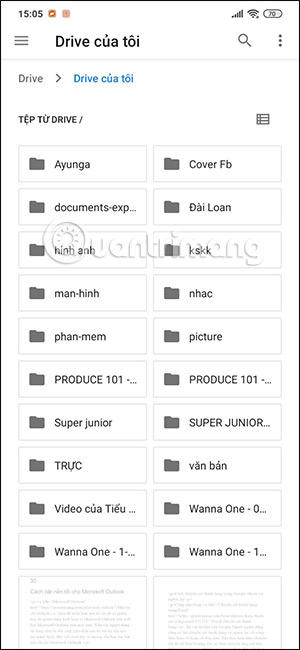
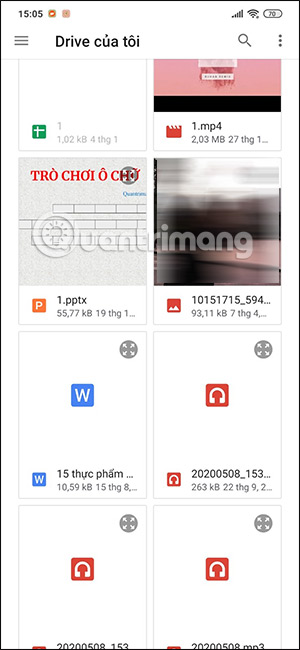
<p>Khi đó sẽ hiển thị 3 kiểu thư mục lưu trữ file gồm thư mục có gắn dấu sao, thư mục Drive của tôi và thư mục Được chia sẻ. Bạn nhấn chọn vào từng thư mục để tìm tới tập tin muốn gửi trên Zalo. Tiếp tục tìm tới tập tin mà người dùng muốn gửi trên Zalo rồi nhấn chọn.</p>

<figure><img alt="Thư mục trên Google Drive" data-i="3" data-src="https://st.quantrimang.com/photos/image/2022/07/26/Zalo-gui-file-Google-Drive-4.jpg" data-was-processed="true" height="650" src="https://st.quantrimang.com/photos/image/2022/07/26/Zalo-gui-file-Google-Drive-4.jpg" width="300" /></figure>

<figure><img alt="Lưu trữ trên Google Drive" data-i="4" data-src="https://st.quantrimang.com/photos/image/2022/07/26/Zalo-gui-file-Google-Drive-5.jpg" data-was-processed="true" height="650" src="https://st.quantrimang.com/photos/image/2022/07/26/Zalo-gui-file-Google-Drive-5.jpg" width="300" /></figure>

<figure><img alt="Chọn tập tin trên Google Drive" data-i="5" data-src="https://st.quantrimang.com/photos/image/2022/07/26/Zalo-gui-file-Google-Drive-6.jpg" data-was-processed="true" height="650" src="https://st.quantrimang.com/photos/image/2022/07/26/Zalo-gui-file-Google-Drive-6.jpg" width="300" /></figure>
<br  />
<iframe allow="attribution-reporting; run-ad-auction" allowtransparency="true" aria-label="Advertisement" browsingtopics="true" data-google-container-id="a!3" data-google-query-id="CMyHjuX4zocDFYyU6QUdiDEEyw" data-load-complete="true" frameborder="0" height="0" hspace="0" id="aswift_2" marginheight="0" marginwidth="0" name="aswift_2" sandbox="allow-forms allow-popups allow-popups-to-escape-sandbox allow-same-origin allow-scripts allow-top-navigation-by-user-activation" scrolling="no" src="https://googleads.g.doubleclick.net/pagead/ads?gdpr=0&amp;client=ca-pub-9275417305531302&amp;output=html&amp;h=174&amp;slotname=4889239415&amp;adk=3991455380&amp;adf=3040688070&amp;pi=t.ma~as.4889239415&amp;w=694&amp;abgtt=5&amp;fwrn=4&amp;lmt=1722348549&amp;rafmt=11&amp;format=694x174&amp;url=https%3A%2F%2Fquantrimang.com%2Fcong-nghe%2Fcach-gui-file-tu-google-drive-dropbox-tren-zalo-pc-142462&amp;wgl=1&amp;uach=WyJXaW5kb3dzIiwiMTUuMC4wIiwieDg2IiwiIiwiMTI3LjAuNjUzMy43MyIsbnVsbCwwLG51bGwsIjY0IixbWyJOb3QpQTtCcmFuZCIsIjk5LjAuMC4wIl0sWyJHb29nbGUgQ2hyb21lIiwiMTI3LjAuNjUzMy43MyJdLFsiQ2hyb21pdW0iLCIxMjcuMC42NTMzLjczIl1dLDBd&amp;dt=1722348524357&amp;bpp=1&amp;bdt=73&amp;idt=128&amp;shv=r20240725&amp;mjsv=m202407250101&amp;ptt=9&amp;saldr=aa&amp;abxe=1&amp;cookie=ID%3D9355174c58565e6d%3AT%3D1717298287%3ART%3D1722348485%3AS%3DALNI_MbdSnjK_kj9JvFXz95oJ80qIGB_1Q&amp;gpic=UID%3D00000e3f28fe26e7%3AT%3D1717298287%3ART%3D1722348485%3AS%3DALNI_MYSvfa-VuTUKxFCE-_AZzT_hPJiIA&amp;eo_id_str=ID%3D5da9184bb49a16b0%3AT%3D1717298287%3ART%3D1722348485%3AS%3DAA-AfjYtx9418Nf_lEAoYiHDE8KW&amp;prev_fmts=1048x280%2C694x174%2C336x280%2C336x280%2C336x672%2C0x0&amp;nras=1&amp;correlator=4023379739473&amp;frm=20&amp;pv=1&amp;rplot=4&amp;u_tz=420&amp;u_his=4&amp;u_h=900&amp;u_w=1440&amp;u_ah=852&amp;u_aw=1440&amp;u_cd=24&amp;u_sd=2.5&amp;dmc=8&amp;adx=46&amp;ady=3188&amp;biw=1138&amp;bih=612&amp;scr_x=0&amp;scr_y=744&amp;eid=44759876%2C44759927%2C44759842%2C44795922%2C95331689%2C95334524%2C95334829%2C95337869%2C95338228%2C95338247%2C95336266%2C31078663%2C31078665%2C31078668%2C31078670&amp;oid=2&amp;pvsid=3570193146383420&amp;tmod=2105044387&amp;uas=0&amp;nvt=1&amp;ref=https%3A%2F%2Fquantrimang.com%2F&amp;fc=896&amp;brdim=0%2C0%2C0%2C0%2C1440%2C0%2C1440%2C852%2C1152%2C612&amp;vis=1&amp;rsz=%7C%7CoEebr%7C&amp;abl=CS&amp;pfx=0&amp;fu=128&amp;bc=31&amp;bz=1.25&amp;td=1&amp;tdf=2&amp;psd=W251bGwsbnVsbCxudWxsLDNd&amp;nt=1&amp;ifi=3&amp;uci=a!3&amp;btvi=4&amp;fsb=1&amp;dtd=M" tabindex="0" title="Advertisement" vspace="0" width="694"></iframe>

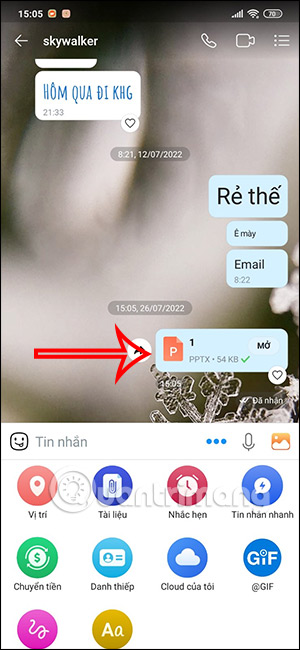
<p>Kết quả tập tin sẽ được gửi trên Zalo thông qua Google Drive rất đơn giản.</p>

<p><img alt="Gửi file trên Zalo" data-i="6" data-src="https://st.quantrimang.com/photos/image/2022/07/26/Zalo-gui-file-Google-Drive-7.jpg" data-was-processed="true" height="650" src="https://st.quantrimang.com/photos/image/2022/07/26/Zalo-gui-file-Google-Drive-7.jpg" width="300" /></p>

<h2>&nbsp;</h2>

<h2><strong>Hướng dẫn gửi file trên Zalo từ Google Drive PC</strong></h2>

<h3>&nbsp;</h3>

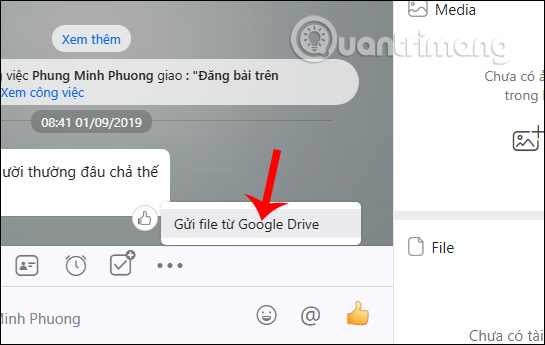
<p><strong>Bước 1:</strong></p>

<p>Tại giao diện Zalo trên máy tính người dùng nhấn vào&nbsp;<strong>biểu tượng 3 dấu chấm</strong>&nbsp;rồi chọn&nbsp;<strong>Gửi file từ Google Drive</strong>.</p>

<p><img alt="Chia sẻ file từ Drive" data-i="7" data-src="https://st.quantrimang.com/photos/image/2019/09/11/Zalo-gui-file-tren-Google-Drive-1.jpg" data-was-processed="true" height="345" src="https://st.quantrimang.com/photos/image/2019/09/11/Zalo-gui-file-tren-Google-Drive-1.jpg" width="545" /></p>
<iframe allow="attribution-reporting; run-ad-auction" allowtransparency="true" aria-label="Advertisement" browsingtopics="true" data-google-container-id="a!4" data-google-query-id="CKmM9-v4zocDFVOK6QUdSRIWUw" data-load-complete="true" frameborder="0" height="0" hspace="0" id="aswift_3" marginheight="0" marginwidth="0" name="aswift_3" sandbox="allow-forms allow-popups allow-popups-to-escape-sandbox allow-same-origin allow-scripts allow-top-navigation-by-user-activation" scrolling="no" src="https://googleads.g.doubleclick.net/pagead/ads?gdpr=0&amp;client=ca-pub-9275417305531302&amp;output=html&amp;h=174&amp;slotname=2737970258&amp;adk=2246973304&amp;adf=509425466&amp;pi=t.ma~as.2737970258&amp;w=694&amp;abgtt=5&amp;fwrn=4&amp;lmt=1722348549&amp;rafmt=11&amp;format=694x174&amp;url=https%3A%2F%2Fquantrimang.com%2Fcong-nghe%2Fcach-gui-file-tu-google-drive-dropbox-tren-zalo-pc-142462&amp;wgl=1&amp;uach=WyJXaW5kb3dzIiwiMTUuMC4wIiwieDg2IiwiIiwiMTI3LjAuNjUzMy43MyIsbnVsbCwwLG51bGwsIjY0IixbWyJOb3QpQTtCcmFuZCIsIjk5LjAuMC4wIl0sWyJHb29nbGUgQ2hyb21lIiwiMTI3LjAuNjUzMy43MyJdLFsiQ2hyb21pdW0iLCIxMjcuMC42NTMzLjczIl1dLDBd&amp;dt=1722348524357&amp;bpp=1&amp;bdt=73&amp;idt=143&amp;shv=r20240725&amp;mjsv=m202407250101&amp;ptt=9&amp;saldr=aa&amp;abxe=1&amp;cookie=ID%3D9355174c58565e6d%3AT%3D1717298287%3ART%3D1722348485%3AS%3DALNI_MbdSnjK_kj9JvFXz95oJ80qIGB_1Q&amp;gpic=UID%3D00000e3f28fe26e7%3AT%3D1717298287%3ART%3D1722348485%3AS%3DALNI_MYSvfa-VuTUKxFCE-_AZzT_hPJiIA&amp;eo_id_str=ID%3D5da9184bb49a16b0%3AT%3D1717298287%3ART%3D1722348485%3AS%3DAA-AfjYtx9418Nf_lEAoYiHDE8KW&amp;prev_fmts=1048x280%2C694x174%2C336x280%2C336x280%2C336x672%2C0x0%2C694x174&amp;nras=1&amp;correlator=4023379739473&amp;frm=20&amp;pv=1&amp;rplot=4&amp;u_tz=420&amp;u_his=4&amp;u_h=900&amp;u_w=1440&amp;u_ah=852&amp;u_aw=1440&amp;u_cd=24&amp;u_sd=2.5&amp;dmc=8&amp;adx=46&amp;ady=5268&amp;biw=1138&amp;bih=612&amp;scr_x=0&amp;scr_y=2824&amp;eid=44759876%2C44759927%2C44759842%2C44795922%2C95331689%2C95334524%2C95334829%2C95337869%2C95338228%2C95338247%2C95336266%2C31078663%2C31078665%2C31078668%2C31078670&amp;oid=2&amp;pvsid=3570193146383420&amp;tmod=2105044387&amp;uas=0&amp;nvt=1&amp;ref=https%3A%2F%2Fquantrimang.com%2F&amp;fc=896&amp;brdim=0%2C0%2C0%2C0%2C1440%2C0%2C1440%2C852%2C1152%2C612&amp;vis=1&amp;rsz=%7C%7CoEebr%7C&amp;abl=CS&amp;pfx=0&amp;fu=128&amp;bc=31&amp;bz=1.25&amp;td=1&amp;tdf=2&amp;psd=W251bGwsbnVsbCxudWxsLDNd&amp;nt=1&amp;ifi=4&amp;uci=a!4&amp;btvi=5&amp;fsb=1&amp;dtd=M" tabindex="0" title="Advertisement" vspace="0" width="694"></iframe>

<p><strong>Bước 2:</strong></p>

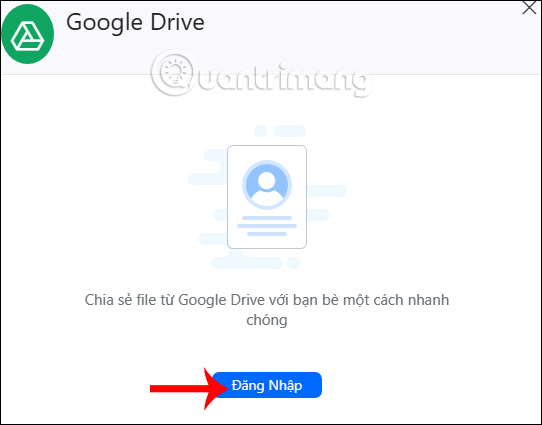
<p>Hiển thị giao diện Google Drive để chúng ta nhấn&nbsp;<strong>Đăng nhập</strong>&nbsp;bên dưới.</p>

<p>&nbsp;</p>
<img alt="Nhấn Đăng nhập" data-adbro-processed="true" data-i="8" data-src="https://st.quantrimang.com/photos/image/2019/09/11/Zalo-gui-file-tren-Google-Drive-2.jpg" data-was-processed="true" height="425" src="https://st.quantrimang.com/photos/image/2019/09/11/Zalo-gui-file-tren-Google-Drive-2.jpg" width="542" />
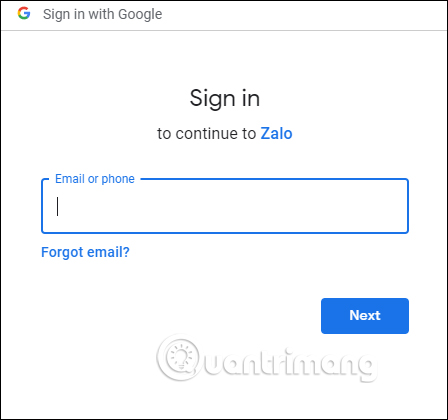
<p>Sau đó bạn được chuyển sang giao diện để&nbsp;<strong>đăng nhập tài khoản Google Drive</strong>&nbsp;cá nhân của mình.</p>

<p><img alt="Đăng nhập tài khoản" data-i="9" data-src="https://st.quantrimang.com/photos/image/2019/09/11/Zalo-gui-file-tren-Google-Drive-3.jpg" data-was-processed="true" height="420" src="https://st.quantrimang.com/photos/image/2019/09/11/Zalo-gui-file-tren-Google-Drive-3.jpg" width="448" /></p>

<p><strong>Bước 3:</strong></p>

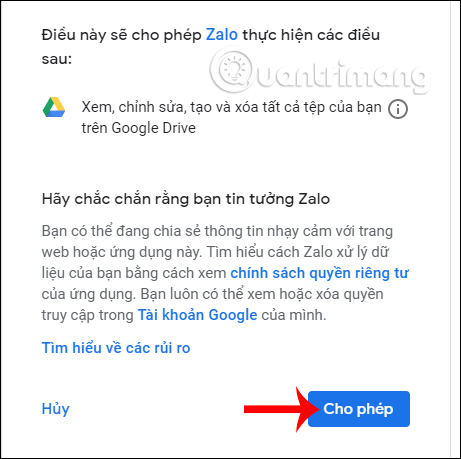
<p>Lúc này bạn sẽ được Google Drive yêu cầu cho phép Zalo đăng nhập dữ liệu lưu trữ hay không, chúng ta&nbsp;<strong>nhấn nút Cho phép</strong>&nbsp;ở bên dưới để tiếp tục.</p>

<p><img alt="Cho phép truy cập" data-i="10" data-src="https://st.quantrimang.com/photos/image/2019/09/11/Zalo-gui-file-tren-Google-Drive-4.jpg" data-was-processed="true" height="459" src="https://st.quantrimang.com/photos/image/2019/09/11/Zalo-gui-file-tren-Google-Drive-4.jpg" width="461" /></p>

<p><strong>Bước 4</strong></p>

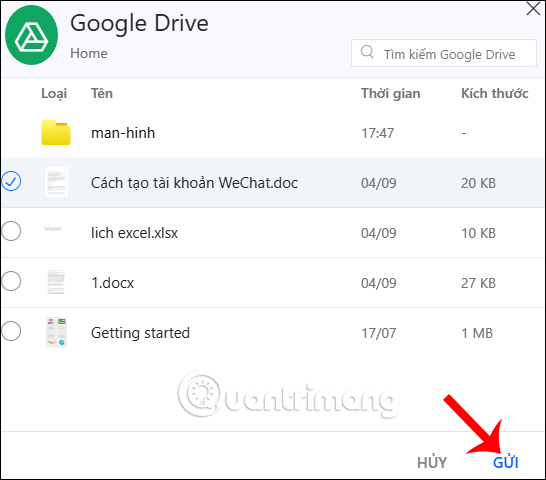
<p>Ngay sau khi chúng ta đồng ý thì quay lại giao diện Zalo sẽ thấy toàn bộ dữ liệu từ file đến các thư mục đang lưu trữ trên Google Drive. Bạn nhấn&nbsp;<strong>chọn vào file muốn chia sẻ</strong>&nbsp;rồi nhấn&nbsp;<strong>nút Gửi</strong>&nbsp;ở bên dưới.</p>

<p><img alt="Nhấn nút Gửi" data-i="11" data-src="https://st.quantrimang.com/photos/image/2019/09/11/Zalo-gui-file-tren-Google-Drive-5.jpg" data-was-processed="true" height="480" src="https://st.quantrimang.com/photos/image/2019/09/11/Zalo-gui-file-tren-Google-Drive-5.jpg" width="546" /></p>

<p><strong>Bước 5:</strong></p>

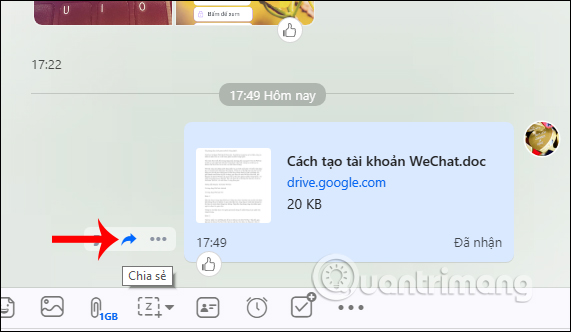
<p>Kết quả file đã được chuyển ngay tới bạn bè. Nếu bạn muốn chuyển tiếp file tới ai thì nhấn vào&nbsp;<strong>biểu tượng mũi tên chia sẻ</strong>.</p>
<iframe allow="attribution-reporting; run-ad-auction" allowtransparency="true" aria-label="Advertisement" browsingtopics="true" data-google-container-id="a!5" data-google-query-id="CMnr7v_4zocDFWqI6QUdwcctUg" data-load-complete="true" frameborder="0" height="0" hspace="0" id="aswift_4" marginheight="0" marginwidth="0" name="aswift_4" sandbox="allow-forms allow-popups allow-popups-to-escape-sandbox allow-same-origin allow-scripts allow-top-navigation-by-user-activation" scrolling="no" src="https://googleads.g.doubleclick.net/pagead/ads?gdpr=0&amp;client=ca-pub-9275417305531302&amp;output=html&amp;h=174&amp;slotname=2079243249&amp;adk=4249125901&amp;adf=1405018871&amp;pi=t.ma~as.2079243249&amp;w=694&amp;abgtt=5&amp;fwrn=4&amp;lmt=1722348549&amp;rafmt=11&amp;format=694x174&amp;url=https%3A%2F%2Fquantrimang.com%2Fcong-nghe%2Fcach-gui-file-tu-google-drive-dropbox-tren-zalo-pc-142462&amp;wgl=1&amp;uach=WyJXaW5kb3dzIiwiMTUuMC4wIiwieDg2IiwiIiwiMTI3LjAuNjUzMy43MyIsbnVsbCwwLG51bGwsIjY0IixbWyJOb3QpQTtCcmFuZCIsIjk5LjAuMC4wIl0sWyJHb29nbGUgQ2hyb21lIiwiMTI3LjAuNjUzMy43MyJdLFsiQ2hyb21pdW0iLCIxMjcuMC42NTMzLjczIl1dLDBd&amp;dt=1722348524358&amp;bpp=1&amp;bdt=73&amp;idt=163&amp;shv=r20240725&amp;mjsv=m202407250101&amp;ptt=9&amp;saldr=aa&amp;abxe=1&amp;cookie=ID%3D9355174c58565e6d%3AT%3D1717298287%3ART%3D1722348485%3AS%3DALNI_MbdSnjK_kj9JvFXz95oJ80qIGB_1Q&amp;gpic=UID%3D00000e3f28fe26e7%3AT%3D1717298287%3ART%3D1722348485%3AS%3DALNI_MYSvfa-VuTUKxFCE-_AZzT_hPJiIA&amp;eo_id_str=ID%3D5da9184bb49a16b0%3AT%3D1717298287%3ART%3D1722348485%3AS%3DAA-AfjYtx9418Nf_lEAoYiHDE8KW&amp;prev_fmts=1048x280%2C694x174%2C336x280%2C336x280%2C336x672%2C0x0%2C694x174%2C694x174&amp;nras=1&amp;correlator=4023379739473&amp;frm=20&amp;pv=1&amp;rplot=4&amp;u_tz=420&amp;u_his=4&amp;u_h=900&amp;u_w=1440&amp;u_ah=852&amp;u_aw=1440&amp;u_cd=24&amp;u_sd=2.5&amp;dmc=8&amp;adx=46&amp;ady=7632&amp;biw=1138&amp;bih=612&amp;scr_x=0&amp;scr_y=5191&amp;eid=44759876%2C44759927%2C44759842%2C44795922%2C95331689%2C95334524%2C95334829%2C95337869%2C95338228%2C95338247%2C95336266%2C31078663%2C31078665%2C31078668%2C31078670&amp;oid=2&amp;pvsid=3570193146383420&amp;tmod=2105044387&amp;uas=0&amp;nvt=1&amp;ref=https%3A%2F%2Fquantrimang.com%2F&amp;fc=896&amp;brdim=0%2C0%2C0%2C0%2C1440%2C0%2C1440%2C852%2C1152%2C612&amp;vis=1&amp;rsz=%7C%7CoEebr%7C&amp;abl=CS&amp;pfx=0&amp;fu=128&amp;bc=31&amp;bz=1.25&amp;td=1&amp;tdf=2&amp;psd=W251bGwsbnVsbCxudWxsLDNd&amp;nt=1&amp;ifi=5&amp;uci=a!5&amp;btvi=6&amp;fsb=1&amp;dtd=M" tabindex="0" title="Advertisement" vspace="0" width="694"></iframe>

<p><img alt="Chuyển tiếp file Drive" data-i="12" data-src="https://st.quantrimang.com/photos/image/2019/09/11/Zalo-gui-file-tren-Google-Drive-6.jpg" data-was-processed="true" height="332" src="https://st.quantrimang.com/photos/image/2019/09/11/Zalo-gui-file-tren-Google-Drive-6.jpg" width="571" /></p>

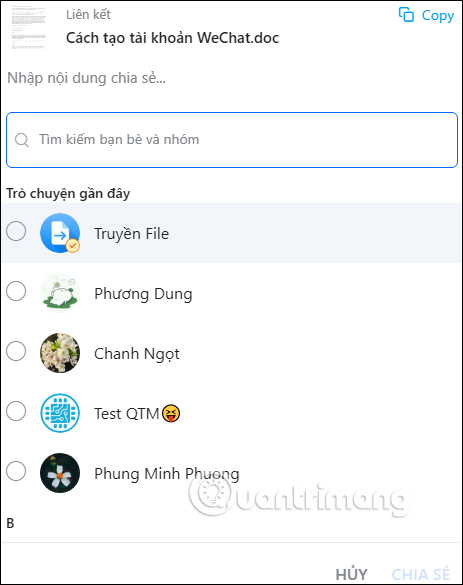
<p>Hiển thị bảng để chúng ta lựa chọn tài khoản Zalo hay nhóm Zalo muốn chia sẻ file lưu trên Google Drive. Nhấn vào hình tròn để chọn rồi nhấn&nbsp;<strong>nút Chia sẻ</strong>&nbsp;ở bên dưới.</p>

<p><img alt="Chọn người chia sẻ" data-i="13" data-src="https://st.quantrimang.com/photos/image/2019/09/11/Zalo-gui-file-tren-Google-Drive-7.jpg" data-was-processed="true" height="585" src="https://st.quantrimang.com/photos/image/2019/09/11/Zalo-gui-file-tren-Google-Drive-7.jpg" width="463" /></p>

<p><strong>Bước 6:</strong></p>

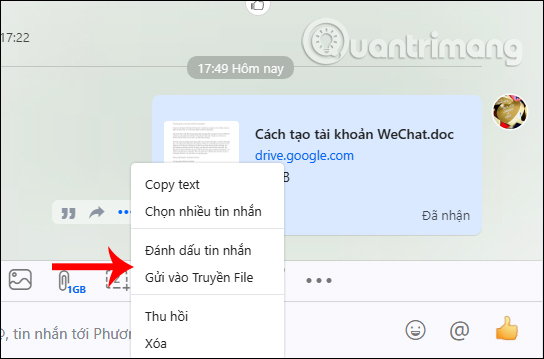
<p>Khi nhấn vào&nbsp;<strong>biểu tượng 3 dấu chấm</strong>&nbsp;sẽ hiển thị thêm danh sách lựa chọn như hình dưới đây.</p>

<p><img alt="Tùy chọn file chia sẻ" data-i="14" data-src="https://st.quantrimang.com/photos/image/2019/09/11/Zalo-gui-file-tren-Google-Drive-8.jpg" data-was-processed="true" height="359" src="https://st.quantrimang.com/photos/image/2019/09/11/Zalo-gui-file-tren-Google-Drive-8.jpg" width="544" /></p>

<p>Việc liên kết Zalo và Google Drive sẽ tiết kiệm thời gian chia sẻ file. Chúng ta không cần phải tải file xuống máy tính rồi mới gửi lên Zalo. Khi có file Google Drive mới tải lên bạn chỉ cần tắt và bật lại tùy chọn chia sẻ trên Zalo để cập nhật dữ liệu mới.</p>

<p>Chúc các bạn thực hiện thành công!</p>
		</div>
				<div id="author">
						<p>
				<strong>Tác giả bài viết:</strong>
				Thanh Sơn
			</p>
						<p>
				<strong>Nguồn tin:</strong>
				quantrimang.com
			</p>
		</div>
	</div>
	<div id="footer" class="clearfix">
		<div id="url">
			<strong>URL của bản tin này: </strong><a href="https://tinhocdct.xyz/tin-cong-nghe/cach-gui-file-tu-google-drive-tren-zalo-dien-thoai-may-tinh-384.html" title="Cách gửi file từ Google Drive trên Zalo điện thoại, máy tính">https://tinhocdct.xyz/tin-cong-nghe/cach-gui-file-tu-google-drive-tren-zalo-dien-thoai-may-tinh-384.html</a>

		</div>
		<div class="clear"></div>
		<div class="copyright">
			&copy; TỔ TIN HỌC TRƯỜNG THPT ĐỖ CÔNG TƯỜNG
		</div>
		<div id="contact">
			<a href="mailto:webmaster@tinhocdct.xyz">webmaster@tinhocdct.xyz</a>
		</div>
	</div>
</div>
        <div id="timeoutsess" class="chromeframe">
            Bạn đã không sử dụng Site, <a onclick="timeoutsesscancel();" href="https://tinhocdct.xyz/#">Bấm vào đây để duy trì trạng thái đăng nhập</a>. Thời gian chờ: <span id="secField"> 60 </span> giây
        </div>
        <div id="openidResult" class="nv-alert" style="display:none"></div>
        <div id="openidBt" data-result="" data-redirect=""></div>
<script src="https://tinhocdct.xyz/assets/js/jquery/jquery.min.js"></script>
<script>var nv_base_siteurl="/",nv_lang_data="vi",nv_lang_interface="vi",nv_name_variable="nv",nv_fc_variable="op",nv_lang_variable="language",nv_module_name="news",nv_func_name="savefile",nv_is_user=0, nv_my_ofs=-4,nv_my_abbr="EDT",nv_cookie_prefix="nv4",nv_check_pass_mstime=1738000,nv_area_admin=0,nv_safemode=0,theme_responsive=0,nv_is_recaptcha=0;</script>
<script src="https://tinhocdct.xyz/assets/js/language/vi.js"></script>
<script src="https://tinhocdct.xyz/assets/js/global.js"></script>
<script src="https://tinhocdct.xyz/themes/default/js/news.js"></script>
<script src="https://tinhocdct.xyz/themes/default/js/main.js"></script>
<script async src="https://pagead2.googlesyndication.com/pagead/js/adsbygoogle.js?client=ca-pub-1816161148536198"
     crossorigin="anonymous"></script>
<script src="https://tinhocdct.xyz/themes/default/js/bootstrap.min.js"></script>
</body>
</html>