<!DOCTYPE html>
	<html lang="vi" xmlns="http://www.w3.org/1999/xhtml" prefix="og: http://ogp.me/ns#">
	<head>
<title>Cách chia sẻ vị trí trên Zalo</title>
<meta name="description" content="Cách chia sẻ vị trí trên Zalo - Savefile - Tin Tức - https&#x3A;&#x002F;&#x002F;tinhocdct.xyz&#x002F;savefile&#x002F;tin-cong-nghe&#x002F;cach-chia-se-vi-tri-tren-zalo-212.html">
<meta name="author" content="TỔ TIN HỌC TRƯỜNG THPT ĐỖ CÔNG TƯỜNG">
<meta name="copyright" content="TỔ TIN HỌC TRƯỜNG THPT ĐỖ CÔNG TƯỜNG [webmaster@tinhocdct.xyz]">
<meta name="robots" content="index, archive, follow, noodp">
<meta name="googlebot" content="index,archive,follow,noodp">
<meta name="msnbot" content="all,index,follow">
<meta name="generator" content="NukeViet v4.0">
<meta http-equiv="Content-Type" content="text/html; charset=utf-8">
<meta property="og:title" content="Cách chia sẻ vị trí trên Zalo">
<meta property="og:type" content="website">
<meta property="og:description" content="Savefile - Tin Tức - https&#x3A;&#x002F;&#x002F;tinhocdct.xyz&#x002F;savefile&#x002F;tin-cong-nghe&#x002F;cach-chia-se-vi-tri-tren-zalo-212.html">
<meta property="og:site_name" content="TỔ TIN HỌC TRƯỜNG THPT ĐỖ CÔNG TƯỜNG">
<meta property="og:url" content="https://tinhocdct.xyz/tin-cong-nghe/cach-chia-se-vi-tri-tren-zalo-212.html">
<link rel="shortcut icon" href="https://tinhocdct.xyz/favicon.ico">
<link rel="canonical" href="https://tinhocdct.xyz/tin-cong-nghe/cach-chia-se-vi-tri-tren-zalo-212.html">
<link rel="alternate" href="https://tinhocdct.xyz/rss/" title="Tin Tức" type="application/rss+xml">
<link rel="alternate" href="https://tinhocdct.xyz/rss/tin-tuc/" title="Tin Tức - TIN TỨC" type="application/rss+xml">
<link rel="alternate" href="https://tinhocdct.xyz/rss/thong-cao-bao-chi/" title="Tin Tức - THÔNG BÁO" type="application/rss+xml">
<link rel="alternate" href="https://tinhocdct.xyz/rss/ban-tin-noi-bo/" title="Tin Tức - BẢN TIN NỘI BỘ" type="application/rss+xml">
<link rel="alternate" href="https://tinhocdct.xyz/rss/tin-cong-nghe/" title="Tin Tức - CÔNG NGHỆ - KHOA HỌC" type="application/rss+xml">
<link rel="alternate" href="https://tinhocdct.xyz/rss/thu-thuat/" title="Tin Tức - THỦ THUẬT" type="application/rss+xml">
<link rel="alternate" href="https://tinhocdct.xyz/rss/tien-ich/" title="Tin Tức - TIỆN ÍCH" type="application/rss+xml">
<link rel="alternate" href="https://tinhocdct.xyz/rss/ai/" title="Tin Tức - AI" type="application/rss+xml">
<link rel="alternate" href="https://tinhocdct.xyz/rss/khoa-hoc/" title="Tin Tức - KHOA HỌC" type="application/rss+xml">
<link rel="alternate" href="https://tinhocdct.xyz/rss/hoat-dong-chuyen-mon/" title="Tin Tức - HOẠT ĐỘNG CHUYÊN MÔN" type="application/rss+xml">
<link rel="alternate" href="https://tinhocdct.xyz/rss/hoat-dong-cong-doan/" title="Tin Tức - CÔNG ĐOÀN" type="application/rss+xml">
<link rel="alternate" href="https://tinhocdct.xyz/rss/hoat-dong-doan-the/" title="Tin Tức - ĐOÀN THỂ" type="application/rss+xml">
<link rel="alternate" href="https://tinhocdct.xyz/rss/tuyen-sinh-huong-nghiep/" title="Tin Tức - TUYỂN SINH - HƯỚNG NGHIỆP" type="application/rss+xml">
<link rel="alternate" href="https://tinhocdct.xyz/rss/tuyen-sinh-2025/" title="Tin Tức - TUYỂN SINH 2025" type="application/rss+xml">
<link rel="alternate" href="https://tinhocdct.xyz/rss/lich-cong-tac-tuan/" title="Tin Tức - Lịch công tác tuần" type="application/rss+xml">
<link rel="preload" as="script" href="https://tinhocdct.xyz/assets/js/jquery/jquery.min.js">
<link rel="preload" as="script" href="https://tinhocdct.xyz/assets/js/language/vi.js">
<link rel="preload" as="script" href="https://tinhocdct.xyz/assets/js/global.js">
<link rel="preload" as="script" href="https://tinhocdct.xyz/themes/default/js/news.js">
<link rel="preload" as="script" href="https://tinhocdct.xyz/themes/default/js/main.js">
<link rel="preload" as="script" href="https://pagead2.googlesyndication.com/pagead/js/adsbygoogle.js?client=ca-pub-1816161148536198">
<link rel="preload" as="script" href="https://tinhocdct.xyz/themes/default/js/bootstrap.min.js">
<link rel="StyleSheet" href="https://tinhocdct.xyz/assets/css/font-awesome.min.css">
<link rel="StyleSheet" href="https://tinhocdct.xyz/themes/default/css/bootstrap.non-responsive.css">
<link rel="StyleSheet" href="https://tinhocdct.xyz/themes/default/css/style.css">
<link rel="StyleSheet" href="https://tinhocdct.xyz/themes/default/css/style.non-responsive.css">
<link rel="StyleSheet" href="https://tinhocdct.xyz/themes/default/css/news.css">
<style>
	body{background: #fff;}
</style>
	</head>
	<body>
<div id="print">
	<div id="hd_print">
		<h2 class="pull-left">TỔ TIN HỌC TRƯỜNG THPT ĐỖ CÔNG TƯỜNG</h2>
		<p class="pull-right"><a title="TỔ TIN HỌC TRƯỜNG THPT ĐỖ CÔNG TƯỜNG" href="https://tinhocdct.xyz/">https://tinhocdct.xyz</a></p>
	</div>
	<div class="clear"></div>
	<hr />
	<div id="content">
		<h1>Cách chia sẻ vị trí trên Zalo</h1>
		<ul class="list-inline">
			<li>Thứ tư - 02/11/2022 10:56</li>
			<li class="hidden-print txtrequired"><em class="fa fa-print">&nbsp;</em><a title="In ra" href="javascript:;" onclick="window.print()">In ra</a></li>
			<li class="hidden-print txtrequired"><em class="fa fa-power-off">&nbsp;</em><a title="Đóng cửa sổ này" href="javascript:;" onclick="window.close()">Đóng cửa sổ này</a></li>
		</ul>
		<div class="clear"></div>
		<div id="hometext">
			Tính năng chia sẻ vị trí thời gian thực trên ứng dụng Zalo trên điện thoại rất hữu ích khi người dùng đặt xe taxi qua Zalo để tài xế xác định được vị trí hiện tại của bạn.
		</div>
				<div class="imghome">
			<img alt="Cách chia sẻ vị trí trên Zalo" src="https://tinhocdct.xyz/uploads/news/2022_11/cach-chia-se-vi-tri-hien-tai-tren-zalo-cho-ban-be013135275-800x418.png" width="460" class="img-thumbnail" />
		</div>
		<div class="clear"></div>
		<div id="bodytext" class="clearfix">
			<p>Bên cạnh đó, khi bạn có một cuộc hẹn đi chơi, đi ăn uống hay xem phim thì việc chia sẻ chính xác địa điểm là rất quan trọng. Vậy thì hôm nay, hãy cùng mình tìm hiểu về cách thức hoạt động của tính năng này nhé!<br  />
Hướng dẫn này được thực hiện trên điện thoại&nbsp;<strong>iPhone</strong>. Bạn có thể thực hiện tương tự trên&nbsp;điện thoại hệ điều hành Android.</p>

<p><strong>Zalo</strong>&nbsp;là phần mềm nhắn tin/gọi điện, chia sẻ hình ảnh/video miễn phí hỗ trợ trên các nền tảng&nbsp;<strong>iOS</strong>,&nbsp;<strong>Android</strong>,&nbsp;<strong>Windows</strong>,&nbsp;<strong>MacOS</strong>. Do người Việt Nam phát triển và lập trình vậy nên Zalo hướng đến chủ yếu là người dùng Việt Nam. Với những tính năng tối ưu, giao diện đơn giản phù hợp thị hiếu, Zalo đang trở thành ứng dụng nghe gọi hàng đầu tại Việt Nam.&nbsp;</p>

<p>Tính năng chia sẻ vị trí trên Zalo hiện tại đã được cung cấp tới các tài khoản Zalo thuôc dòng điện thoại Android. Riêng bản Zalo iPhone thì người dùng cần tới ứng dụng chia sẻ bản đồ&nbsp;<strong><a href="https://www.thegioididong.com/game-app?ref=http://www.thegioididong.com/game-app/google-maps-ung-dung-tim-kiem-ban-do-219938" rel="dofollow" target="_blank">Google Maps</a></strong>&nbsp;để chia sẻ vị trí.&nbsp;</p>

<h3 id="qmenu1">I. Hướng dẫn chia sẻ vị trí trên Zalo</h3>

<h4 id="subqmenu1">1. Hướng dẫn nhanh</h4>

<p>Chọn người muốn chia sẻ vị trí &gt; Chọn&nbsp;<strong>dấu cộng trong khung</strong>&nbsp;soạn tin nhắn &gt; Chọn<strong>&nbsp;Vị trí</strong>&nbsp;&gt; Chọn&nbsp;<strong>Cho phép Zalo truy cập</strong>&nbsp;&gt; Chọn<strong>&nbsp;chế độ chia sẻ</strong>&nbsp;&gt;&nbsp;<strong>Xác nhận và gửi</strong>, hoàn tất.</p>

<h4 id="subqmenu2">2. Hướng dẫn chi tiết</h4>

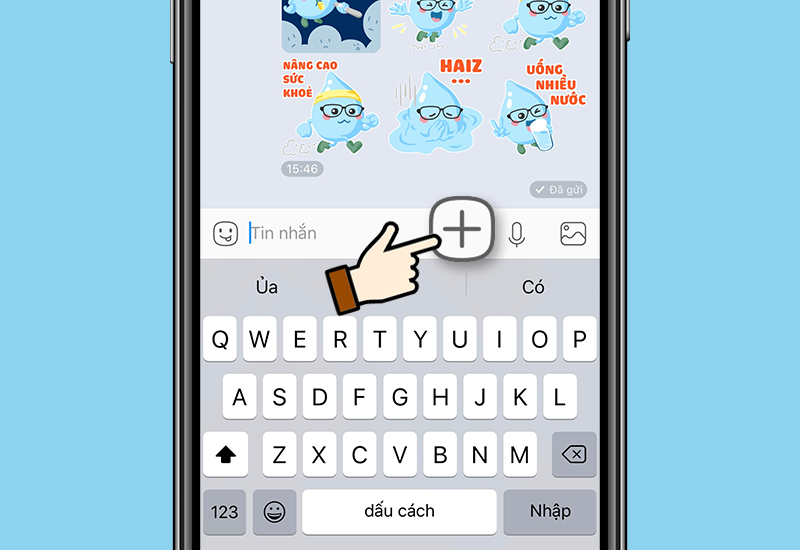
<p><strong>Bước 1:</strong>&nbsp;Chọn người bạn muốn chia sẻ vị trí &gt; Chọn&nbsp;<strong>biểu tượng dấu cộng (+)</strong>&nbsp;ở góc phải phần viết tin nhắn.</p>

<p><img alt="Chọn biểu tượng Thêm" data-src="https://cdn.tgdd.vn/2020/04/content/1-800x550-18.png" height="550" src="https://cdn.tgdd.vn/2020/04/content/1-800x550-18.png" width="800" /></p>

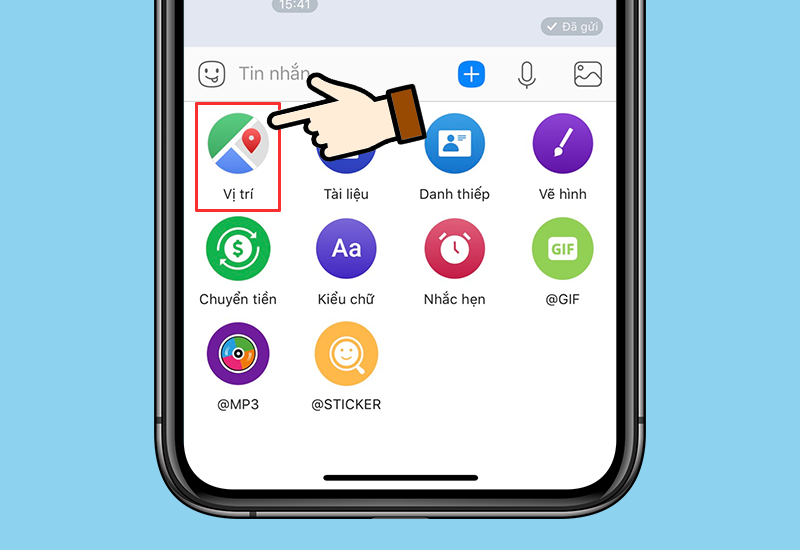
<p><strong>Bước 2:</strong>&nbsp;Chọn Vị trí.</p>

<p><img alt="chọn Vị trí" data-src="https://cdn.tgdd.vn/2020/04/content/2-800x550-16.png" height="550" src="https://cdn.tgdd.vn/2020/04/content/2-800x550-16.png" width="800" /></p>

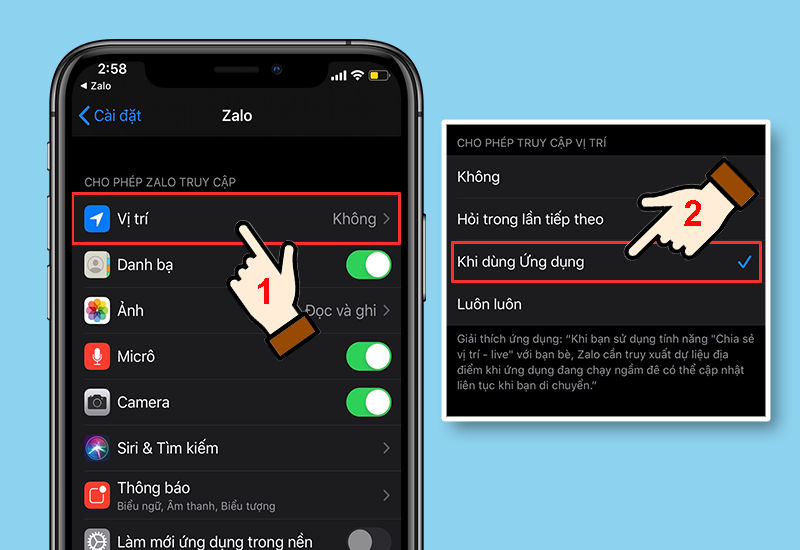
<p><strong>Bước 3:</strong>&nbsp;Cho phép truy cập bằng cách vào&nbsp;<strong>Cài đặt</strong>&nbsp;&gt;&nbsp;<strong>Zalo</strong>&nbsp;&gt; Chọn&nbsp;<strong>Vị trí</strong>&nbsp;&gt; Chọn Khi dùng Ứng dụng.</p>

<p><img alt="Cho phép truy cập vị trí" data-src="https://cdn.tgdd.vn/2020/04/content/3-800x550-16.png" height="550" src="https://cdn.tgdd.vn/2020/04/content/3-800x550-16.png" width="800" /></p>

<p>&nbsp;</p>

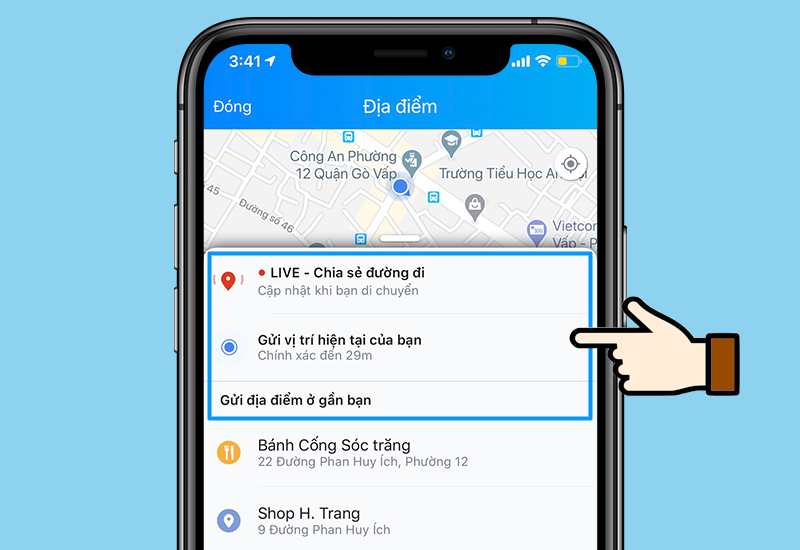
<p><strong>Bước 4:</strong>&nbsp;Quay lại&nbsp;<a href="https://www.thegioididong.com/game-app/zalo-ung-dung-mang-xa-hoi-pho-bien-viet-nam-219921" rel="dofollow" target="_blank" title="ứng dụng Zalo">ứng dụng Zalo</a>&nbsp;&gt; Chọn chế độ chia sẻ vị trí.</p>

<p><img alt="Chọn chế độ chia sẻ" data-src="https://cdn.tgdd.vn/2020/04/content/4-800x550-15.png" height="550" src="https://cdn.tgdd.vn/2020/04/content/4-800x550-15.png" width="800" /></p>

<ul>
	<li>Chọn LIVE - Chia sẻ đường đi để cập nhật vị trí cả khi bạn đang di chuyển&nbsp;</li>
	<li>Chọn Gửi vị trí hiện tại của bạn để gửi vị trí thực theo thời gian bạn đang ở</li>
	<li>Chọn các địa điểm gần bạn được gợi ý bên dưới&nbsp;</li>
</ul>

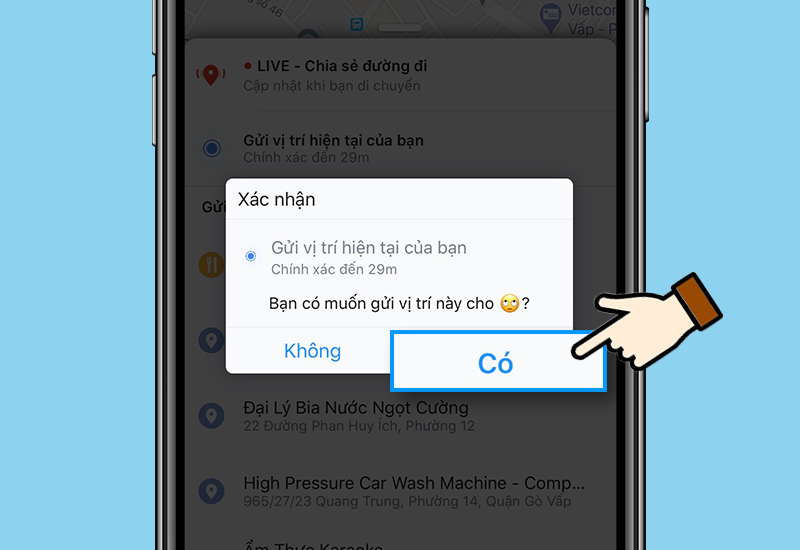
<p><strong>Bước 5:</strong>&nbsp;Xác nhận yêu cầu gửi vị trí&nbsp;</p>

<p><img alt="Xác nhận chia sẻ" data-src="https://cdn.tgdd.vn/2020/04/content/5-800x550-18.png" height="550" src="https://cdn.tgdd.vn/2020/04/content/5-800x550-18.png" width="800" /></p>

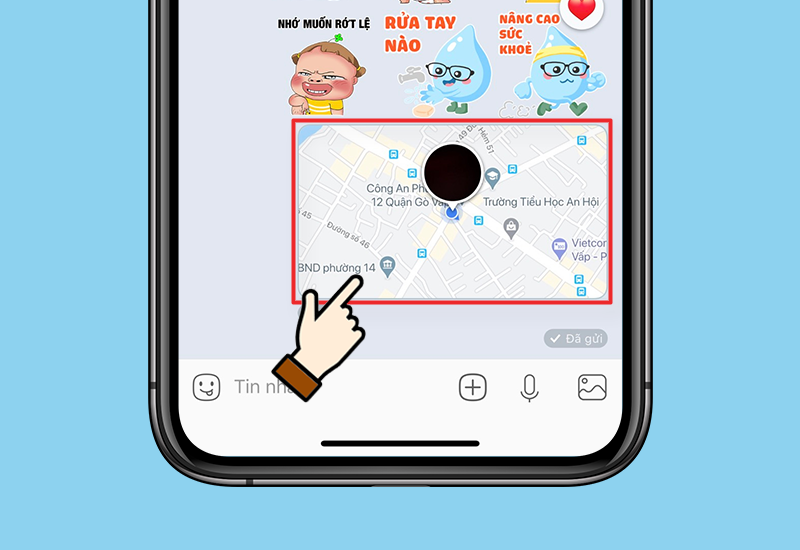
<p>Như vậy các bạn đã gửi vị trí của mình thành công rồi đó</p>

<p><img alt="Kết quả" data-src="https://cdn.tgdd.vn/2020/04/content/6-800x550-15.png" height="550" src="https://cdn.tgdd.vn/2020/04/content/6-800x550-15.png" width="800" /></p>

<p>Chúc bạn thực hiện thành công!&nbsp;</p>
		</div>
				<div id="author">
						<p>
				<strong>Tác giả bài viết:</strong>
				Thanh Sơn
			</p>
						<p>
				<strong>Nguồn tin:</strong>
				www.thegioididong.com
			</p>
		</div>
	</div>
	<div id="footer" class="clearfix">
		<div id="url">
			<strong>URL của bản tin này: </strong><a href="https://tinhocdct.xyz/tin-cong-nghe/cach-chia-se-vi-tri-tren-zalo-212.html" title="Cách chia sẻ vị trí trên Zalo">https://tinhocdct.xyz/tin-cong-nghe/cach-chia-se-vi-tri-tren-zalo-212.html</a>

		</div>
		<div class="clear"></div>
		<div class="copyright">
			&copy; TỔ TIN HỌC TRƯỜNG THPT ĐỖ CÔNG TƯỜNG
		</div>
		<div id="contact">
			<a href="mailto:webmaster@tinhocdct.xyz">webmaster@tinhocdct.xyz</a>
		</div>
	</div>
</div>
        <div id="timeoutsess" class="chromeframe">
            Bạn đã không sử dụng Site, <a onclick="timeoutsesscancel();" href="https://tinhocdct.xyz/#">Bấm vào đây để duy trì trạng thái đăng nhập</a>. Thời gian chờ: <span id="secField"> 60 </span> giây
        </div>
        <div id="openidResult" class="nv-alert" style="display:none"></div>
        <div id="openidBt" data-result="" data-redirect=""></div>
<div id="run_cronjobs" style="visibility:hidden;display:none;"><img alt="" src="/index.php?second=cronjobs&amp;p=o8Mcz5J6" width="1" height="1" /></div>
<script src="https://tinhocdct.xyz/assets/js/jquery/jquery.min.js"></script>
<script>var nv_base_siteurl="/",nv_lang_data="vi",nv_lang_interface="vi",nv_name_variable="nv",nv_fc_variable="op",nv_lang_variable="language",nv_module_name="news",nv_func_name="savefile",nv_is_user=0, nv_my_ofs=-4,nv_my_abbr="EDT",nv_cookie_prefix="nv4",nv_check_pass_mstime=1738000,nv_area_admin=0,nv_safemode=0,theme_responsive=0,nv_is_recaptcha=0;</script>
<script src="https://tinhocdct.xyz/assets/js/language/vi.js"></script>
<script src="https://tinhocdct.xyz/assets/js/global.js"></script>
<script src="https://tinhocdct.xyz/themes/default/js/news.js"></script>
<script src="https://tinhocdct.xyz/themes/default/js/main.js"></script>
<script async src="https://pagead2.googlesyndication.com/pagead/js/adsbygoogle.js?client=ca-pub-1816161148536198"
     crossorigin="anonymous"></script>
<script src="https://tinhocdct.xyz/themes/default/js/bootstrap.min.js"></script>
</body>
</html>