<!DOCTYPE html>
	<html lang="vi" xmlns="http://www.w3.org/1999/xhtml" prefix="og: http://ogp.me/ns#">
	<head>
<title>Cách chặn quảng cáo trên điện thoại đơn giản nhất</title>
<meta name="description" content="Cách chặn quảng cáo trên điện thoại đơn giản nhất - Savefile - Tin Tức -...">
<meta name="author" content="TỔ TIN HỌC TRƯỜNG THPT ĐỖ CÔNG TƯỜNG">
<meta name="copyright" content="TỔ TIN HỌC TRƯỜNG THPT ĐỖ CÔNG TƯỜNG [webmaster@tinhocdct.xyz]">
<meta name="robots" content="index, archive, follow, noodp">
<meta name="googlebot" content="index,archive,follow,noodp">
<meta name="msnbot" content="all,index,follow">
<meta name="generator" content="NukeViet v4.0">
<meta http-equiv="Content-Type" content="text/html; charset=utf-8">
<meta property="og:title" content="Cách chặn quảng cáo trên điện thoại đơn giản nhất">
<meta property="og:type" content="website">
<meta property="og:description" content="Savefile - Tin Tức - https&#x3A;&#x002F;&#x002F;tinhocdct.xyz&#x002F;savefile&#x002F;tin-cong-nghe&#x002F;cach-chan-quang-cao-tren-dien-thoai-don-gian-nhat-238.html">
<meta property="og:site_name" content="TỔ TIN HỌC TRƯỜNG THPT ĐỖ CÔNG TƯỜNG">
<meta property="og:url" content="https://tinhocdct.xyz/tin-cong-nghe/cach-chan-quang-cao-tren-dien-thoai-don-gian-nhat-238.html">
<link rel="shortcut icon" href="https://tinhocdct.xyz/favicon.ico">
<link rel="canonical" href="https://tinhocdct.xyz/tin-cong-nghe/cach-chan-quang-cao-tren-dien-thoai-don-gian-nhat-238.html">
<link rel="alternate" href="https://tinhocdct.xyz/rss/" title="Tin Tức" type="application/rss+xml">
<link rel="alternate" href="https://tinhocdct.xyz/rss/tin-tuc/" title="Tin Tức - TIN TỨC" type="application/rss+xml">
<link rel="alternate" href="https://tinhocdct.xyz/rss/thong-cao-bao-chi/" title="Tin Tức - THÔNG BÁO" type="application/rss+xml">
<link rel="alternate" href="https://tinhocdct.xyz/rss/ban-tin-noi-bo/" title="Tin Tức - BẢN TIN NỘI BỘ" type="application/rss+xml">
<link rel="alternate" href="https://tinhocdct.xyz/rss/tin-cong-nghe/" title="Tin Tức - CÔNG NGHỆ - KHOA HỌC" type="application/rss+xml">
<link rel="alternate" href="https://tinhocdct.xyz/rss/thu-thuat/" title="Tin Tức - THỦ THUẬT" type="application/rss+xml">
<link rel="alternate" href="https://tinhocdct.xyz/rss/tien-ich/" title="Tin Tức - TIỆN ÍCH" type="application/rss+xml">
<link rel="alternate" href="https://tinhocdct.xyz/rss/ai/" title="Tin Tức - AI" type="application/rss+xml">
<link rel="alternate" href="https://tinhocdct.xyz/rss/khoa-hoc/" title="Tin Tức - KHOA HỌC" type="application/rss+xml">
<link rel="alternate" href="https://tinhocdct.xyz/rss/hoat-dong-chuyen-mon/" title="Tin Tức - HOẠT ĐỘNG CHUYÊN MÔN" type="application/rss+xml">
<link rel="alternate" href="https://tinhocdct.xyz/rss/hoat-dong-cong-doan/" title="Tin Tức - CÔNG ĐOÀN" type="application/rss+xml">
<link rel="alternate" href="https://tinhocdct.xyz/rss/hoat-dong-doan-the/" title="Tin Tức - ĐOÀN THỂ" type="application/rss+xml">
<link rel="alternate" href="https://tinhocdct.xyz/rss/tuyen-sinh-huong-nghiep/" title="Tin Tức - TUYỂN SINH - HƯỚNG NGHIỆP" type="application/rss+xml">
<link rel="alternate" href="https://tinhocdct.xyz/rss/tuyen-sinh-2025/" title="Tin Tức - TUYỂN SINH 2025" type="application/rss+xml">
<link rel="alternate" href="https://tinhocdct.xyz/rss/lich-cong-tac-tuan/" title="Tin Tức - Lịch công tác tuần" type="application/rss+xml">
<link rel="preload" as="script" href="https://tinhocdct.xyz/assets/js/jquery/jquery.min.js">
<link rel="preload" as="script" href="https://tinhocdct.xyz/assets/js/language/vi.js">
<link rel="preload" as="script" href="https://tinhocdct.xyz/assets/js/global.js">
<link rel="preload" as="script" href="https://tinhocdct.xyz/themes/default/js/news.js">
<link rel="preload" as="script" href="https://tinhocdct.xyz/themes/default/js/main.js">
<link rel="preload" as="script" href="https://pagead2.googlesyndication.com/pagead/js/adsbygoogle.js?client=ca-pub-1816161148536198">
<link rel="preload" as="script" href="https://tinhocdct.xyz/themes/default/js/bootstrap.min.js">
<link rel="StyleSheet" href="https://tinhocdct.xyz/assets/css/font-awesome.min.css">
<link rel="StyleSheet" href="https://tinhocdct.xyz/themes/default/css/bootstrap.non-responsive.css">
<link rel="StyleSheet" href="https://tinhocdct.xyz/themes/default/css/style.css">
<link rel="StyleSheet" href="https://tinhocdct.xyz/themes/default/css/style.non-responsive.css">
<link rel="StyleSheet" href="https://tinhocdct.xyz/themes/default/css/news.css">
<style>
	body{background: #fff;}
</style>
	</head>
	<body>
<div id="print">
	<div id="hd_print">
		<h2 class="pull-left">TỔ TIN HỌC TRƯỜNG THPT ĐỖ CÔNG TƯỜNG</h2>
		<p class="pull-right"><a title="TỔ TIN HỌC TRƯỜNG THPT ĐỖ CÔNG TƯỜNG" href="https://tinhocdct.xyz/">https://tinhocdct.xyz</a></p>
	</div>
	<div class="clear"></div>
	<hr />
	<div id="content">
		<h1>Cách chặn quảng cáo trên điện thoại đơn giản nhất</h1>
		<ul class="list-inline">
			<li>Thứ hai - 27/02/2023 21:28</li>
			<li class="hidden-print txtrequired"><em class="fa fa-print">&nbsp;</em><a title="In ra" href="javascript:;" onclick="window.print()">In ra</a></li>
			<li class="hidden-print txtrequired"><em class="fa fa-power-off">&nbsp;</em><a title="Đóng cửa sổ này" href="javascript:;" onclick="window.close()">Đóng cửa sổ này</a></li>
		</ul>
		<div class="clear"></div>
		<div id="hometext">
			Cách chặn quảng cáo trên điện thoại cực kỳ đơn giản này sẽ giúp bạn hết khó chịu mỗi khi dùng điện thoại.
		</div>
				<div class="imghome">
			<img alt="Cách chặn quảng cáo trên điện thoại đơn giản nhất" src="https://tinhocdct.xyz/uploads/news/2023_02/ipiccyimage-2023-02-26t092124743-09214272.jpg" width="460" class="img-thumbnail" />
		</div>
		<div class="clear"></div>
		<div id="bodytext" class="clearfix">
			<p>Việc quảng cáo liên tục hiện lên khi dùng điện thoại khiến bạn vô cùng khó chịu. Dưới đây là những cách chặn quảng cáo trên điện thoại đơn giản nhất bạn có thể áp dụng ngay.</p>

<p><strong>Các cách chặn quảng cáo trên điện thoại</strong></p>

<p><em>Cách 1: Tắt cửa sổ Pop-up và Ads trên Chrome</em></p>

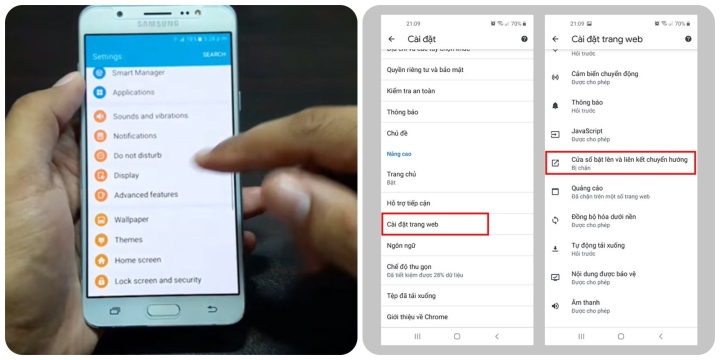
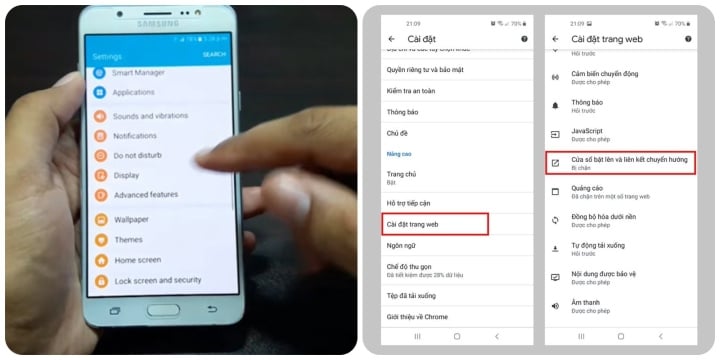
<p>Bước 1: Mở trình duyệt Chrome trên điện thoại &gt; Chọn biểu tượng dấu ba chấm góc trên cùng bên phải &gt; Chọn &quot;Cài đặt&quot;.</p>

<p>Bước 2: Chọn &quot;Cài đặt trang web&quot; &gt; Chọn &quot;Cửa sổ bật lên và liên kết chuyển hướng&quot; &gt; Chạm hoặc kéo thanh gạt sang trái để tắt &quot;Cửa sổ bật lên và liên kết chuyển hướng&quot;.</p>

<p>Bước 3: Quay lại phần &quot;Cài đặt&quot;, chọn &quot;Quảng cáo&quot; &gt; Chạm hoặc kéo thanh gạt sang trái để tắt &quot;Quảng cáo&quot; trên Chrome.</p>

<p>Như vậy, từ nay dùng trình duyệt sẽ không phải mất thời gian để xem quảng cáo nữa rồi.</p>

<p><em>Cách 2: Sử dụng chế độ tiết kiệm dữ liệu (Lite mode) trên Chrome</em></p>

<p>Có một phương pháp khác ít được biết đến hơn có thể giúp bạn không nhìn thấy một số trang web và quảng cáo gây phiền phức cho bạn trên Chrome.</p>

<figure><img alt="Cách chặn quảng cáo trên điện thoại đơn giản nhất - 1" data-adbro-processed="true" data-detail="1" data-height="330" data-id="2012070" data-index="1" data-src="https://image.vtcnews.vn/resize/th/upload/2023/02/26/ipiccyimage---2023-02-26t092124743-09214272.jpg" data-was-processed="true" data-width="660" height="330" src="https://image.vtcnews.vn/resize/th/upload/2023/02/26/ipiccyimage---2023-02-26t092124743-09214272.jpg" />
<figcaption>
<p><em>Cách chặn quảng cáo trên điện thoại đơn giản nhất.</em></p>
</figcaption>
</figure>

<p><br  />
<br  />
<br  />
<br  />
<br  />
<br  />
<br  />
<br  />
<br  />
<br  />
<br  />
<br  />
<br  />
Chỉ cần vào menu chính một lần nữa, nhấn vào &quot;Cài đặt&quot;, sau đó tìm đến phần &quot;Chế độ thu gọn&quot; và kéo thanh trượt sang phải để chuyển thành màu xanh.<br  />
Cách 3: Cài đặt Extension (Tiện ích mở rộng) chặn quảng cáo</p>

<p>&nbsp;</p>

<p>Một giải pháp khác để chặn quảng cáo trên điện thoại là tải xuống các tiện ích mở rộng chặn quảng cáo cho Chrome. Bạn có thể sử dụng ADBlock để giúp loại bỏ các phiền nhiễu tinh vi hơn mà bản thân Chrome bất lực.<br  />
Ngoài ra, bạn có thể sử dụng trình duyệt khác như Opera có tích hợp chức năng chặn quảng cáo.</p>

<p>&nbsp;</p>

<p>Cách 4: Hướng dẫn chặn quảng cáo theo hệ điều hành</p>

<p>&nbsp;</p>

<p>Mỗi hệ điều hành sẽ có một cách chặn quảng cáo khác nhau, bạn hãy tham khảo cách này</p>

<p>&nbsp;</p>

<p>+ Hướng dẫn thiết lập chặn quảng cáo trên nền tảng Android<br  />
Dưới đây là cách tắt quảng cáo trên điện thoại Samsung nói riêng và nền tảng Android nói chung:</p>

<p>&nbsp;</p>

<p>Bước 1: Vào &quot;Cài đặt&quot; &gt; Chọn mục &quot;Google&quot;.</p>

<p>&nbsp;</p>

<p>Bước 2: Chọn &quot;Quảng cáo&quot; &gt; Chạm hoặc kéo thanh gạt sang phải để bật tính năng &quot;Không cá nhân hóa quảng cáo&quot; &gt; Chọn &quot;OK&quot; để xác nhận khi bảng hỏi hiện ra.</p>

<p>&nbsp;</p>

<p>Bước 3: Cửa sổ mới hiện ra, bạn chọn mục &quot;Đặt lại mật mã nhận dạng cho Quảng cáo&quot; &gt; Chọn &quot;OK&quot;.</p>

<p>&nbsp;</p>

<p>+ Hướng dẫn thiết lập chặn quảng cáo trên nền tảng iOS</p>

<p>&nbsp;</p>

<p>Bước 1: Trên điện thoại iPhone, truy cập vào &quot;Settings&quot; (cài đặt) &gt; Chọn &quot;Privacy&quot; (quyền riêng tư).</p>

<p>&nbsp;</p>

<p>Bước 2: Chọn &quot;Apple Advertising&quot; (quảng cáo của Apple) &gt; Vô hiệu hóa tùy chọn &quot;Personalized Ads&quot; (quảng cáo được cá nhân hóa).</p>

<p>&nbsp;</p>

<p>Bạn cũng có thể tắt luôn tính năng định vị khi sử dụng ứng dụng trên iPhone của mình ở phần &quot;Location services&quot; (dịch vụ định vị).</p>

<p>&nbsp;</p>

<p>Trên đây là các cách chặn quảng cáo trên điện thoại đơn giản nhất.&nbsp;</p>
		</div>
				<div id="author">
						<p>
				<strong>Tác giả bài viết:</strong>
				Thanh Sơn
			</p>
		</div>
	</div>
	<div id="footer" class="clearfix">
		<div id="url">
			<strong>URL của bản tin này: </strong><a href="https://tinhocdct.xyz/tin-cong-nghe/cach-chan-quang-cao-tren-dien-thoai-don-gian-nhat-238.html" title="Cách chặn quảng cáo trên điện thoại đơn giản nhất">https://tinhocdct.xyz/tin-cong-nghe/cach-chan-quang-cao-tren-dien-thoai-don-gian-nhat-238.html</a>

		</div>
		<div class="clear"></div>
		<div class="copyright">
			&copy; TỔ TIN HỌC TRƯỜNG THPT ĐỖ CÔNG TƯỜNG
		</div>
		<div id="contact">
			<a href="mailto:webmaster@tinhocdct.xyz">webmaster@tinhocdct.xyz</a>
		</div>
	</div>
</div>
        <div id="timeoutsess" class="chromeframe">
            Bạn đã không sử dụng Site, <a onclick="timeoutsesscancel();" href="https://tinhocdct.xyz/#">Bấm vào đây để duy trì trạng thái đăng nhập</a>. Thời gian chờ: <span id="secField"> 60 </span> giây
        </div>
        <div id="openidResult" class="nv-alert" style="display:none"></div>
        <div id="openidBt" data-result="" data-redirect=""></div>
<script src="https://tinhocdct.xyz/assets/js/jquery/jquery.min.js"></script>
<script>var nv_base_siteurl="/",nv_lang_data="vi",nv_lang_interface="vi",nv_name_variable="nv",nv_fc_variable="op",nv_lang_variable="language",nv_module_name="news",nv_func_name="savefile",nv_is_user=0, nv_my_ofs=-4,nv_my_abbr="EDT",nv_cookie_prefix="nv4",nv_check_pass_mstime=1738000,nv_area_admin=0,nv_safemode=0,theme_responsive=0,nv_is_recaptcha=0;</script>
<script src="https://tinhocdct.xyz/assets/js/language/vi.js"></script>
<script src="https://tinhocdct.xyz/assets/js/global.js"></script>
<script src="https://tinhocdct.xyz/themes/default/js/news.js"></script>
<script src="https://tinhocdct.xyz/themes/default/js/main.js"></script>
<script async src="https://pagead2.googlesyndication.com/pagead/js/adsbygoogle.js?client=ca-pub-1816161148536198"
     crossorigin="anonymous"></script>
<script src="https://tinhocdct.xyz/themes/default/js/bootstrap.min.js"></script>
</body>
</html>